
Cohere and OpenAI API Keys
To access and use the Generative AI features in the Oracle Database you’ll need access to the API of a LLM. In this post, I’ll step through what you need to do to get API keys from Cohere and OpenAI. These are the two main LLMs for use with the database and others will be accessible over time.
Cohere API
First, go to the Cohere API Dashboard. You can sign-up using your Google or GitHub accounts to sign in. Or create an account by clicking on Sign-up? (Bottom right-hand corner of page). Fill in your email address and a suitable password. Then confirm your sign-up using the email they just sent to you.

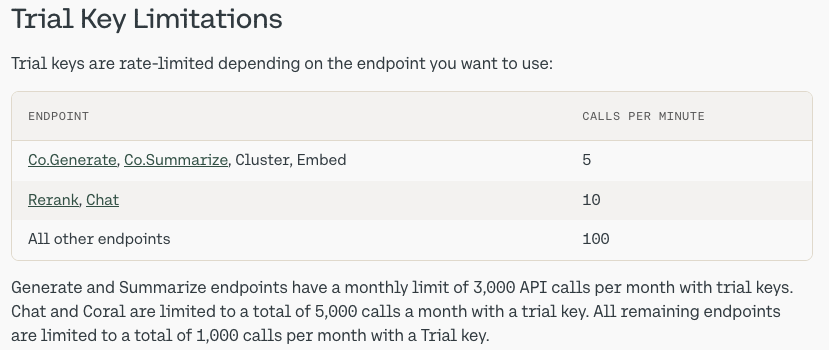
When you sign-up to Cohere, you are initially creating a Trial (Free) account. For now, this will be enough for playing with Select AI. There are some restrictions (shown below) but these might change over time so make sure to check this out.
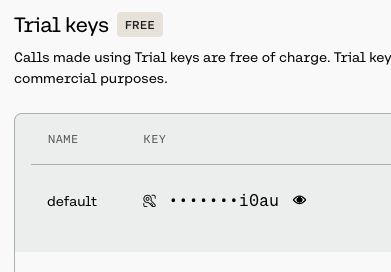
From your Cohere Dashboard, you can access your API key, and use this to set-up your access to the LLM from your remote (app, database, etc) environment. This is a Trial API Key, that is rate-limited, so is kind of ok for testing and evaluation. If you need more, you’ll need to upgrade your account.
Open API
For Open API, you’ll need to create an account – Sign-up here.
Initially, you’ll be set-up with a Trial Account but you may need to upgrade this by depositing some money into your account. The minimum is $10 (plus taxes) and this should be enough to allow you to have a good play with using the API, and only top-up as needed after that, particularly if you go into production use. When you get logged into OpenAI, go to your Dashboard and click on the ‘Create new secret key’ button.

When you’ve obtained the API keys check out my other posts on how to allow access to these from the database and start using the Oracle Select AI features (and other products and code libraries) .
You only need an API key from one of these, but I’ve shown both. This allows you to decide which one you’d like to use.
Check out the other posts about Select AI.
 Ora-lytics