
BIWA Summit 2016
The annual BIWA Summit 2016 will be next week from the 26-28 January, and it is back in Oracle HQ at Redwood Shores. If you are into the Oracle Database, Business Intelligence, Big Data, Advanced Analytics, etc then this is the conference for you.

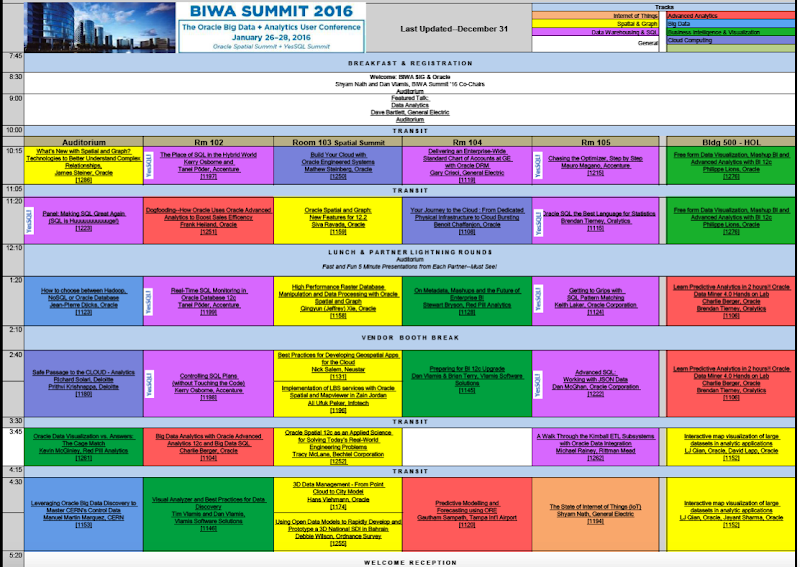
Over the 3 days there is an action packed agenda of 5 parallel tracks, plus a full 3 days of Hands-on Labs. The agenda is filled with the whos-who of the Oracle BI and Analytics world, so if this is your area then BIWA Summit is the conference for you and your training budget. (I’m sure it is not too late to book your place)
I’ve been lucky this year in that I will have 2 Hands-on Labs and 1 presentation to give. Yes that is 5 hours of presenting/hosting to do. The presentation I will be giving is ‘Is Oracle SQL the best language for Statistics?’ (on Tuesday 26th). This presentation is listed for the BIWA Summit and also for the NoCOUG Yes SQL conference that is running at the same time in the same venue (i.e. co-located). I’ve also written a brand new 2-hour Hands-on Lab titled ‘Predictive Analytics using SQL and PL/SQL’. The first outing for this will be on Wednesday 27th. I will also be co-hosting, with Charlie Berger, the ‘Learn Predictive Analytics in 2hours with Oracle Data Miner’ Hands-on Lab on Tuesday 26th.
Hopefully I’ll see you there!
Check out the full agenda by clicking on the image below.
ORE video : Demo Code Part 4
The following is the fourth set of demo code from my video on using R in the Oracle Database. Check out the video before using the following code. The blog post for the video will be updated to contain links to all blog posts that have the various demo code.
The following code example illustrate how you can build a Data Mining model using the in-database data mining algorithms. In this example a Decision Tree model is created. This model is then applied to new data, scoring this data with the predicted values.
> #
> # Build am in-database ODM Decision Tree
> #
> dtData  # Create a ODM DT model in the DB : Only a temporary model. It is deleted when you logout
> dtModel  # View the details of the ODM model
> #summary(dtModel)
> names(dtModel)
 [1] "name"          "settings"      "attributes"    "costs"         "distributions”
 [6] "nodes"         "formula"       "extRef"        "call"
> dtModel$name
 [1] "ORE$208_210”
> dtModel$settings
                          value
prep.auto                    on
impurity.metric   impurity.gini
term.max.depth                7
term.minpct.node           0.05
term.minpct.split           0.1
term.minrec.node             10
term.minrec.split            20
> dtModel$attributes
                 name        type data.type data.length precision scale is.target
1       AFFINITY_CARD categorical    number          22         0     0      TRUE
2                 AGE   numerical    number          22        NA    NA     FALSE
3 CUST_MARITAL_STATUS categorical  varchar2          20        NA    NA     FALSE
4           EDUCATION categorical  varchar2          21        NA    NA     FALSE
5      HOUSEHOLD_SIZE categorical  varchar2          21        NA    NA     FALSE
6          OCCUPATION categorical  varchar2          21        NA    NA     FALSE
7       YRS_RESIDENCE   numerical    number          22        NA    NA     FALSE
>

> ## Compute the Compusion Matrix
> dtResults  with(dtResults, table(AFFINITY_CARD, PREDICTION))
             PREDICTION
AFFINITY_CARD    0    1
            0 1056   64
            1  201  179
> ## How do you persist the model in the DB
> ##     Rename and save the model in the database
> dtModel$name
 [1] "ORE$208_210"

> ## Save the ODM model in the in-database R datastore
> ore.save(dtModel, name = "ORE_MODELS", overwrite=TRUE)
> ore.load(name = "ORE_MODELS")
 [1] "dtModel"

> ## Score new data using the DM Model
> ore.sync(table = c("MINING_DATA_APPLY"))
> ore.ls()
 [1] "DEMO_R_APPLY_RESULT"   "DEMO_R_TABLE"          "DEMO_SUBSET_TABLE"
 [4] "INSUR_CUST_LTV_SAMPLE" "MINING_DATA_APPLY"     "MINING_DATA_BUILD_V"
 [7] "MINING_DATA_TEST_V"   > dtApply  dim(dtApply)
 [1] 1500   18
> class(dtApply)
 [1] "ore.frame”
 attr(,"package")
 [1] "OREbase”
> DTAPPLY  dtApplyResult  dtApplyResult  head(dtApplyResult)
             '0'        '1' PREDICTION
100001 0.9521912 0.04780876          0
100002 0.9521912 0.04780876          0
100003 0.9521912 0.04780876          0
100004 0.9521912 0.04780876          0
100005 0.2633745 0.73662551          1
100006 0.9521912 0.04780876          0
> dim(dtApplyResult)
 [1] 1500    3
> dim(dtApply)
 [1] 1500   18
> dtResults  dim(dtResults)
 [1] 1500   21
> ore.drop(table = "DEMO_R_APPLY_RESULT")
> ore.create(dtApplyResult, table="DEMO_R_APPLY_RESULT")
> ## Run the following for the first time you will rename a mode
> # ore.exec(paste("BEGIN>
  #                  DBMS_DATA_MINING.RENAME_MODEL(model_name => '", dtModel$name, "',>
  #                      new_model_name => 'DEMO_R_DT_MODEL'); END;",sep=""))>
  ## Run the following to refresh an existing model
> ore.exec(paste("BEGIN
+ DBMS_DATA_MINING.DROP_MODEL('DEMO_R_DT_MODEL');
+ DBMS_DATA_MINING.RENAME_MODEL(model_name => '", dtModel$name,"',
+ new_model_name => 'DEMO_R_DT_MODEL');
+ END;",sep=""))
ORE video : Demo Code Part 4
The following is the fourth set of demo code from my video on using R in the Oracle Database. Check out the video before using the following code. The blog post for the video will be updated to contain links to all blog posts that have the various demo code.
The following code example illustrate how you can build a Data Mining model using the in-database data mining algorithms. In this example a Decision Tree model is created. This model is then applied to new data, scoring this data with the predicted values.
> #
> # Build am in-database ODM Decision Tree
> #
> dtData  # Create a ODM DT model in the DB : Only a temporary model. It is deleted when you logout
> dtModel  # View the details of the ODM model
> #summary(dtModel)
> names(dtModel)
 [1] "name"          "settings"      "attributes"    "costs"         "distributions”
 [6] "nodes"         "formula"       "extRef"        "call"
> dtModel$name
 [1] "ORE$208_210”
> dtModel$settings
                          value
prep.auto                    on
impurity.metric   impurity.gini
term.max.depth                7
term.minpct.node           0.05
term.minpct.split           0.1
term.minrec.node             10
term.minrec.split            20
> dtModel$attributes
                 name        type data.type data.length precision scale is.target
1       AFFINITY_CARD categorical    number          22         0     0      TRUE
2                 AGE   numerical    number          22        NA    NA     FALSE
3 CUST_MARITAL_STATUS categorical  varchar2          20        NA    NA     FALSE
4           EDUCATION categorical  varchar2          21        NA    NA     FALSE
5      HOUSEHOLD_SIZE categorical  varchar2          21        NA    NA     FALSE
6          OCCUPATION categorical  varchar2          21        NA    NA     FALSE
7       YRS_RESIDENCE   numerical    number          22        NA    NA     FALSE
>

> ## Compute the Compusion Matrix
> dtResults  with(dtResults, table(AFFINITY_CARD, PREDICTION))
             PREDICTION
AFFINITY_CARD    0    1
            0 1056   64
            1  201  179
> ## How do you persist the model in the DB
> ##     Rename and save the model in the database
> dtModel$name
 [1] "ORE$208_210"

> ## Save the ODM model in the in-database R datastore
> ore.save(dtModel, name = "ORE_MODELS", overwrite=TRUE)
> ore.load(name = "ORE_MODELS")
 [1] "dtModel"

> ## Score new data using the DM Model
> ore.sync(table = c("MINING_DATA_APPLY"))
> ore.ls()
 [1] "DEMO_R_APPLY_RESULT"   "DEMO_R_TABLE"          "DEMO_SUBSET_TABLE"
 [4] "INSUR_CUST_LTV_SAMPLE" "MINING_DATA_APPLY"     "MINING_DATA_BUILD_V"
 [7] "MINING_DATA_TEST_V"   > dtApply  dim(dtApply)
 [1] 1500   18
> class(dtApply)
 [1] "ore.frame”
 attr(,"package")
 [1] "OREbase”
> DTAPPLY  dtApplyResult  dtApplyResult  head(dtApplyResult)
             '0'        '1' PREDICTION
100001 0.9521912 0.04780876          0
100002 0.9521912 0.04780876          0
100003 0.9521912 0.04780876          0
100004 0.9521912 0.04780876          0
100005 0.2633745 0.73662551          1
100006 0.9521912 0.04780876          0
> dim(dtApplyResult)
 [1] 1500    3
> dim(dtApply)
 [1] 1500   18
> dtResults  dim(dtResults)
 [1] 1500   21
> ore.drop(table = "DEMO_R_APPLY_RESULT")
> ore.create(dtApplyResult, table="DEMO_R_APPLY_RESULT")
> ## Run the following for the first time you will rename a mode
> # ore.exec(paste("BEGIN>
  #                  DBMS_DATA_MINING.RENAME_MODEL(model_name => '", dtModel$name, "',>
  #                      new_model_name => 'DEMO_R_DT_MODEL'); END;",sep=""))>
  ## Run the following to refresh an existing model
> ore.exec(paste("BEGIN
+ DBMS_DATA_MINING.DROP_MODEL('DEMO_R_DT_MODEL');
+ DBMS_DATA_MINING.RENAME_MODEL(model_name => '", dtModel$name,"',
+ new_model_name => 'DEMO_R_DT_MODEL');
+ END;",sep=""))
Running R in the Oracle Database video
Earlier this year I was asked by the Business Analysics & Big Data SIG (of the UKOUG) to give a presentation on Oracle R Enterprise. Unfortunately I had already committed to giving the same presentation at the OUG Norway conference on the same day.
But then they asked me if I could record a video of the presentation and they would show it at the SIG. The following video is what I recorded.
At the UKOUG annual (2015) conferences I was supposed to give a 2 hour presentation during their Super Sunday event. Unfortunately due to a storm passing over Ireland on the Saturday all flights going to the UK were cancelled. This meant that I would miss my 2 hour presentation.
Instead of trying to find an alternative speaker for my presentation slot at such sort notice, the committee suggested that they would show the video.
Based on the feedback and the people who thanked me in person during the rest of the conference, I’ve decided to make it available to everyone. Hopefully you will find it useful.
The following are the links to the demo code that is shown or referred to in the video.
- Demo Code 1
- Demo Code 2
- Demo Code 3
- Demo Code 4
- Demo Code 5
People have been asking me if the demo scripts I used in video are available. You will probably find some of these on various blog posts. So to make it easier for everyone I will post the demo scripts in one or more blog posts over the coming weeks. When these are available I will update this blog post with the links.
I have a few new presentations on Oracle R Enterprise in 2016 so watch out for these at an Oracle User Group conference.
ORE video : Demo Code Part 3
The following is the third set of demo code from my video on using R in the Oracle Database. Check out the video before using the following code. The blog post for the video will be updated to contain links to all blog posts that have the various demo code.
The following code is illustrates some simple examples of using Oracle R Enterprise. In these example you will see how to connect to the Oracle Database, how to query and process some of the tables and views in the Oracle Database, how to check that you are working with objects in the database, how to move data to the database and query it.
> library(ORE)
> # ore.connect(user="rquser", sid="orcl", host="localhost", password="rquser", port=1521, all=TRUE);
> ore.connect(user="dmuser", sid="orcl", host="localhost", password="dmuser", port=1521, all=FALSE);
> # Test the connection
> ore.is.connected()
 [1] TRUE
> # List all the tables and views
> ore.ls()
character(0)
> # Use ore.sync to only include the tables and views listed
> ore.sync()
> ore.ls()
 [1] "DEMO_R_APPLY_RESULT"      "DEMO_R_TABLE"             "INSUR_CUST_LTV_SAMPLE"    "MINING_DATA_APPLY"
 [5] "MINING_DATA_APPLY_V"      "MINING_DATA_BUILD_V"      "MINING_DATA_TEST_V"       "MINING_DATA_TEXT_APPLY_V”
 [9] "MINING_DATA_TEXT_BUILD_V" "MINING_DATA_TEXT_TEST_V"
> # Disconnect and reattached with no meta-data sync
> ore.disconnect()
> ore.connect(user="dmuser", sid="orcl", host="localhost", password="dmuser", port=1521, all=FALSE);
> ore.sync(table = c("MINING_DATA_BUILD_V", "MINING_DATA_TEST_V", "INSUR_CUST_LTV_SAMPLE"))
> ore.ls()
 [1] "INSUR_CUST_LTV_SAMPLE" "MINING_DATA_BUILD_V"   "MINING_DATA_TEST_V"
> # Check for the existance of a table or view
> ore.exists("MINING_DATA_BUILD_V")
 [1] TRUE
> # list the objects in the DMUSER schema
> ore.ls("DMUSER")
 [1] "INSUR_CUST_LTV_SAMPLE" "MINING_DATA_BUILD_V"   "MINING_DATA_TEST_V"
> #
> # Load data from a file into a new table
> ore.exists("DEMO_R_TABLE")
 [1] TRUE
> ore.drop(table='DEMO_R_TABLE')
> ore.ls()
 [1] "INSUR_CUST_LTV_SAMPLE" "MINING_DATA_BUILD_V"   "MINING_DATA_TEST_V"
> titanic  ore.create(titanic, table="DEMO_R_TABLE")
> tData  head(tData)
                 NAME PCLASS AGE    SEX SURVIVED
1 Fynney, Mr Joseph J    2nd  35   male        0
2      Gale, Mr Harry    2nd  35   male        0
3   Gale, Mr Shadrach    2nd  38   male        0
4 Garside, Miss Ethel    2nd  24 female        1
5  Gaskell, Mr Alfred    2nd  16   male        0
6  Gavey, Mr Lawrence    2nd  26   male        0
> # Use ORE to pull data from the Database to local R
> # ore.pull  -- United States of America
> mdbv  mdbv_data  head(mdbv_data,3)
  CUST_ID CUST_GENDER AGE CUST_MARITAL_STATUS             COUNTRY_NAME    CUST_INCOME_LEVEL EDUCATION OCCUPATION
1  101501           F  41              NeverM United States of America J: 190,000 - 249,999   Masters      Prof.
2  101502           M  27              NeverM United States of America I: 170,000 - 189,999     Bach.      Sales
3  101503           F  20              NeverM United States of America H: 150,000 - 169,999   HS-grad    Cleric.
  HOUSEHOLD_SIZE YRS_RESIDENCE AFFINITY_CARD BULK_PACK_DISKETTES FLAT_PANEL_MONITOR HOME_THEATER_PACKAGE
1              2             4             0                   1                  1                    1
2              2             3             0                   1                  1                    0
3              2             2             0                   1                  0                    0
  BOOKKEEPING_APPLICATION PRINTER_SUPPLIES Y_BOX_GAMES OS_DOC_SET_KANJI
1                       1                1           0                0
2                       1                1           1                0
3                       1                1           1                0
> class(mdbv_data)
[1] "data.frame”
> summary(mdbv_data)
ORE video : Demo Code Part 2
The following is the second set of demo code from my video on using R in the Oracle Database. Check out the video before using the following code. The blog post for the video will be updated to contain links to all blog posts that have the various demo code.
The following code gives a very quick demonstration of using the RORACLE R package to access the data in your Oracle schema. ROracle has a number of advantages over using RJDBC and most of the advantages are about the performance improvements. Typically when using ROracle you will see a many fold improvement with selecting data and moving it to your R client, processing data in the database and also writing data back to the Oracle Database. In some tests you can see a 7 times improvement in performance over RJDBC. Now that is a big difference.
But the problem with ROracle is that it is only available on certain platforms/OS. For example it is not officially available for the Mac. But if you google this issue carefully you will find unofficial ways over coming this problem.
ROracle is dependent on Oracle Client. So you will need to have Oracle Client installed on you machine and have it available on the search path.
When you have Oracle Client installed and the ROracle R package installed you are ready to start using it.
So here is the demo code from the video.
> library(ROracle)
> drv  # Create the connection string
> host  port  sid connect.string     "(CONNECT_DATA=(SID=", sid, ")))", sep = "")

> con  rs  # fetch records from the resultSet into a data.frame
> data  # extract all rows
> dim(data)
[1] 6 1
> data
                  VIEW_NAME
1       MINING_DATA_APPLY_V
2       MINING_DATA_BUILD_V
3        MINING_DATA_TEST_V
4  MINING_DATA_TEXT_APPLY_V
5  MINING_DATA_TEXT_BUILD_V
6   MINING_DATA_TEXT_TEST_V
> dbCommit(con)
> dbClearResult(rs)
> dbDisconnect(con)
ORE video : Demo Code Part 2
The following is the second set of demo code from my video on using R in the Oracle Database. Check out the video before using the following code. The blog post for the video will be updated to contain links to all blog posts that have the various demo code.
The following code gives a very quick demonstration of using the RORACLE R package to access the data in your Oracle schema. ROracle has a number of advantages over using RJDBC and most of the advantages are about the performance improvements. Typically when using ROracle you will see a many fold improvement with selecting data and moving it to your R client, processing data in the database and also writing data back to the Oracle Database. In some tests you can see a 7 times improvement in performance over RJDBC. Now that is a big difference.
But the problem with ROracle is that it is only available on certain platforms/OS. For example it is not officially available for the Mac. But if you google this issue carefully you will find unofficial ways over coming this problem.
ROracle is dependent on Oracle Client. So you will need to have Oracle Client installed on you machine and have it available on the search path.
When you have Oracle Client installed and the ROracle R package installed you are ready to start using it.
So here is the demo code from the video.
> library(ROracle)
> drv  # Create the connection string
> host  port  sid connect.string     "(CONNECT_DATA=(SID=", sid, ")))", sep = "")

> con  rs  # fetch records from the resultSet into a data.frame
> data  # extract all rows
> dim(data)
[1] 6 1
> data
                  VIEW_NAME
1       MINING_DATA_APPLY_V
2       MINING_DATA_BUILD_V
3        MINING_DATA_TEST_V
4  MINING_DATA_TEXT_APPLY_V
5  MINING_DATA_TEXT_BUILD_V
6   MINING_DATA_TEXT_TEST_V
> dbCommit(con)
> dbClearResult(rs)
> dbDisconnect(con)
Oracle R Enterprise 1.5 (new release)
The Oracle Santa had a busy time just before Christmas with the release of several new version of products. One of these was Oracle R Enterprise version 1.5.
Oracle R Enterprise (1.5) is part of the Oracle Advanced Analytics option for the enterprise edition of the Oracle Database.
As with every new release of a product there are a range of bug fixes. But with ORE 1.5 there are also some important new features. These important new features include:
- New Random Forest specific for ORE.
- New ORE Data Store functions and privileges.
- Partitioning on multiple columns for ore.groupApply.
- Multiple improvements to ore.summary.
- Now performs parallel in-database execution for functions prcomp and svd.
- BLOB and CLOB data types are now supported in some of the ORE functions.
Check out the ORE 1.5 Release Notes for more details on the new features.
ORE 1.5 is only certified (for now) on R 3.2.x in both the open source version and the Oracle R Distribution version 3.2.
Check out the ORE 1.5 Documentation.
You can download ORE 1.5 Server side and Client side software here.
ORE Video : Demo Code part 1
In a previous blog post I posted a video on using R with the Oracle Database and using Oracle R Enterprise. This is a part 1 extension of that blog post that gives the first set of demo code.
This first set of demonstration code is for using RJDBC to connect to the Oracle Database. Using RJDBC relies on using the JDBC jar file for Oracle. It is easily found in various installations of Oracle products and will be called something like ojdbc.jar. I like to take a copy of this file and place it in the root/home directory.
> library(RJDBC)
> # Create connection driver and open
> connectionjdbcDriver  jdbcConnection  #list the tables in the schema
> #dbListTables(jdbcConnection)
> #get the DB connections details - it get LOTS of info - Do not run unless it is really needed
> dbGetInfo(jdbcConnection)
> # Query on the Oracle instance name.
> #instanceName  #print(instanceName)tableNames  print(tableNames)
> viewNames  v  names(v)
[1] "CUST_ID"                 "CUST_GENDER"             "AGE"
[4] "CUST_MARITAL_STATUS"     "COUNTRY_NAME"            "CUST_INCOME_LEVEL"
[7] "EDUCATION"               "OCCUPATION"              "HOUSEHOLD_SIZE"
[10] "YRS_RESIDENCE"           "AFFINITY_CARD"           "BULK_PACK_DISKETTES"
[13] "FLAT_PANEL_MONITOR"      "HOME_THEATER_PACKAGE"    "BOOKKEEPING_APPLICATION”
[16] "PRINTER_SUPPLIES"        "Y_BOX_GAMES"             "OS_DOC_SET_KANJI"
> dim(v)
[1] 1500   18
> summary(v)
    CUST_ID       CUST_GENDER             AGE        CUST_MARITAL_STATUS COUNTRY_NAME
Min.   :101501   Length:1500        Min.   :17.00   Length:1500         Length:1500
1st Qu.:101876   Class :character   1st Qu.:28.00   Class :character    Class :character
Median :102251   Mode  :character   Median :37.00   Mode  :character    Mode  :character
Mean   :102251                      Mean   :38.89
3rd Qu.:102625                      3rd Qu.:47.00
Max.   :103000                      Max.   :90.00
CUST_INCOME_LEVEL   EDUCATION          OCCUPATION        HOUSEHOLD_SIZE     YRS_RESIDENCE
Length:1500        Length:1500        Length:1500        Length:1500        Min.   : 0.000
Class :character   Class :character   Class :character   Class :character   1st Qu.: 3.000
Mode  :character   Mode  :character   Mode  :character   Mode  :character   Median : 4.000
                                                                            Mean   : 4.089
                                                                            3rd Qu.: 5.000
                                                                            Max.   :14.000
> hist(v$RESIDENCE)
> hist(v$AGE)
> dbDisconnect(jdbcConnection)
Make sure to check out the other demonstration scripts that are shown in the video.
Running R in the Oracle Database video
Earlier this year I was asked by the Business Analysics & Big Data SIG (of the UKOUG) to give a presentation on Oracle R Enterprise. Unfortunately I had already committed to giving the same presentation at the OUG Norway conference on the same day.
But then they asked me if I could record a video of the presentation and they would show it at the SIG. The following video is what I recorded.
At the UKOUG annual (2015) conferences I was supposed to give a 2 hour presentation during their Super Sunday event. Unfortunately due to a storm passing over Ireland on the Saturday all flights going to the UK were cancelled. This meant that I would miss my 2 hour presentation.
Instead of trying to find an alternative speaker for my presentation slot at such sort notice, the committee suggested that they would show the video.
Based on the feedback and the people who thanked me in person during the rest of the conference, I’ve decided to make it available to everyone. Hopefully you will find it useful.
People have been asking me if the demo scripts I used in video are available. You will probably find some of these on various blog posts. So to make it easier for everyone I will post the demo scripts in one or more blog posts over the coming weeks. When these are available I will update this blog post with the links.
I have a few new presentations on Oracle R Enterprise in 2016 so watch out for these at an Oracle User Group conference.
KScope 2016 Acceptances
I’ve never been to KScope. Yes never.
I’ve always wanted to. Each year you hear of all of these stories about how much people really enjoy KScope and how much they learn.
So back in October I decided to submit 5 presentations to KScope. 4 of these presentations are solo presentations and 1 joint presentation.
This week I have received the happy news that 2 of my solo presentations have been accepted, plus my joint presentation with Kim Berg Hansen.
So at the end of June 2016 I will be making my way to Chicago for a week of Oracle geekie fun at KScope.
My presentations will be:
- Is Oracle SQL the best language for Statistic?
- Running R in your Oracle Database using Oracle R Enterprise
and my join presentations is called
Forecasting in Oracle using the Power of SQL (this will talk about ROracle, Forecasting in R, Using Oracle R Enterprise and SQL)
I was really hoping that one of my rejected presentations would have been accepted. I really enjoy this presentation and I get to share stories about some of my predictive analytics projects. Ah well, maybe in 2017.
The last time I was in Chicago was over 15 years ago when I sent 5 days in Cellular One (The brand was sold to Trilogy Partners by AT&T in 2008 shortly after AT&T had completed its acquisition of Dobson Communications). I was there to kick off a project to build them a data warehouse and to build their first customer churn predictive model. I stayed in a hotel across the road from their office which was famous because a certain person had stayed in it why one the run. Unfortunately I didn’t get time to visit downtown Chicago.
OUG Ireland 2015 : Call for Papers
We finally have confirmed dates for the OUG Ireland Annual Conference. It will be on the 3rd & 4th March, 2016.
In 2016 we are expanding the conference and marking it a 2 day conference. Over the past few years some of the feedback from delegates has been, can we have more sessions and add a second day. So we have listened and will now have a 2 day conference on 3rd & 4th March, 2016.
We also have a new venue too. The 2016 conference will be held in the Gresham Hotel, on O’Connell Street in central Dublin. It is so close to lots of the tourist attractions, lots of hotels and lots of entertainment.
The call for papers is now open and we are looking for presentations for the typical Business Analytics/Big Data, Hardcore DBA, Development, Cloud and Applications.
Do you have a story to share? Have you discovered something recently? Have you used a new product? Is there anything about some part of an Oracle Product you would like to share?
If so then click on the image below to go to the Submissions Website and get submitting. Closing date for submissions is 9am on 4th January.
Hopefully I’ll see you in Dublin in March.
 Ora-lytics
You must be logged in to post a comment.