
rag
Using Oracle Vector Search to find Similar Wines – Part 3
In this post we will move onto exploring similarity search for the wine of interest. This is an Irish produced wine called Lusca Wine. In the previous posts we did all the hard work of setting up our original data set and adding the AI model to the database. Check out Part-1 and Part-2 for these details. This post will focus on creating a stored function to generate the vector, creating a trigger on our data set table to automatically update the vector data when a new record is added or a update, and then exploring similar wines using vector search.
1-Create a Function to Generate the Vector
To simplify the generation of a Vector we can create a function to perform the necessary steps. This means we have a simple function call to use going forward.
create or replace function wine_desc_vector(p_desc varchar2) return VECTORIS v_vector VECTOR;BEGIN SELECT vector_embedding(all_minilm_l12_v2 using p_desc as data) INTO v_vector; RETURN v_vector;END wine_desc_vector;/
We can test this using the following:
set serveroutput on;DECLARE v_return VECTOR;BEGIN v_return := wine_desc_vector('A lovely fruity red from the south of france.'); dbms_output.put_line(to_char(v_return));END;/set serveroutput off;
This will print out the vector data. I haven’t included it here as the output is very long.
2-Cerate a Table Trigger to Automatically the Vector
We can now use this function to add or update the vector data whenever a record is inserted into the table or a record is updated.
CREATE OR REPLACE TRIGGER trig_winereviews_vecBEFORE INSERT OR UPDATE ON winereviews_vecREFERENCING NEW as NEWFOR EACH ROWBEGIN IF INSERTING THEN :NEW.wine_vec := wine_desc_vector(:NEW.description); ELSIF UPDATING THEN :NEW.wine_vec := wine_desc_vector(:NEW.description); END IF;END;/
3-Insert our Lusca Wine Data
For our test/sample Wine I’m using the Lusca Cabernet Merlot. I’m going to use the description on their website and create a record in the table.
insert into winereviews_vec (id, country, title, winery, description)values(999999, 'Ireland', 'Lusca Cabernet Merlot', 'Lusca Vineyard', 'With a smattering of Cabernet Franc, Shiraz, and Dunkelfelder. Deep ruby red in colour. On the nose there are harmonious aromas of blackcurrants, green herbs, green peppers, mint, black pepper and vanilla. Ripe, dark fruit flavours of blackcurrants, plums, damsons and redcurrants');select country, title, winery, description, wine_vec from winereviews_vec where id = 999999;
When the above is run, we will see the Vector data being displayed.
4-Use Vector Search to Explore Similar Wines
We can now perform Similarity Search.
SELECT vector_distance(wine_vec, (SELECT wine_vec FROM winereviews_vec WHERE id = 999999)) AS distance, title, variety, winery, countryFROM winereviews_vecWHERE id <> 999999ORDER BY 1FETCH APPROXIMATE FIRST 5 ROWS ONLY;
This will display the 5 closest or most similar wines.
We can expand our search for Wines from France and Italy.
SELECT vector_distance(wine_vec, (SELECT wine_vec FROM winereviews_vec WHERE id = 999999)) AS distance, title, variety, winery, countryFROM winereviews_vecWHERE id <> 999999AND country in ('France', 'Italy')ORDER BY 1FETCH APPROXIMATE FIRST 5 ROWS ONLY;
Although the results gives us the most similar other wines based on the description data. But out accurate are the results. This is where some empirical testing is needed. Yes we would have to buy these wines and to do a full tasting. I’ll leave that enjoyable experience to yourself to explore.
Using Oracle Vector Search to find Similar Wines – Part 2
Vector Search can be powerful way to perform Similarity Search in bodies of text. In Part 1 of this series, we walked through the steps for getting everything setup to perform Vector Search. We are using a Wine dataset with the aim of using a locally grown and produced Irish wine to find similar wines. In the Part 1 we loaded the dataset, imported the ONNX Model and were able to run some basis queries or similarity searches using some general text and to produce Vectors. In this post we will move onto generating Vector embeddings, look are some different scenarios around what data and text to include/exclude and how these can be easily added to tables containing our data.
Step 2-1: Adding a column to store the Vector data
We will need to add a new column to our Wine Reviews table to store Vector Embeddings. There is a VECTOR data type for storing this kind of data.
alter table winereviews add (wine_vec vector);
Step 2-2: Creating Vectors and Updating our Data
To generate the Vector Embeddings we can use the ONNX model we imported into the database. See my previous post for more on this. A simple SQL UPDATE command can create the Vector and add this data to our WINEREVIEWS table.
UPDATE winereviews set wine_vec = vector_embedding(all_minilm_l12_v2 using description as data);
This took about 40 minutes to complete on my laptop running the Database in a Docker container. This might seem like a long time but most of that time is taken up the OS extending files, as there weren’t created to process this kind of workload. In a real world database this wouldn’t be an issue and would be completed significantly quicker.
If you don’t want to wait around for this command to run, you can IMPORT the already updated dataset including the Vector data using the following file and commands. The first thing you need to do is to create another table called WINEREVIEWS_VEC.
drop table if exists winereviews_vec;CREATE TABLE WINEREVIEWS_VEC ( "ID" NUMBER(38,0), "COUNTRY" VARCHAR2(300), "DESCRIPTION" VARCHAR2(3000), "DESIGNATION" VARCHAR2(2000), "POINTS" NUMBER(38,0), "PRICE" VARCHAR2(50), "PROVINCE" VARCHAR2(100), "REGION_1" VARCHAR2(200), "REGION_2" VARCHAR2(100), "TASTER_NAME" VARCHAR2(200), "TASTER_TWITTER_HANDLE" VARCHAR2(200), "TITLE" VARCHAR2(2000), "VARIETY" VARCHAR2(300), "WINERY" VARCHAR2(300), "WINE_VEC" VECTOR);
Download this file to your computer. It contains the original Wine Reviews data in addition to the Vector data. This data file can be imported using SQL Command Line ‘load’ function. Using SQL Command Line (SQLcl) log into the schema you are using, and run the following at the SQL prompt.
-- The following LOAD command takes approx. 15seconds to load the datasetload winereviews_vec WINEREVIEWS_DATA_TABLE_vec.csv
We can examine the newly imported data by
-- Let's examine the dataselect count(*) from winereviews_vec;select * from winereviews_vec where rownum=1;
Step 2-3: Let’s explore our Vector Data – Vector Search
We can now explore the Wine Vectors with some specific wine descriptions. For example, we are looking for wines that have a description that are similar to ‘light, crisp, summer wine with little fruit and good citrus’. We need to define a session variable to hold this description and then query the data.
variable search_text varchar2(100);exec :search_text := 'light, crisp, summer wine with little fruit and good citrus';SELECT vector_distance(wine_vec, (vector_embedding(all_minilm_l12_v2 using :search_text as data))) as distance, title, variety, winery, countryFROM winereviews_vecorder by 1fetch approximate first 5 rows only;

We can fine tune the search to only return wines from France or Italy, by adding to the WHERE clause. For example,
SELECT vector_distance(wine_vec, (vector_embedding(all_minilm_l12_v2 using :search_text as data))) as distance, title, variety, winery, countryFROM winereviews_vecWHERE country = 'Italy'ORDER BY 1 ascfetch approximate first 5 rows only;

We can see from the outcomes from the above two queries the wines from Italy have a weaker match than some of the Wines from France, Portugal and US. We look at the wine descriptions from these wines to see how the description of the wine compares to our original text stored in the session variable. (I’m not including this query here for conciseness, but it is straightforward to write). In the results we don’t necessarily see an exact match with our search text. What we do get is wine descriptions that are similar to our search text. This illustrates how Vector Search can be used for similarity matches.

Step 2-4: What is the Database Query Optimizer doing
There are a few ways to look at how the Database executes the above queries. One of the simplest is to use AUTOTRACE. In SQLcl we can turn it on using,
set autotrace on
Using the last query used in the previous section above when we run it we get the following details. Only particial details is given here. When you examine the trace details you will notice a large number of block reads and a full table scan. The aim is to reduce the number of block reads and we can achieve this in a number of ways from using a larger block size, increasing memory, buffers etc. One additional method is to use indexes and the next section will show how this can be done for Vector data.
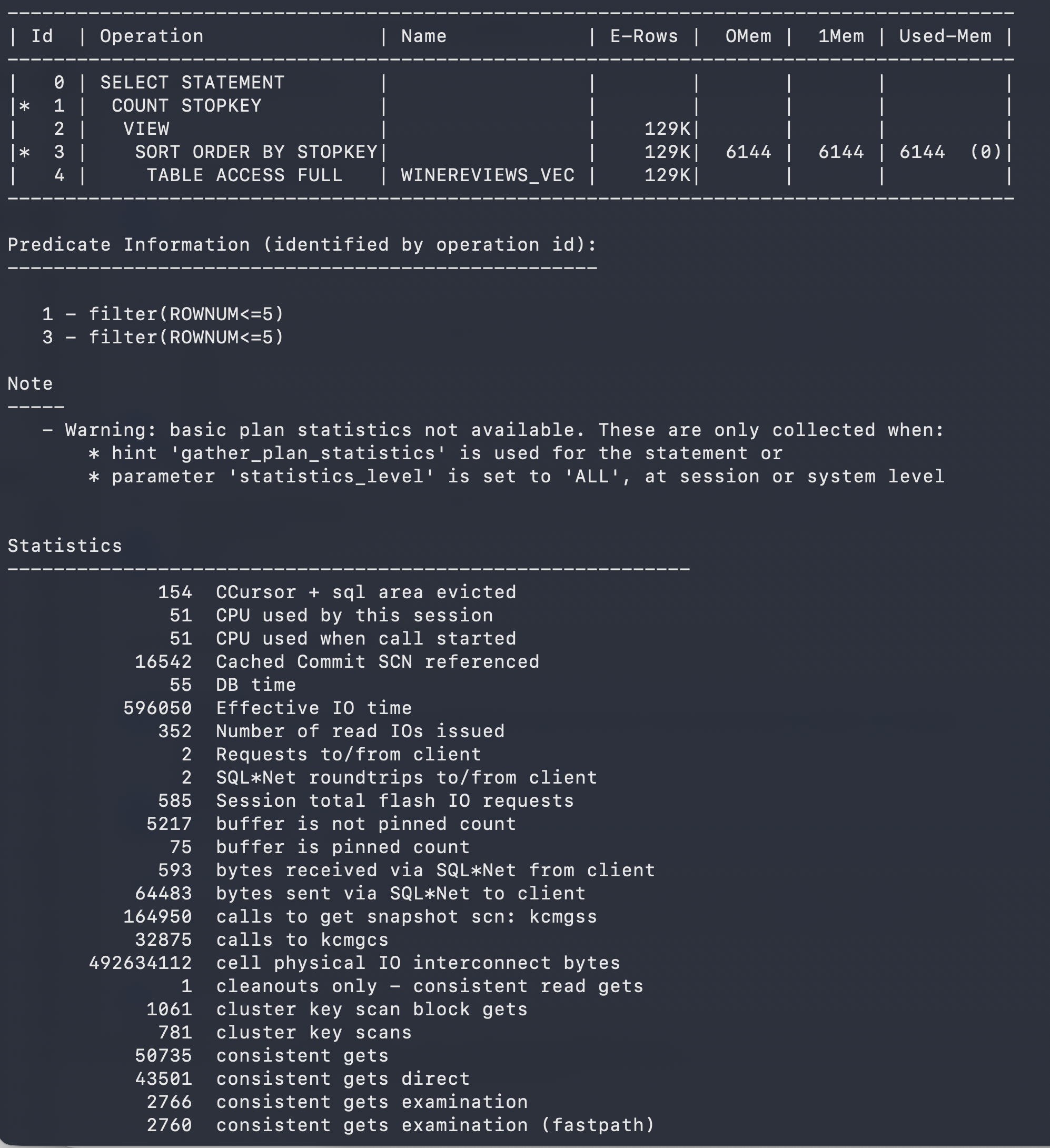
Don’t forget to turn off AUTOTRACE when you are finished using it.
set autotrace off
Step 2-5: Creating Vector Indexes
Before we can create vector indexes we might need to allocate some memory resources to it. We can examine this using the command
show parameter vector_memory_size
On the docker container I’m using this returned Zero for the size, which means if I tried to create a vector index it would fail. To allocate memory to Vectors we need to do the following on the docker container.
- connect to the Docker container shell. docker exec -it sh
- cd /opt/oracle/product/26ai/dbhomeFree/bin
- sqlplus / as sysdba
- alter system set vector_memory_size = 500M scope=spfile;
- show parameter vector_memory_size – to verify the exhange
- restart the database
When we reconnect to our schema we can run the show parameter command now to show the change.
SQL> show parameter vector_memory_sizeNAME TYPE VALUE ------------------ ----------- ----- vector_memory_size big integer 512M
Now we can create the index.
create vector index winereviews_vec_idx on winereviews_vec(wine_vec) organization inmemory neighbor graphdistance cosinewith target accuracy 95;
When we re-run the query now we get the following plan. Her we can see the index being used and reduction in the number of buffers used. Roughly a 1,600x reduction.
------------------------------------------------------------------------------------------------------------------------------------------- | Id | Operation | Name | Starts | E-Rows | A-Rows | A-Time | Buffers | OMem | 1Mem | Used-Mem | ------------------------------------------------------------------------------------------------------------------------------------------- | 0 | SELECT STATEMENT | | 1 | | 5 |00:00:00.01 | 27 | | | | |* 1 | COUNT STOPKEY | | 1 | | 5 |00:00:00.01 | 27 | | | | | 2 | VIEW | | 1 | 5 | 5 |00:00:00.01 | 27 | | | | |* 3 | SORT ORDER BY STOPKEY | | 1 | 5 | 5 |00:00:00.01 | 27 | 2048 | 2048 | 2048 (0)| | 4 | TABLE ACCESS BY INDEX ROWID| WINEREVIEWS_VEC | 1 | 5 | 5 |00:00:00.01 | 27 | | | | | 5 | VECTOR INDEX HNSW SCAN | WINEREVIEWS_VEC_IDX | 1 | 5 | 5 |00:00:00.01 | 22 | | | | ------------------------------------------------------------------------------------------------------------------------------------------- Predicate Information (identified by operation id): --------------------------------------------------- 1 - filter(ROWNUM<=5) 3 - filter(ROWNUM<=5) Statistics----------------------------------------------------------- 7 CPU used by this session 6 CPU used when call started 6 DB time 2 Requests to/from client 17 enqueue releases 17 enqueue requests 17 non-idle wait count 513 opened cursors cumulative 1 opened cursors current 1674 recursive calls 5 recursive cpu usage 2097 session logical reads 3 user calls
If you run this query again you will see a reduction in the numbers again and this indicates that it is reading the data what was cached from the previous run.
We are now at the point that we can use Vector Search to compare wines to our Luscas Wine, from Ireland, and to find similar wines in the dataset. I’ll explore this, the steps needed and what we discovered in the next post.


You must be logged in to post a comment.