
Oracle Advanced Analytics
ORE video : Demo Code Part 2
The following is the second set of demo code from my video on using R in the Oracle Database. Check out the video before using the following code. The blog post for the video will be updated to contain links to all blog posts that have the various demo code.
The following code gives a very quick demonstration of using the RORACLE R package to access the data in your Oracle schema. ROracle has a number of advantages over using RJDBC and most of the advantages are about the performance improvements. Typically when using ROracle you will see a many fold improvement with selecting data and moving it to your R client, processing data in the database and also writing data back to the Oracle Database. In some tests you can see a 7 times improvement in performance over RJDBC. Now that is a big difference.
But the problem with ROracle is that it is only available on certain platforms/OS. For example it is not officially available for the Mac. But if you google this issue carefully you will find unofficial ways over coming this problem.
ROracle is dependent on Oracle Client. So you will need to have Oracle Client installed on you machine and have it available on the search path.
When you have Oracle Client installed and the ROracle R package installed you are ready to start using it.
So here is the demo code from the video.
> library(ROracle)
> drv  # Create the connection string
> host  port  sid connect.string     "(CONNECT_DATA=(SID=", sid, ")))", sep = "")

> con  rs  # fetch records from the resultSet into a data.frame
> data  # extract all rows
> dim(data)
[1] 6 1
> data
                  VIEW_NAME
1       MINING_DATA_APPLY_V
2       MINING_DATA_BUILD_V
3        MINING_DATA_TEST_V
4  MINING_DATA_TEXT_APPLY_V
5  MINING_DATA_TEXT_BUILD_V
6   MINING_DATA_TEXT_TEST_V
> dbCommit(con)
> dbClearResult(rs)
> dbDisconnect(con)
ORE video : Demo Code Part 2
The following is the second set of demo code from my video on using R in the Oracle Database. Check out the video before using the following code. The blog post for the video will be updated to contain links to all blog posts that have the various demo code.
The following code gives a very quick demonstration of using the RORACLE R package to access the data in your Oracle schema. ROracle has a number of advantages over using RJDBC and most of the advantages are about the performance improvements. Typically when using ROracle you will see a many fold improvement with selecting data and moving it to your R client, processing data in the database and also writing data back to the Oracle Database. In some tests you can see a 7 times improvement in performance over RJDBC. Now that is a big difference.
But the problem with ROracle is that it is only available on certain platforms/OS. For example it is not officially available for the Mac. But if you google this issue carefully you will find unofficial ways over coming this problem.
ROracle is dependent on Oracle Client. So you will need to have Oracle Client installed on you machine and have it available on the search path.
When you have Oracle Client installed and the ROracle R package installed you are ready to start using it.
So here is the demo code from the video.
> library(ROracle)
> drv  # Create the connection string
> host  port  sid connect.string     "(CONNECT_DATA=(SID=", sid, ")))", sep = "")

> con  rs  # fetch records from the resultSet into a data.frame
> data  # extract all rows
> dim(data)
[1] 6 1
> data
                  VIEW_NAME
1       MINING_DATA_APPLY_V
2       MINING_DATA_BUILD_V
3        MINING_DATA_TEST_V
4  MINING_DATA_TEXT_APPLY_V
5  MINING_DATA_TEXT_BUILD_V
6   MINING_DATA_TEXT_TEST_V
> dbCommit(con)
> dbClearResult(rs)
> dbDisconnect(con)
Oracle R Enterprise 1.5 (new release)
The Oracle Santa had a busy time just before Christmas with the release of several new version of products. One of these was Oracle R Enterprise version 1.5.
Oracle R Enterprise (1.5) is part of the Oracle Advanced Analytics option for the enterprise edition of the Oracle Database.
As with every new release of a product there are a range of bug fixes. But with ORE 1.5 there are also some important new features. These important new features include:
- New Random Forest specific for ORE.
- New ORE Data Store functions and privileges.
- Partitioning on multiple columns for ore.groupApply.
- Multiple improvements to ore.summary.
- Now performs parallel in-database execution for functions prcomp and svd.
- BLOB and CLOB data types are now supported in some of the ORE functions.
Check out the ORE 1.5 Release Notes for more details on the new features.
ORE 1.5 is only certified (for now) on R 3.2.x in both the open source version and the Oracle R Distribution version 3.2.
Check out the ORE 1.5 Documentation.
You can download ORE 1.5 Server side and Client side software here.
ORE Video : Demo Code part 1
In a previous blog post I posted a video on using R with the Oracle Database and using Oracle R Enterprise. This is a part 1 extension of that blog post that gives the first set of demo code.
This first set of demonstration code is for using RJDBC to connect to the Oracle Database. Using RJDBC relies on using the JDBC jar file for Oracle. It is easily found in various installations of Oracle products and will be called something like ojdbc.jar. I like to take a copy of this file and place it in the root/home directory.
> library(RJDBC)
> # Create connection driver and open
> connectionjdbcDriver  jdbcConnection  #list the tables in the schema
> #dbListTables(jdbcConnection)
> #get the DB connections details - it get LOTS of info - Do not run unless it is really needed
> dbGetInfo(jdbcConnection)
> # Query on the Oracle instance name.
> #instanceName  #print(instanceName)tableNames  print(tableNames)
> viewNames  v  names(v)
[1] "CUST_ID"                 "CUST_GENDER"             "AGE"
[4] "CUST_MARITAL_STATUS"     "COUNTRY_NAME"            "CUST_INCOME_LEVEL"
[7] "EDUCATION"               "OCCUPATION"              "HOUSEHOLD_SIZE"
[10] "YRS_RESIDENCE"           "AFFINITY_CARD"           "BULK_PACK_DISKETTES"
[13] "FLAT_PANEL_MONITOR"      "HOME_THEATER_PACKAGE"    "BOOKKEEPING_APPLICATION”
[16] "PRINTER_SUPPLIES"        "Y_BOX_GAMES"             "OS_DOC_SET_KANJI"
> dim(v)
[1] 1500   18
> summary(v)
    CUST_ID       CUST_GENDER             AGE        CUST_MARITAL_STATUS COUNTRY_NAME
Min.   :101501   Length:1500        Min.   :17.00   Length:1500         Length:1500
1st Qu.:101876   Class :character   1st Qu.:28.00   Class :character    Class :character
Median :102251   Mode  :character   Median :37.00   Mode  :character    Mode  :character
Mean   :102251                      Mean   :38.89
3rd Qu.:102625                      3rd Qu.:47.00
Max.   :103000                      Max.   :90.00
CUST_INCOME_LEVEL   EDUCATION          OCCUPATION        HOUSEHOLD_SIZE     YRS_RESIDENCE
Length:1500        Length:1500        Length:1500        Length:1500        Min.   : 0.000
Class :character   Class :character   Class :character   Class :character   1st Qu.: 3.000
Mode  :character   Mode  :character   Mode  :character   Mode  :character   Median : 4.000
                                                                            Mean   : 4.089
                                                                            3rd Qu.: 5.000
                                                                            Max.   :14.000
> hist(v$RESIDENCE)
> hist(v$AGE)
> dbDisconnect(jdbcConnection)
Make sure to check out the other demonstration scripts that are shown in the video.
Running R in the Oracle Database video
Earlier this year I was asked by the Business Analysics & Big Data SIG (of the UKOUG) to give a presentation on Oracle R Enterprise. Unfortunately I had already committed to giving the same presentation at the OUG Norway conference on the same day.
But then they asked me if I could record a video of the presentation and they would show it at the SIG. The following video is what I recorded.
At the UKOUG annual (2015) conferences I was supposed to give a 2 hour presentation during their Super Sunday event. Unfortunately due to a storm passing over Ireland on the Saturday all flights going to the UK were cancelled. This meant that I would miss my 2 hour presentation.
Instead of trying to find an alternative speaker for my presentation slot at such sort notice, the committee suggested that they would show the video.
Based on the feedback and the people who thanked me in person during the rest of the conference, I’ve decided to make it available to everyone. Hopefully you will find it useful.
People have been asking me if the demo scripts I used in video are available. You will probably find some of these on various blog posts. So to make it easier for everyone I will post the demo scripts in one or more blog posts over the coming weeks. When these are available I will update this blog post with the links.
I have a few new presentations on Oracle R Enterprise in 2016 so watch out for these at an Oracle User Group conference.
KScope 2016 Acceptances
I’ve never been to KScope. Yes never.
I’ve always wanted to. Each year you hear of all of these stories about how much people really enjoy KScope and how much they learn.
So back in October I decided to submit 5 presentations to KScope. 4 of these presentations are solo presentations and 1 joint presentation.
This week I have received the happy news that 2 of my solo presentations have been accepted, plus my joint presentation with Kim Berg Hansen.
So at the end of June 2016 I will be making my way to Chicago for a week of Oracle geekie fun at KScope.
My presentations will be:
- Is Oracle SQL the best language for Statistic?
- Running R in your Oracle Database using Oracle R Enterprise
and my join presentations is called
Forecasting in Oracle using the Power of SQL (this will talk about ROracle, Forecasting in R, Using Oracle R Enterprise and SQL)
I was really hoping that one of my rejected presentations would have been accepted. I really enjoy this presentation and I get to share stories about some of my predictive analytics projects. Ah well, maybe in 2017.
The last time I was in Chicago was over 15 years ago when I sent 5 days in Cellular One (The brand was sold to Trilogy Partners by AT&T in 2008 shortly after AT&T had completed its acquisition of Dobson Communications). I was there to kick off a project to build them a data warehouse and to build their first customer churn predictive model. I stayed in a hotel across the road from their office which was famous because a certain person had stayed in it why one the run. Unfortunately I didn’t get time to visit downtown Chicago.
Slide from my OOW15 Presentations
At Oracle Open World (OOW15) I gave 2 presentations on the Sunday during the Oracle User Group Forum. The slides are now available for download from the Oracle Open World website.
Go get them now!
More Than Another 12 on Oracle Database 12c [UGF3190]
During this sessions I was one of 16 presenters talking about various features in the Oracle Database. All of the presenters where from the EOUC region.
Real Business Value from Big Data and Advanced Analytics [UGF4519]
I co-presented with Antony Heljula from Peak Indicators. During this presentation we talked about some of the Advanced Analytics projects we have worked on over the past 18-24 months. We also announced a new Analytics-as-a-Service offering.
The slides are also available for most of the other Oracle Open World Presentations and these can be accessed here. Just go search for the topic you are interested in.
Check out my previous blog post that summarises just a small part of what I got up to at OOW15.
Slide from my OOW15 Presentations
At Oracle Open World (OOW15) I gave 2 presentations on the Sunday during the Oracle User Group Forum. The slides are now available for download from the Oracle Open World website.
Go get them now!
More Than Another 12 on Oracle Database 12c [UGF3190]
During this sessions I was one of 16 presenters talking about various features in the Oracle Database. All of the presenters where from the EOUC region.
Real Business Value from Big Data and Advanced Analytics [UGF4519]
I co-presented with Antony Heljula from Peak Indicators. During this presentation we talked about some of the Advanced Analytics projects we have worked on over the past 18-24 months. We also announced a new Analytics-as-a-Service offering.
The slides are also available for most of the other Oracle Open World Presentations and these can be accessed here. Just go search for the topic you are interested in.
Evaluating Classification Models in ODM (Part 2)
In a previous blog post I talked about and showed some of the typical statistical methods to evaluate the classification models that you develop. Click to see this (first) blog post.
In this blog post I want to show you how you can go about evaluating your classification models that you develop using Oracle Data Miner (part of SQL Developer).
What I’m not going to show you here is how to develop classification models using Oracle Data Mining 😦 I’ve had several blog posts over the years on this topics. So you can go and search of those posts or alternately this topic is cover in a lot more detail in my Oracle Data Miner book 🙂
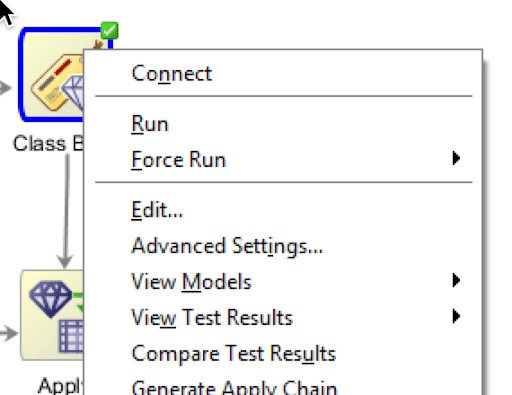
After you have developed your ODM models in Oracle Data Miner you have 2 levels of details available to you. The first of these is the Compare Test Results. You can find this by right clicking on the Classification node of your ODM Workflow, as showing below.
When you select the Compare Test Results a new (worksheet) tab will open. This will display summary statistics and graphics for the summary statistics for each Oracle Data Ming model created. In the following image an ODM model was created for each In-Database Classification algorithm in the Oracle Database.
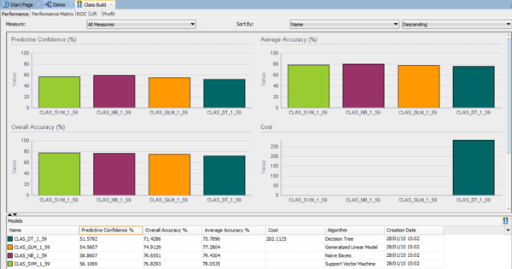
Here we get to see 2 of the statistical measures that I talked about in my previous blog post, the (average) Accuracy and the Overall Accuracy. We can look at and examine this in a bit more detail in a minute. A new measure that I haven’t mentioned before is the Predictive Confidence.
The Predictive Confidence measure provides an estimate of the overall goodness of the model. Predictive Confidence is a number between 0 and 1. Data Miner displays Predictive Confidence as a percent.
- If Predictive Confidence=0, then it indicates that the predictions of the model are no better than the predictions made by using the naive model.
- If Predictive Confidence=1, then it indicates that the predictions are perfect.
- If Predictive Confidence=0.5, then it indicates that the model has cut the error of a naive model by 50%./li>
So the higher the value for Predictive Confidence the better the model. Particularly when it is higher than 50%.
After evaluation these summary statistical measures you will want to drill down on these to see the lower level statistical measures, for example you will want to see the confusion matrix and the corresponding statistical measures. To view the confusion matrix all you need to do is to click on the Performance Matrix tab. Before you can really start evaluating the models you will need to click on the Display drop down and select ‘Show Detail’ from the drop down list. Another thing you will need to do is to click/check the ‘Show totals and codes’ check box on the lower part of the screen. This will give you some of the statistical measures that I outlined in my previous blog post.
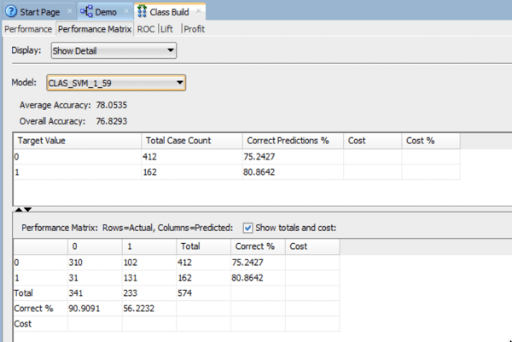
When you examine the statistical measures displayed on the screen you will notice that some of the statistical measures I outlined in my previous blog post are missing. Some of these missing measures are ones that you will want to consider and use as part of your evaluation of you ODM models.
So what how do you find out what these missing statistical measures are? Well ODM does not display these so the only real option open to you is to go and calculate them yourself 😦 This is not ideal but these are relatively easy to calculate and you can do this on a piece of paper or you can open your spreadsheet software and let it calculate them for you (once you have defined to formula for each). Here is an example of the completed/extended confusion matrix based on the results from the CLAS_SVM_1_59 model shown in the above image.

In my next blog post I will look at how you can evaluate a classification model that was developed using the in-database Oracle Data Mining algorithms (Oracle Data Miner GUI was not used). The evaluation criteria that I will show will be based on the statistical methods that I highlighted in my first blog post on this topic.
ODMr 4.1 EA1 Repository Upgrade
If you are downloading the EA1 of SQL Developer that includes Oracle Data Miner (ODMr), and you intend to use Oracle Data Miner then you will need to update the ODMr Repository.
You could do it the hard way and run the upgrade repository sql scripts that are located in the …\sqldeveloper-4.1.0.17.29-no-jre\sqldeveloper\dataminer\scripts directory.
Or you could do it the easy way and let the inbuilt functionality in Oracle Data Miner do it for you.
To do it the easy way all you need to do is to open the ODMr Connections window and the double click on one of your ODM connections.
ODMr will check the version of the repository you have installed and if needed it will prompt you about upgrading the repository. Select Yes and you will be prompted to enter the SYS password. So talk kindly with your DBA for them to enter the password for you. Then click on the Start button. They will lick off the OMDr Repository Upgrade scripts.
NB: Make sure you have a backup of your workflows before you do this. A little think happened to me during the SQL Dev / ODMr 4.0 upgrade back in September 2013 where all my workflows disappeared. You can imagine how happy I was about that. Since then the ODMr team have added some functionality to ensure something like this doesn’t happen again. But you never know.
To backup your ODMr workflows use the Export Workflow option.
When the repository upgrade has finished you will get a ‘Task Complete Successfully’ message in the upgrade window. Click on the close button and away you go with this updated version.
Check out this blog post for details of what is new in ODMr 4.1.
Oracle Data Miner (SQL Dev) 4.1 EA1
A few days ago the first Early Adaptor release of SQL Developer 4.1 (EA1) was made available. You can go ahead and download it from here and make sure to check out the blog post by Jeff Smith on some install and setup that is required around the latest version of Java.
I’ve been using SQL Developer since its very first release, so getting my hands on a new release is very exciting. There are lots and lots of new features in the tool. Again check out the blog posts by Jeff Smith and Kris Rice on some of these new features. I really like the new DBA screens 🙂 But this screen really needs some scroll bars and not everything fits on my screen. So Jeff and Kris if you are reading this, can you add some scroll bars.

In addition they have been working on “new” SQL*Plus that is called SDSQL. This is a new command line tool that is supposed to be bigger and better than SQL*Plus but still gives us a command line tool to run our scripts and demos. To download and install the tool go to here.
As you know I’m a bit of an Oracle Data Miner/Mining fan. There are now new in-database features, but there are a lot of new features in the GUI tool (aka ODMr) along with some improvements and bug fixes. Here is a list of the ODMr 4.1 EA1 new and updated features (taken from the ODMr Help in SQL Dev)
JSON Data Support for Oracle Database 12.1.0.2 and above
In response to the growing popularity of JSON data and its use in Big Data configurations, Data Miner now provides an easy to use JSON Query node. The JSON Query node allows you to select and aggregate JSON data without entering any SQL commands. The JSON Query node opens up using all of the existing Data Miner features with JSON data. The enhancements include:
Data Source Node
Automatically identifies columns containing JSON data by identifying those with the IS_JSON constraint.
Generates JSON schema for any selected column that contain JSON data.
Imports a JSON schema for a given column.
JSON schema viewer.
Create Table Node
Ability to select a column to be typed as JSON.
Generates JSON schema in the same manner as the Data Source node.
JSON Data Type
Columns can be specifically typed as JSON data.
JSON Query Node
Ability to utilize any of the selection and aggregation features without having to enter SQL commands.
Ability to select data from a graphical layout of the JSON schema, making data selection as easy as it is with scalar relational data columns.
Ability to partially select JSON data as standard relational scalar data while leaving other parts of the same JSON document as JSON data.
Ability to aggregate JSON data in combination with relational data. Includes the Sub-Group By option, used to generate nested data that can be passed into mining model build nodes.
General Improvements
Improved database session management resulting in less database sessions being generated and a more responsive user interface.
Filter Columns Node
Combined primary Editor and associated advanced panel to improve usability.
Explore Data Node
Allows multiple row selection to provide group chart display.
Classification Build Node
Automatically filters out rows where the Target column contains NULLs or all Spaces. Also, issues a warning to user but continues with Model build.
Workflow
Enhanced workflows to ensure that Loading, Reloading, Stopping, Saving operations no longer block the UI.
Online Help
Revised the Online Help to adhere to topic-based framework.
Selected Bug Fixes (does not include 4.0 patch release fixes)
GLM Model Algorithm Settings: Added GLM feature identification sampling option (Oracle Database 12.1 and above).
Filter Rows Node: Custom Expression Editor not showing all possible available columns.
WebEx Display Issues: Fixed problems affecting the display of the Data Miner UI through WebEx conferencing.
Denny Wong of the ODM team in Oracle has made available a tutorial on importing JSON data for use with ODMr. Check it out here.
I’ve been told there will be a couple of tutorials on the new features coming out (from the ODMr team) over the next few weeks. So keep an eye out of these.
Check out my blog post on what you need to do to get started/using ODMr 4.1 EA1.
UKOUG 2015 Conferences
The UKOUG annual conferences commence on Sunday 7th December and run until Wednesday 10th.
Like previous years there are two conferences, one called TECH15 and the other is called APPS15. You might guess what each conference is about!!.
This year these conferences are being held at the same time and in the same venue. But they are separate conferences!.
This year I’ve been very lucky (or very unlucky) to have 3 presentations at these conferences. Two of these will on part of the TECH15 conference and one will be part of the APPS15 conference.
Just in case you interested in what I’m presenting about and you might want to attend them, here is the list with the room numbers.
Monday
10:30-11:20 : Oracle Advanced Analytics in Oracle Fusion Apps & Beyond (Apps) (Room : Ex1)
11:30-12:20 : Predictive Queries in Oracle 12c (TECH) (Room : Hall 6)
Wednesday
11:30-12:20 : What are they thinking? With APEX and Oracle Data Miner. (TECH) (Room : Ex4)
(this is a joint presentation with Roel Hartman)
Yes on the Monday I have 2 back-to-back presentation with a 10 minute gap to get from one side of the conference centre to the other side 😦 I’m not looking forward to that transition, but I’m sure it will be fine.
 Ora-lytics
You must be logged in to post a comment.