
Oracle
Oracle 18c DBaaS Cloud Setup
The 18c Oracle DBaaS is now available. This is the only place that Oracle 18c will be available until later in 2018. So if you want to try it out, then you are going to need to get some Oracle Cloud credits, or you may already have a paying account for Oracle Cloud.

The following outlines the steps you need to go through to gets Oracle 18c setup.
1. Log into your Oracle Cloud
Log into your Oracle Cloud environment. Depending on your access path you will get to your dashboard.
Select Create Instance from the dashboard.
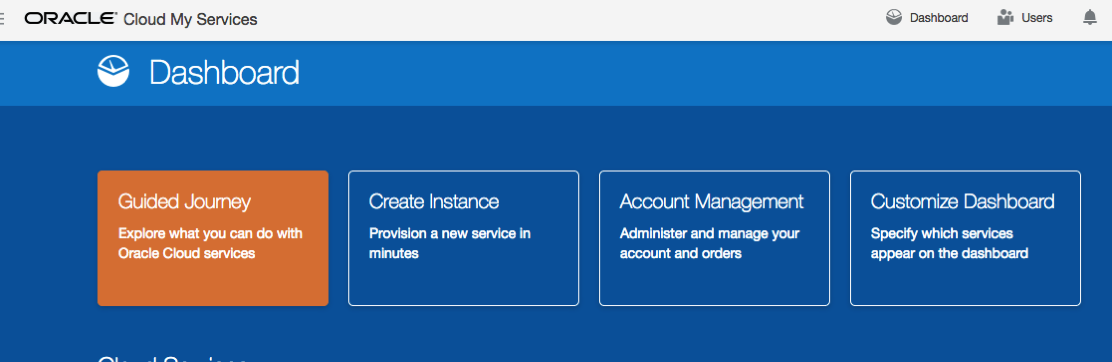
2. Create a new Database
From the list of services to create, select Database.
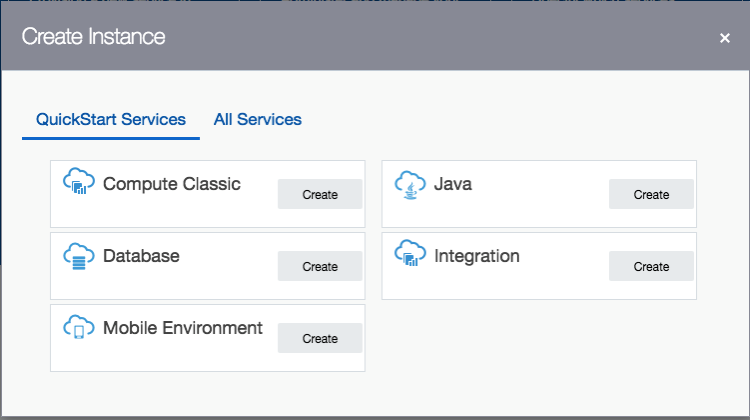
3. Click ‘Create Instance’
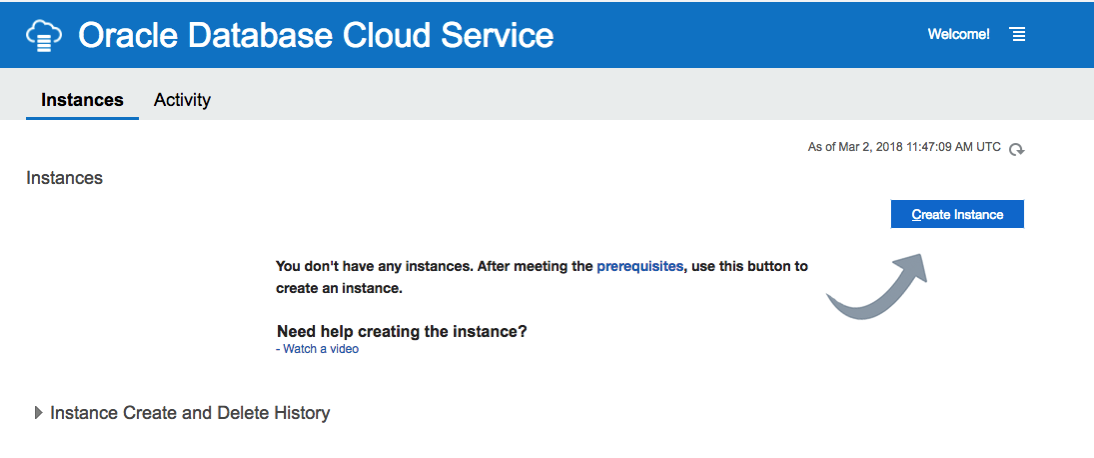
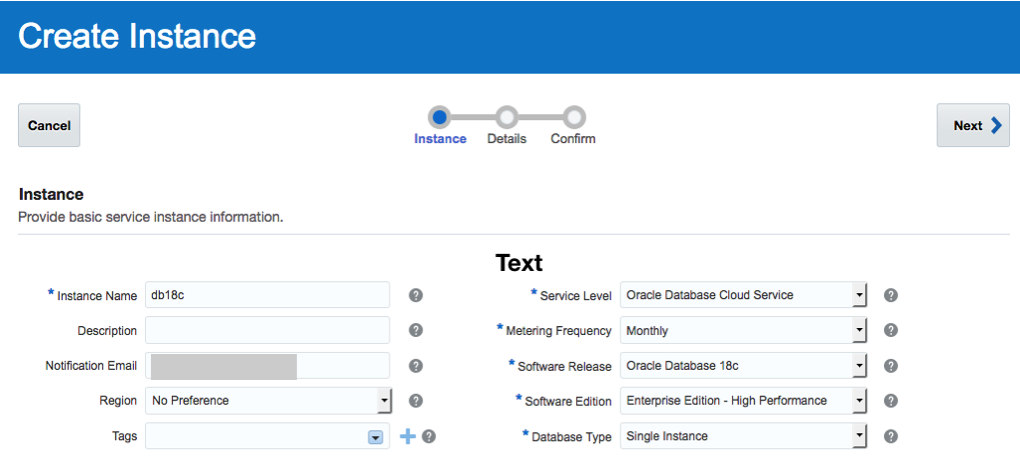
4. Enter the Database Instance details
Enter the details for your new Oracle 18c Database. I’ve called mine ‘db18c’.
Then for the Software Release dropdown list, select ‘Oracle Database 18c’.
Next select the Software Edition from the dropdown list.
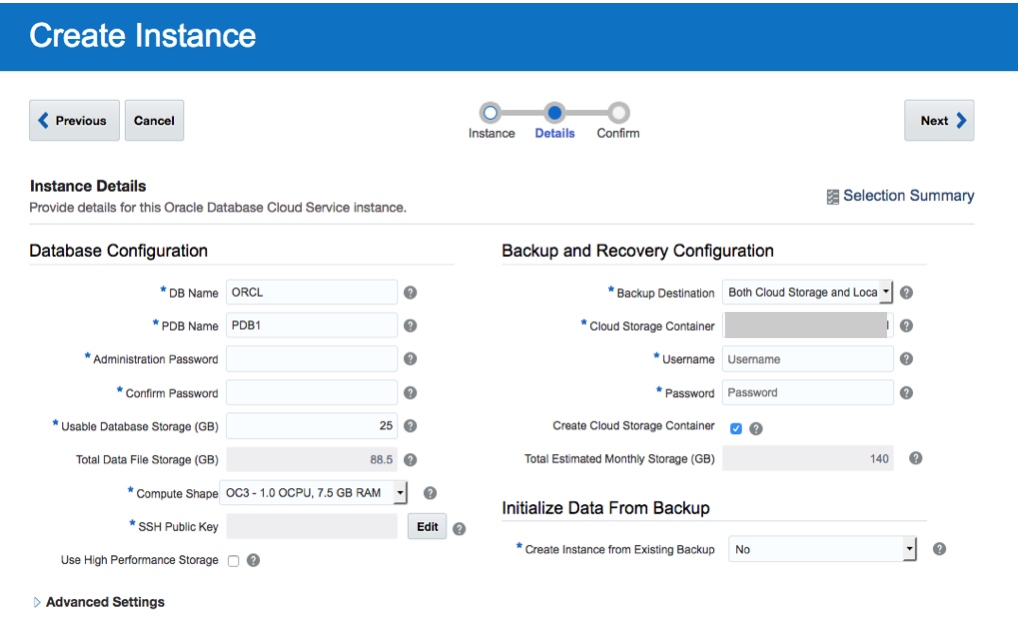
5. Fill in the Instance Details
Fill in the details for ‘DB Name’, ‘PDB Name’, ‘Administration Password’, ‘Confirm Password’, setup the SSH Public Key, and then decide if you need the Backup and Recovery option.
 <
<
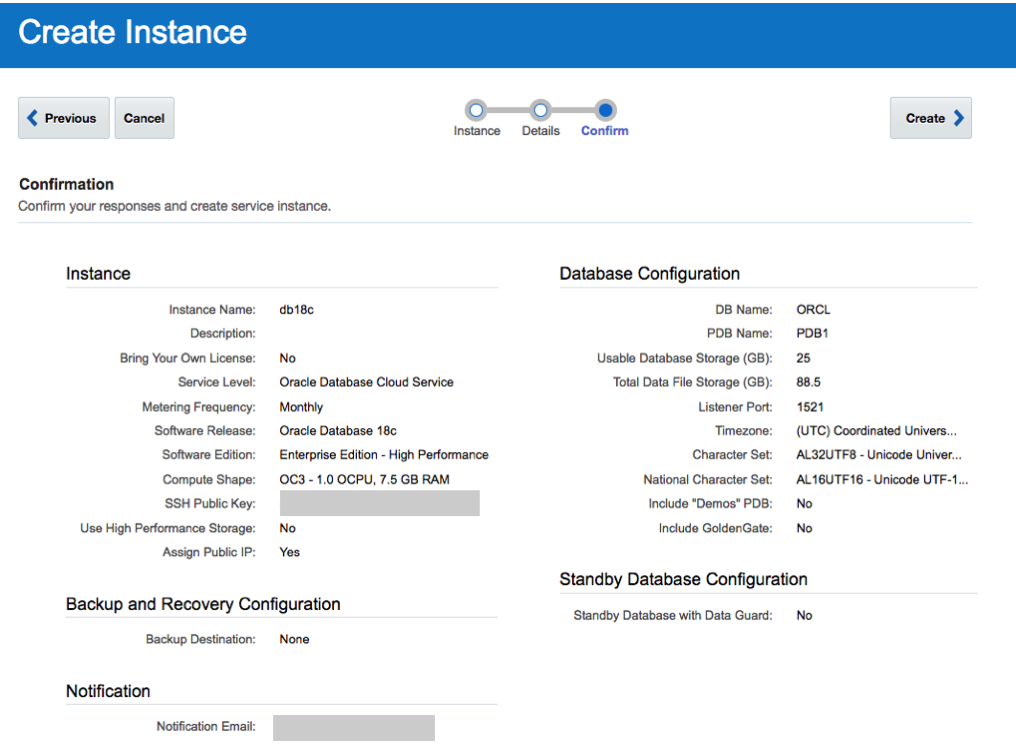
6. Create the DBaaS
Double check everything and when ready click on the ‘Create’ button.
7. Wait for Everything to be Create
Now is the time to be patient and wait while your cloud service is created.
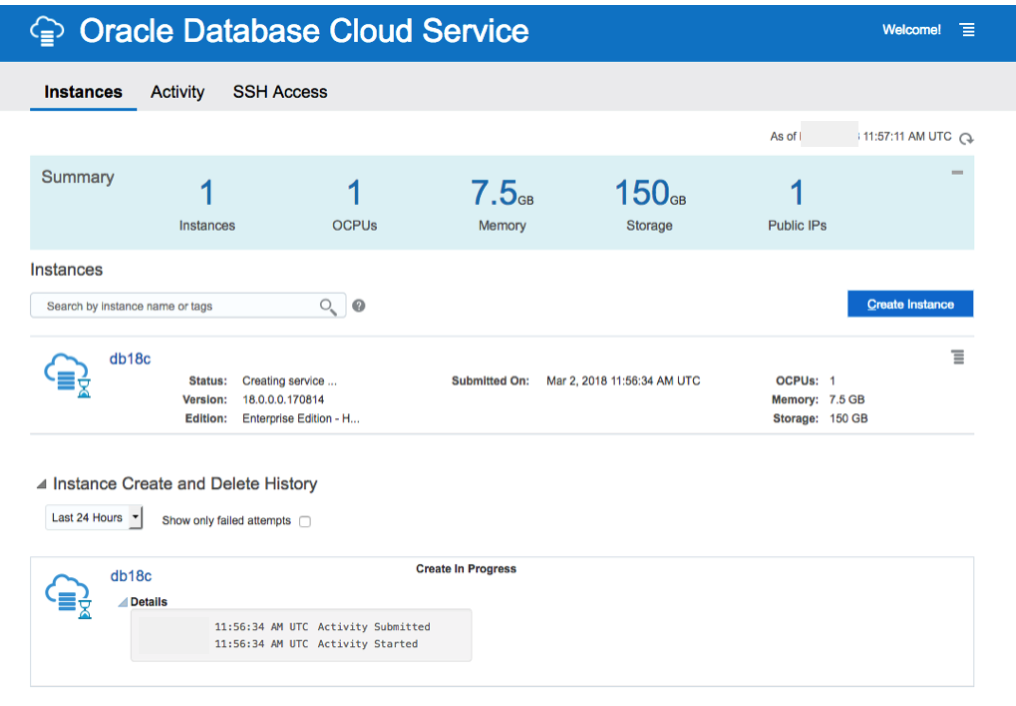
I’ve created two different version of the 18c Oracle DBaaS. The Enterprise Edition to 30 minutes to complete and the High Performance service too 47 minutes.
No it’s time to go play.
18c is now available (but only on the Cloud)
On Friday afternoon (16th February) we started to see tweets and blog posts from people in Oracle saying that Oracle 18c was now available. But is only available on Oracle Cloud and Engineered Systems.
It looks like we will have to wait until the Autumn before we can install it ourselves on our own servers 😦
Here is the link to the official announcement for Oracle 18c.
Oracle 18c is really Oracle 12.2.0.2. The next full new release of the Oracle database is expected to be Oracle 19.
The new features and incremental enhancements in Oracle 18c are:
- Multitenant
- In-Memory
- Sharding
- Memory Optimized Fetches
- Exadata RAC Optimizations
- High Availability
- Security
- Online Partition Merge
- Improved Machine Learning (OAA)
- Polymorphic Table Functions
- Spatial and Graph
- More JSON improvements
- Private Temporary Tablespaces
- New mode for Connection Manager
And now the all important links to the documentation.
To give Oracle 18c a try you will need to go to cloud.oracle.com and select Database from the drop down list from the Platform menu. Yes you are going to need an Oracle Cloud account and some money or some free credit. Go and get some free cloud credits at the upcoming Oracle Code events.
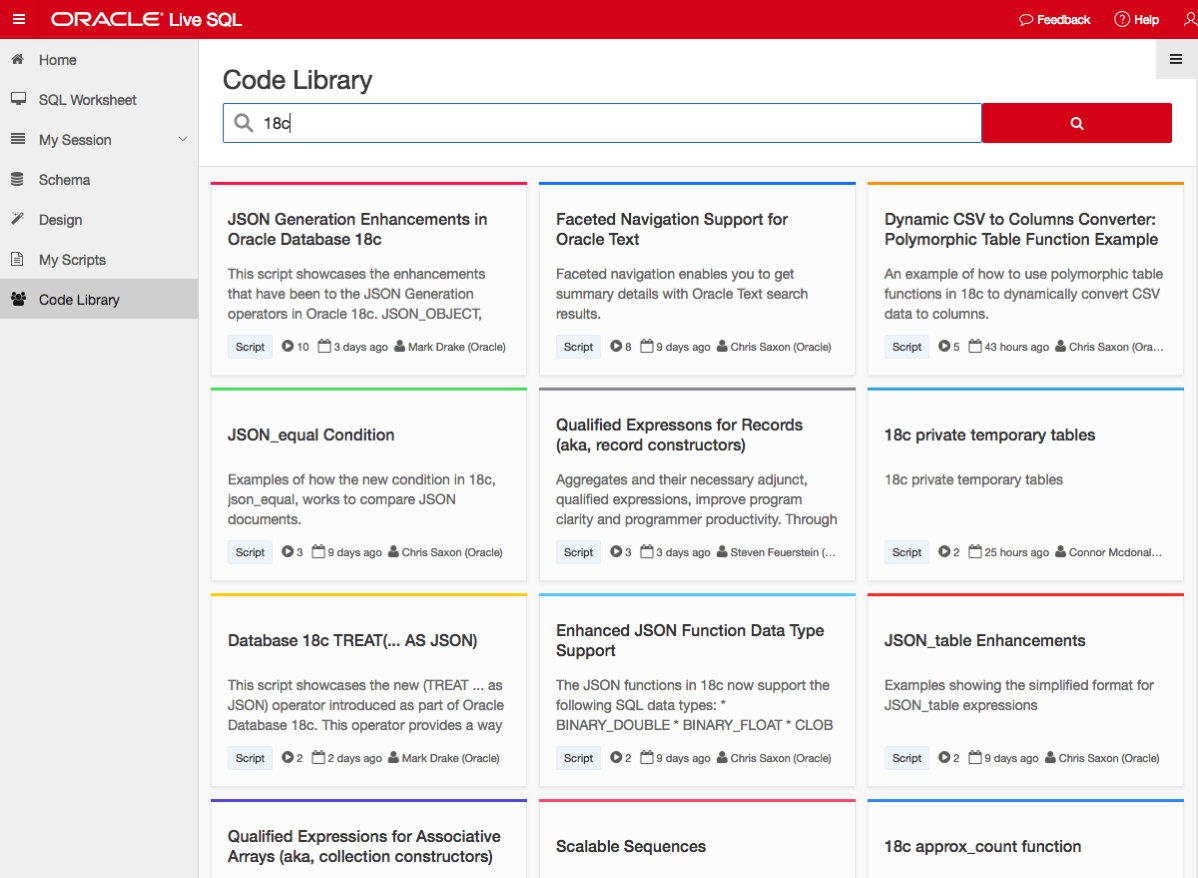
If you want a ‘free’ way of trying out Oracle 18c, you can use Oracle Live SQL. They have setup some examples of the new features for you to try.
NOTE: Oracle 18c is not Autonomous. Check out Tim Hall’s blog posts about this. The Autonomous Oracle Database is something different, and we will be hearing more about this going forward.
Oracle Code Online December 2017
This week Oracle Code will be having an online event consisting of 5 tracks and with 3 presentations on each track.
This online Oracle Code event will be given in 3 different geographic regions on 12th, 13th and 14th December.
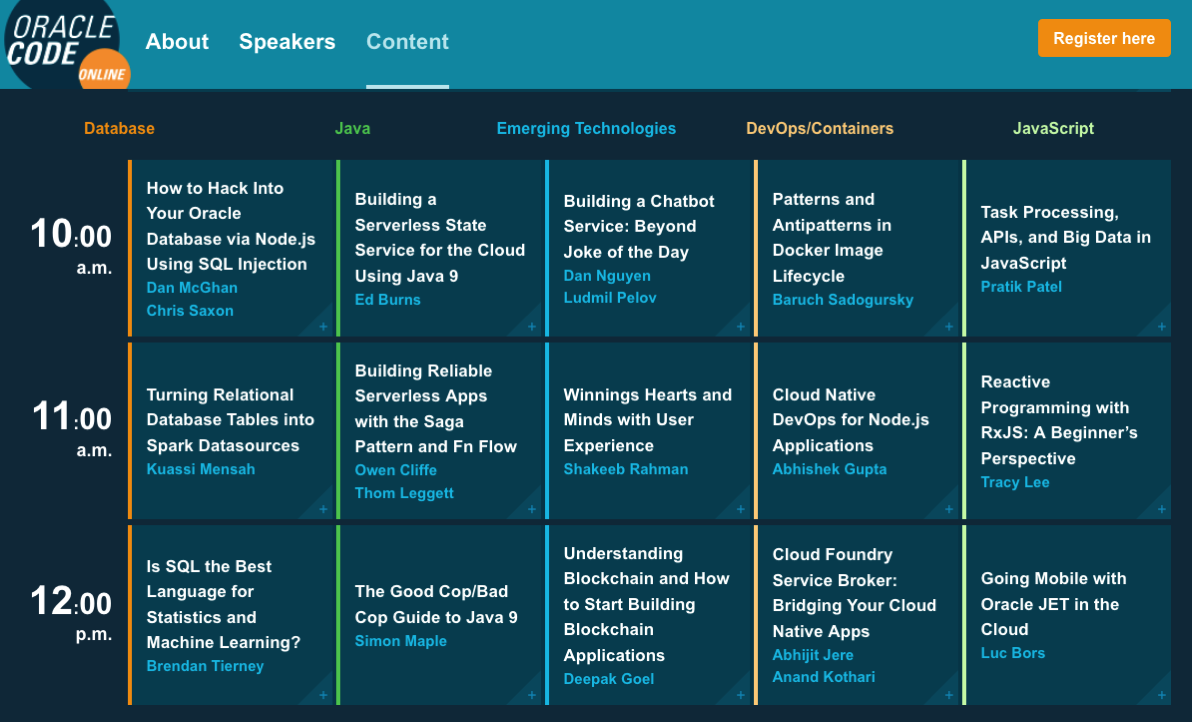
I’ve been selected to give one of these talks, and I’ve given this talk at some live Oracle Code events and at JavaOne back in October.
The present is pre-recorded and I recorded this video back in September.
I hope to be online at the end of some of these presentations to answer any questions, but unfortunately due to changes with my work commitments I may not be able to be online for all of them.
The moderator for these events will take your questions (or you can send them to me here) and I will write a blog post answering all your questions.
My Oracle Open World 2017 Presentations
Oracle Open World 2017 will be happening very soon (1st-5th October). Still lots to do before I can get on that plane to San Francisco.
This year I’ll be giving 2 presentations (see table below). One on the Sunday during the User Groups Sunday sessions. I’ve been accepted on the EMEA track. I then get a few days off to enjoy and experience OOW until Thursday when I have my second presentation that is part of JavaOne (I think!)
My OOW kicks off on Friday 29th September with the ACE Director briefing at Oracle HQ, after flying to SFO on Thursday 28th. This year it is only for one day instead of two days. I really enjoy this event as we get to learn and see what Oracle will be announcing at OOW as well as some things that will be coming out during the following few months.
| Day | Time | Presentation | Location |
|---|---|---|---|
| Sunday | 13:45-14:30 | SQL: One Language to Rule All Your Data [OOW SUN1238]
SQL is a very powerful language that has been in use for almost 40 years. SQL comes with many powerful techniques for analyzing your data, and you can analyze data outside the database using SQL as well. Using the new Oracle Big Data SQL it is now possible to analyze data that is stored in a database, in Hadoop, and in NoSQL all at the same time. This session explores the capabilities in Oracle Database that allow you to work with all your data. Discover how SQL really is the unified language for processing all your data, allowing you to analyze, process, run machine learning, and protect all your data. Hopefully this presentation will be a bit of Fun! For those who have been working with the database for a long time, we can sometimes forget what we can really do. For those starting out in the career may not realise what the database can do. The presentation delivers an important message while having a laugh or two (probably at me). | Marriott Marquis (Golden Gate Level) – Golden Gate C1/C2 |
| Thursday | 13:45-14:30 | Is SQL the Best Language for Statistics and Machine Learning?
[OOW and JavaOne CON7350] Did you know that Oracle Database comes with more than 300 statistical functions? And most of these statistical functions are available in all versions of Oracle Database? Most people do not seem to know this. When we hear about people performing statistical analytics, we hear them talking about Excel and R, but what if we could do statistical analysis in the database without having to extract any data onto client machines? This presentation explores the various statistical areas available in Oracle Database and gives several demonstrations. We can also greatly expand our statistical capabilities by using Oracle R Enterprise with the embedded capabilities in SQL. This presentation is just one of the 14 presentations that are scheduled for the Thursday! I believe this session is already fully booked, but you can still add yourself to the wait list. |
Marriott Marquis (Golden Gate Level) – Golden Gate B |
My flights and hotel have been paid by OTN as part of the Oracle ACE Director program. Yes this costs a lot of money and there is no way I’d be able to pay these costs. Thank you.
My diary for OOW is really full. No it is completely over booked. It is just mental. Between attending conference session, meeting with various product teams (we only get to meet at OOW), attending various community meet-ups, this year I get to attend some events for OUG leaders (representing UKOUG), spending some time on the EMEA User Group booth, various meetings with people to discuss how they can help or contribute to the UKOUG, then there is Oak Table World, trying to check out the exhibition hall, spend some time at the OTN/ODC hangout area, getting a few OTN t-shirts, doing some book promotions at the Oracle Press shop, etc., etc., etc. I’m exhausted just thinking about it. Mosts days start at 7am and then finish around 10pm.
I’ll need a holiday when I get home! but it will be straight back to work 😦
If you are at OOW and want to chat then contact me via DM on Twitter or WhatsApp (these two are best) or via email (this will be the slowest way).
I’ll have another blog post listing the presentations from various people and partners from the Republic of Ireland who are speaking at OOW.
My Oracle Open World 2017 Presentations
Oracle Open World 2017 will be happening very soon (1st-5th October). Still lots to do before I can get on that plane to San Francisco.
This year I’ll be giving 2 presentations (see table below). One on the Sunday during the User Groups Sunday sessions. I’ve been accepted on the EMEA track. I then get a few days off to enjoy and experience OOW until Thursday when I have my second presentation that is part of JavaOne (I think!)
My OOW kicks off on Friday 29th September with the ACE Director briefing at Oracle HQ, after flying to SFO on Thursday 28th. This year it is only for one day instead of two days. I really enjoy this event as we get to learn and see what Oracle will be announcing at OOW as well as some things that will be coming out during the following few months.
table.myTable { border-collapse:collapse; }
table.myTable td, table.myTable th { border:1px solid black;padding:5px; }
| Day | Time | Presentation | Location |
|---|---|---|---|
| Sunday | 13:45-14:30 | SQL: One Language to Rule All Your Data [OOW SUN1238]
SQL is a very powerful language that has been in use for almost 40 years. SQL comes with many powerful techniques for analyzing your data, and you can analyze data outside the database using SQL as well. Using the new Oracle Big Data SQL it is now possible to analyze data that is stored in a database, in Hadoop, and in NoSQL all at the same time. This session explores the capabilities in Oracle Database that allow you to work with all your data. Discover how SQL really is the unified language for processing all your data, allowing you to analyze, process, run machine learning, and protect all your data. Hopefully this presentation will be a bit of Fun! For those who have been working with the database for a long time, we can sometimes forget what we can really do. For those starting out in the career may not realise what the database can do. The presentation delivers an important message while having a laugh or two (probably at me). | Marriott Marquis (Golden Gate Level) – Golden Gate C1/C2 |
| Thursday | 13:45-14:30 | Is SQL the Best Language for Statistics and Machine Learning?
[OOW and JavaOne CON7350] Did you know that Oracle Database comes with more than 300 statistical functions? And most of these statistical functions are available in all versions of Oracle Database? Most people do not seem to know this. When we hear about people performing statistical analytics, we hear them talking about Excel and R, but what if we could do statistical analysis in the database without having to extract any data onto client machines? This presentation explores the various statistical areas available in Oracle Database and gives several demonstrations. We can also greatly expand our statistical capabilities by using Oracle R Enterprise with the embedded capabilities in SQL. This presentation is just one of the 14 presentations that are scheduled for the Thursday! I believe this session is already fully booked, but you can still add yourself to the wait list. |
Marriott Marquis (Golden Gate Level) – Golden Gate C3 |
My flights and hotel have been paid by OTN as part of the Oracle ACE Director program. Yes this costs a lot of money and there is no way I’d be able to pay these costs. Thank you.
My diary for OOW is really full. No it is completely over booked. It is just mental. Between attending conference session, meeting with various product teams (we only get to meet at OOW), attending various community meet-ups, this year I get to attend some events for OUG leaders (representing UKOUG), spending some time on the EMEA User Group booth, various meetings with people to discuss how they can help or contribute to the UKOUG, then there is Oak Table World, trying to check out the exhibition hall, spend some time at the OTN/ODC hangout area, getting a few OTN t-shirts, doing some book promotions at the Oracle Press shop, etc., etc., etc. I’m exhausted just thinking about it. Mosts days start at 7am and then finish around 10pm.
I’ll need a holiday when I get home! but it will be straight back to work 😦
If you are at OOW and want to chat then contact me via DM on Twitter or WhatsApp (these two are best) or via email (this will be the slowest way).
I’ll have another blog post listing the presentations from various people and partners from the Republic of Ireland who are speaking at OOW.
Cluster Distance using SQL with Oracle Data Mining – Part 4
This is the fourth and last blog post in a series that looks at how you can examine the details of predicted clusters using Oracle Data Mining. In the previous blog posts I looked at how to use CLUSER_ID, CLUSTER_PROBABILITY and CLUSTER_SET.
In this blog post we will look at CLUSTER_DISTANCE. We can use the function to determine how close a record is to the centroid of the cluster. Perhaps we can use this to determine what customers etc we might want to focus on most. The customers who are closest to the centroid are one we want to focus on first. So we can use it as a way to prioritise our workflows, particularly when it is used in combination with the value for CLUSTER_PROBABILITY.
Here is an example of using CLUSTER_DISTANCE to list all the records that belong to Cluster 14 and the results are ordered based on closeness to the centroid of this cluster.
SELECT customer_id,
       cluster_probability(clus_km_1_37 USING *) as cluster_Prob,
       cluster_distance(clus_km_1_37 USING *) as cluster_Distance
FROM   insur_cust_ltv_sample
WHERE   cluster_id(clus_km_1_37 USING *) = 14
order by cluster_Distance asc;
Here is a subset of the results from this query.
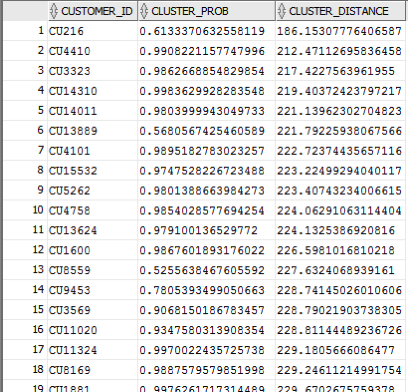
When you examine the results you may notice that the records that is listed first and closest record to the centre of cluster 14 has a very low probability. You need to remember that we are working in a N-dimensional space here. Although this first record is closest to the centre of cluster 14 it has a really low probability and if we examine this record in more detail we will find that it is at an overlapping point between a number of clusters.
This is why we need to use the CLUSTER_DISTANCE and CLUSTER_PROBABILITY functions together in our workflows and applications to determine how we need to process records like these.
Cluster Sets using SQL with Oracle Data Mining – Part 3
This is the third blog post on my series on examining the Clusters that were predicted by an Oracle Data Mining model. Check out the previous blog posts.
- Part 1 – Examining predicted Clusters and Cluster details using SQL
- Part 2 – Cluster Details with Oracle Data Mining
In the previous posts we were able to list the predicted cluster for each record in our data set. This is the cluster that the records belonged to the most. I also mentioned that a record could belong to many clusters.
So how can you list all the clusters that the a record belongs to?
You can use the CLUSTER_SET SQL function. This will list the Cluster Id and a probability measure for each cluster. This function returns a array consisting of the set of all clusters that the record belongs to.
The following example illustrates how to use the CLUSTER_SET function for a particular cluster model.
SELECT t.customer_id, s.cluster_id, s.probability
FROM   (select customer_id, cluster_set(clus_km_1_37 USING *) as Cluster_Set
        from   insur_cust_ltv_sample
        WHERE  customer_id in ('CU13386', 'CU100')) T,
      TABLE(T.cluster_set) S
order by t.customer_id, s.probability desc;
The output from this query will be an ordered data set based on the customer id and then the clusters listed in descending order of probability. The cluster with the highest probability is what would be returned by the CLUSTER_ID function. The output from the above query is shown below.

If you would like to see the details of each of the clusters and to examine the differences between these clusters then you will need to use the CLUSTER_DETAILS function (see previous blog post).
You can specify topN and cutoff to limit the number of clusters returned by the function. By default, both topN and cutoff are null and all clusters are returned.
– topN is the N most probable clusters. If multiple clusters share the Nth probability, then the function chooses one of them.
– cutoff is a probability threshold. Only clusters with probability greater than or equal to cutoff are returned. To filter by cutoff only, specify NULL for topN.
You may want to use these individually or combined together if you have a large number of customers. To return up to the N most probable clusters that are greater than or equal to cutoff, specify both topN and cutoff.
The following example illustrates using the topN value to return the top 4 clusters.
SELECT t.customer_id, s.cluster_id, s.probability
FROM   (select customer_id, cluster_set(clus_km_1_37, 4, null USING *) as Cluster_Set
        from   insur_cust_ltv_sample
        WHERE  customer_id in ('CU13386', 'CU100')) T,
      TABLE(T.cluster_set) S
order by t.customer_id, s.probability desc;
and the output from this query shows only 4 clusters displayed for each record.

Alternatively you can select the clusters based on a cut off value for the probability. In the following example this is set to 0.05.
SELECT t.customer_id, s.cluster_id, s.probability
FROM   (select customer_id, cluster_set(clus_km_1_37, NULL, 0.05 USING *) as Cluster_Set
        from   insur_cust_ltv_sample
        WHERE  customer_id in ('CU13386', 'CU100')) T,
      TABLE(T.cluster_set) S
order by t.customer_id, s.probability desc;
and the output this time looks a bit different.

Finally, yes you can combine these two parameters to work together.
SELECT t.customer_id, s.cluster_id, s.probability
FROM (select customer_id, cluster_set(clus_km_1_37, 2, 0.05 USING *) as Cluster_Set
from insur_cust_ltv_sample
WHERE customer_id in (‘CU13386’, ‘CU100’)) T,
TABLE(T.cluster_set) S
order by t.customer_id, s.probability desc;
Examining predicted Clusters and Cluster details using SQL
In a previous blog post I gave some details of how you can examine some of the details behind a prediction made using a classification model. This seemed to spark a lot of interest. But before I come back to looking at classification prediction details and other information, this blog post is the first in a 4 part blog post on examining the details of Clusters, as identified by a cluster model created using Oracle Data Mining.
The 4 blog posts will consist of:
- 1 – (this blog post) will look at how to determine the predicted cluster and cluster probability for your record.
- 2 – will show you how to examine the details behind and used to predict the cluster.
- 3 – A record could belong to many clusters. In this blog post we will look at how you can determine what clusters a record can belong to.
- 4 – Cluster distance is a measure of how far the record is from the cluster centroid. As a data point or record can belong to many clusters, it can be useful to know the distances as you can build logic to perform different actions based on the cluster distances and cluster probabilities.
Right. Let’s have a look at the first set of these closer functions. These are CLUSTER_ID and CLUSTER_PROBABILITY.
CLUSER_ID : Returns the number of the cluster that the record most closely belongs to. This is measured by the cluster distance to the centroid of the cluster. A data point or record can belong or be part of many clusters. So the CLUSTER_ID is the cluster number that the data point or record most closely belongs too.
CLUSTER_PROBABILITY : Is a probability measure of the likelihood of the data point or record belongs to a cluster. The cluster with the highest probability score is the cluster that is returned by the CLUSTER_ID function.
Now let us have a quick look at the SQL for these two functions. This first query returns the cluster number that each record most strong belongs too.
SELECT customer_id,
       cluster_id(clus_km_1_37 USING *) as Cluster_Id,
FROM   insur_cust_ltv_sample
WHERE  customer_id in ('CU13386', 'CU6607', 'CU100');

Now let us add in the cluster probability function.
SELECT customer_id,
       cluster_id(clus_km_1_37 USING *) as Cluster_Id,
       cluster_probability(clus_km_1_37 USING *) as cluster_Prob
FROM   insur_cust_ltv_sample
WHERE  customer_id in ('CU13386', 'CU6607', 'CU100');
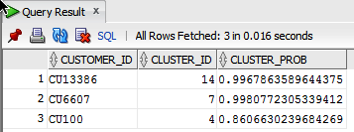
These functions gives us some insights into what the cluster predictive model is doing. In the remaining blog posts in this series I will look at how you can delve deeper into the predictions that the cluster algorithm is make.
Oracle Data Visualization Desktop – now available
After a bit of a long wait Oracle have finally release Oracle Data Visualization for the desktop. The desktop version of this tool is only available for Windows desktops at the moment. I’m sure Oracle will be bringing out versions of other OS soon (I hope).
To get you hands on the Oracle Data Visualization to to the following OTN webpage (click on this image)
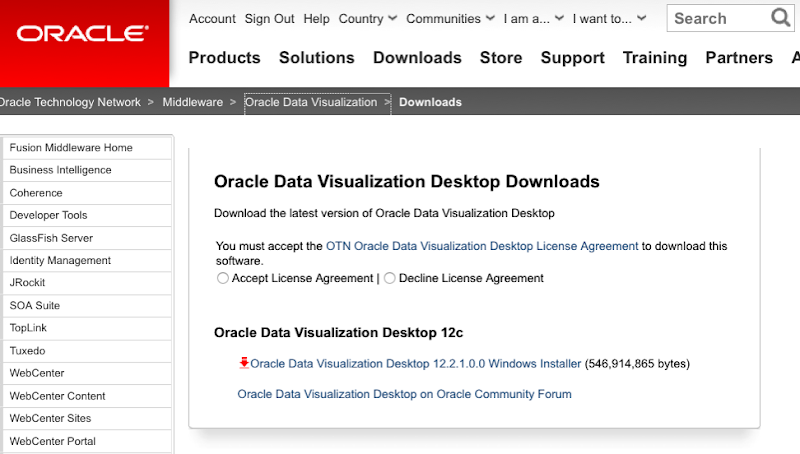
After downloading has finished, you can run the installer.
When the Oracle Installer opens you will be prompted to enter the required details or to accept the defaults, as outlined below.
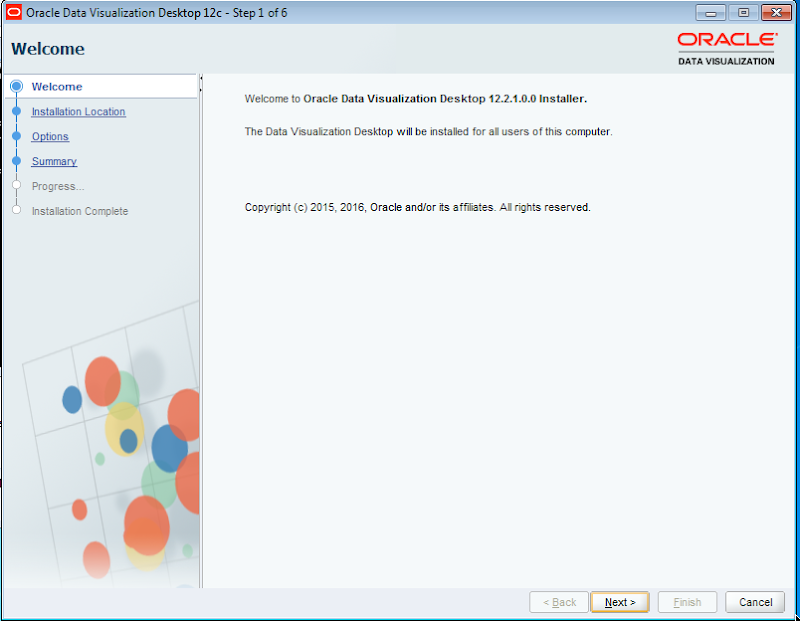
- Installation Location : Decide where you are going to have the Oracle Data Visualization tool installed on your desktop. The default location is
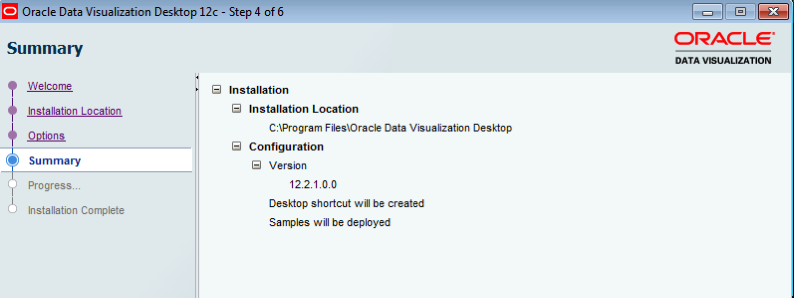
C:\Program Files\Oracle Data Visualization Desktop. Click Next - Options : There are 2 check boxes for ‘Create desktop shortcut’ and ‘Deploy samples’. Leave both of these checked, as you will probably want these. Click Next.
- Summary : Lists a summary of the installation. There is nothing really for you to do here, so on the Install button.
- Progress : You can ten sit back and monitor the progress of the installation. The installation tool about 4 minutes on my small Windows VM
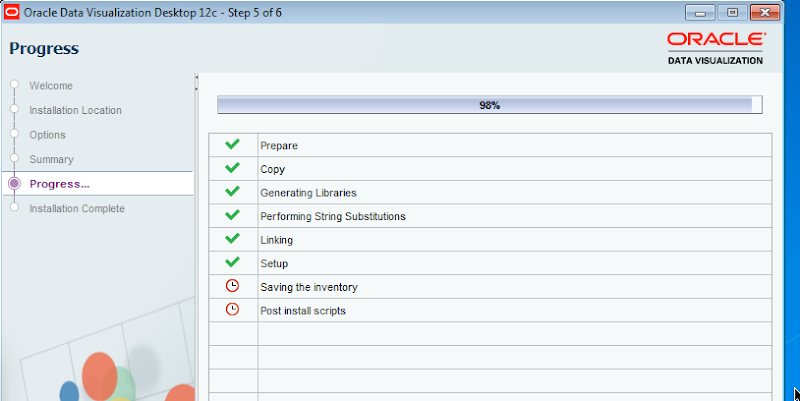
When the installation is complete you can now fire up Oracle Data Visualization and enjoy. If you have just installed the tool it will automatically be started for you.
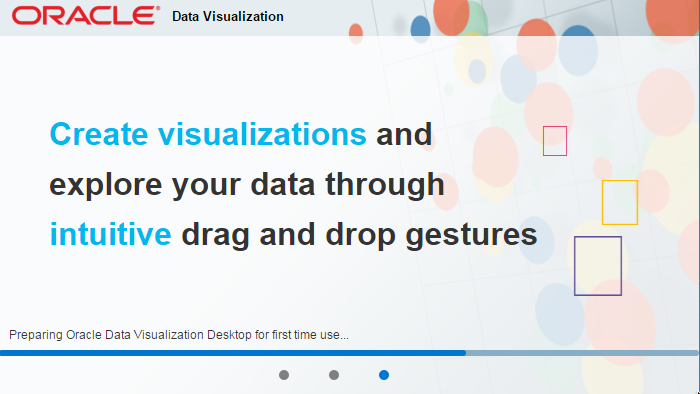
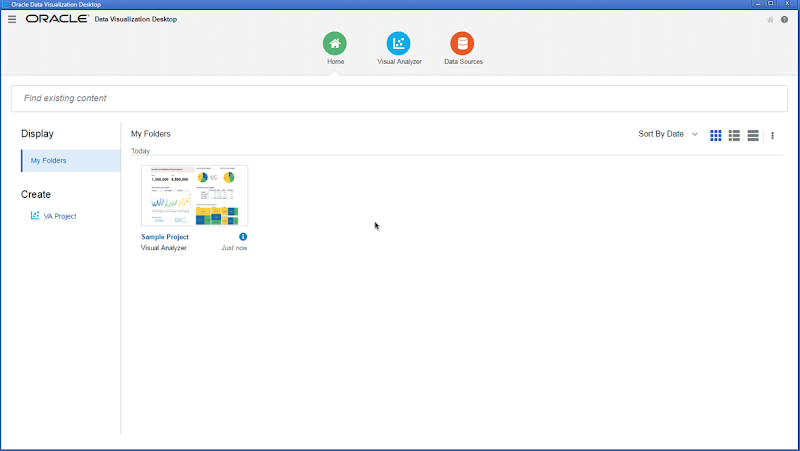
When the tool has finished all the configurations that it needs to do, the tool will open with the following window and shows a sample projects for you to get an idea of some of the things that are possible.
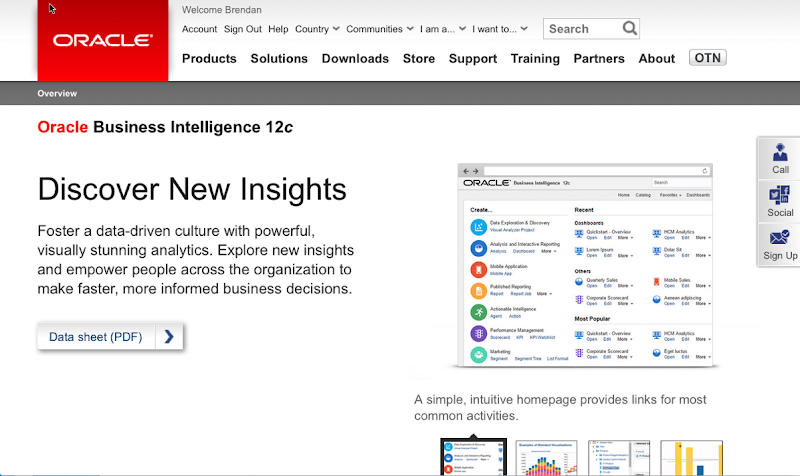
For more details on the tool and on the Oracle Cloud hosted version click on the following image to get to the Oracle webpage for the product.
Oracle Magazine – March/April 2001
The headline articles of Oracle Magazine for March/April 2001 were on using Oracle 9i Application server to deliver e-business and web based applications. There was some case studies of companies using this technologies including Tantalus Communications, Digital River Commerce System, Tomatoland.com and Oracle themselves.

Other articles included:
- Tom Kyte’s column looked at tips on automation, cleanup and database maintenance. Some of the details included index rebuilds, indexing interMedia files, killing and cleaning up sessions, how to specify the column at runtime in an order by, and how to use DBMS_JOB for database maintenance.
- Oracle announces the release of PORTAL.ORACLE.COM and MY.ORACLE.COM.
- Fre Sansmark has an article on Database Benchmarking and discusses what it means and how well they address real-world performance questions.
- Understanding XML Standards gives a brief introduction to what XML is about, explains the three layers of XML Grammar, XML based Protocols and XML Vocabularies. .
- Part 3 of ‘Exploring Oracle Text Basics’ looks at text searching and comparisons, creating, indexing and loading data.
- Creating Updatable Views explores the various requirements for creating an View that can be used to update data that is based on a single table or based on the joining of multiple tables..
- Linking to Remote Databases explores the basics of Database Links and that the DBA needs to know to setup and manages these..
- Steven Feuerstein’s article looks at Advanced Native Dynamic SQL and the use of bind variables and their limitations.
To view the cover page and the table of contents click on the image at the top of this post or click here.
My Oracle Magazine Collection can be found here. You will find links to my blog posts on previous editions and a PDF for the very first Oracle Magazine from June 1987.
Loading JSON data into Oracle using ROracle and jsonlite
In this post I want to show you one way of taking a JSON file of data and loading it into your Oracle schema using ROracle. The JSON data will then be used to create a table in your schema. Yes you could use other methods to connect to the database and to create the table. But ROracle is by far the fastest method of connecting, selecting and processing data.
1. Necessary R Packages
You will need two R library. The first of these is the ROracle package. This gives us all the connection and data processing commands to work with the Oracle database. The second package is the jsonlite R package. This package allows us to open, read and process a file that has JSON data.
> install.package(“ROracle”)
> install.package(“jsonlite”)
After you have installed the packages you can now load them into your R environment so that you can use them in your current session.
> library(ROracle)
> library(jsonlite)
Depending on your version of R you may get some working messages about the libraries being built under a different version of R. Then again maybe you won’t get these 🙂
2. Open & Read the JSON file in R
Now you are ready to name and open the file that contains your JSON data. In my case the file is called ‘demo_json_data.json’
> jsonFile <- "c:/app/demo_json_data.json"
> jsonData <- fromJSON(jsonFile)
We now have the JSON data loaded into R. We can now look at the attributes of each JSON record and the number of records that was in the JSON file.
> names(jsonData$items)
[1] “cust_id” “cust_gender” “age”
[4] “cust_marital_status” “country_name” “cust_income_level”
[7] “education” “occupation” “household_size”
[10] “yrs_residence” “affinity_card” “bulk_pack_diskettes”
[13] “flat_panel_monitor” “home_theater_package” “bookkeeping_application”
[16] “printer_supplies” “y_box_games” “os_doc_set_kanji”
> nrow(jsonData$items)
[1] 1500
As you can see the records are grouped under a higher label of ‘items’. You might want to extract these records into a new data frame.
> data <- jsonData$items
>
Now we have our data ready in a data frame and we can use this data frame to create a table and insert the data.
3. Create the connection to the Oracle Schema
I have a previous post on connecting to an Oracle Schema using ROracle. That was connecting to an 11g Oracle Database.
JSON is a new feature in Oracle 12c and the connection details are a little bit different because we are now having to deal with connection to a pluggable database. The following illustrates connecting to a 12c database and assumes you have Oracle Client already installed and configured with your tnsnames.ora entry.
# Create the connection string
> host <- "localhost"
> port <- 1521
> service <- "pdb12c"
> connect.string <- paste(
“(DESCRIPTION=”,
“(ADDRESS=(PROTOCOL=tcp)(HOST=”, host, “)(PORT=”, port, “))”,
“(CONNECT_DATA=(SERVICE_NAME=”, service, “)))”, sep = “”)
> con2 <- dbConnect(drv, username = "dmuser", password = "dmuser",dbname=connect.string)
>
4. Create the table in your Oracle Schema
At this point we have our connection to our Oracle Schema setup and connected, we have read in the JSON file and we have the JSON data in a data frame. We are now ready to push the JSON data to a table in our schema.
> dbWriteTable(con, “JSON_DATA”, overwrite=TRUE, value=data)
Job done 🙂
The table JSON_DATA has been created and the data is stored in the table in typical table attributes and rows format.
One thing to watch our for with the above command is with the overwrite=TRUE parameter setting. This replaces a table if it already exists. So your old data will be gone. Be careful.
5. View and Query the data using SQL
When you now log into your schema in the 12c Database, you can now query the data in the JSON_DATA table. (Yes I know it is not in JSON format in this table).

How did I get/generate my JSON data?
I generated the JSON file using a table that I already had in one of my schemas. This table is part of the sample data set that is built on top of the Oracle sample schemas.
The image below shows the steps involved in generating the data in JSON format. I used SQL Developer and set the SQLFORMAT to be JSON. I then ran the query to select the data. You will need to run this as a script. Then copy the JSON data and paste it into a file.

The SQL FORMAT command sets the output format for a query back to the default query output format that we are well use to.
A nice little JSON viewer can be found at http://jsonviewer.stack.hu/
Copy and paste your JSON data into this and you can view the structure of the data. Check it out.
Pulling Large Database tables in R
As the volume of the data in your tables grows, particularly in the big data world, you may run into some memory issues or package restrictions with pulling down the tables to your R environment.
Some of the R packages and drivers have some recommended numbers or limits for the number of records that can be fetched.
Caveate: My laptop is a Mac and at this point in time the ROracle package is unavailable for a Mac. It is for Windows, Solaris and AIX.
In the following example I’m looking at downloading a table with 300K records from an Oracle Database. I’ve already setup my DB connection using the Oracle JDBC driver. But when I run the following command I get an error.
> res<-dbSendQuery(jdbcConnection, "select * from my_large_table")
> dbFetch(res)
Error in .jcall(rp, “I”, “fetch”, stride) :
java.lang.OutOfMemoryError: Java heap space
I also get a similar error if I run the following command.
> train_data <- dbReadTable(jdbcConnection, "MY_LARGE_TABLE")
How can you pull down a large table in R? So that you are not restricted to memory restrictions or limits on the number of records.
One way to do this is to loop through the data, pull the records down in chunks (a certain fetch size), put these into an array, and then merge them all together into a data frame. The following code illustrates how to do this.
> res<-dbSendQuery(jdbcConnection, "select * from my_large_table")
> dbFetch(res)
> rm(result)
> result<-list()
> i=1
> result[[i]]<-dbFetch(res,n=1000)
> while(nrow(chunk 0){
+ i<-i+1
+ result[[i]]<-chunk
+ }
> train_data<-do.call(rbind,result)
The above code runs surprisingly quickly, generate no errors and I now have all the data I need in my R environment.
The fetch size in the above example is set to 1000. This is a bit small really and is only set to that for illustration purposes here. You will need to play with this size to find out what size works best for your environment.
As with all programming languages and with R too there can be many different ways of performing the same thing.
 Ora-lytics
You must be logged in to post a comment.