
SQL
Creating ggplot2 graphics using SQL
Did you read the title of this blog post! Read it again.
Yes, Yes, I know what you are saying, “SQL cannot produce graphics or charts and particularly not ggplot2 graphics”.
You are correct to a certain extent. SQL is rubbish a creating graphics (and I’m being polite).
But with Oracle R Enterprise you can now produce graphics on your data using the embedded R execution feature of Oracle R Enterprise using SQL. In this blog post I will show you how.
1. Pre-requisites
You need to have installed Oracle R Enterprise on your Oracle Database Server. Plus you need to install the ggplot2 R package.
In your R session you will need to setup a ORE connection to your Oracle schema.
2. Write and Test your R code to produce the graphic
It is always a good idea to write and test your R code before you go near using it in a user defined function.
For our (first) example we are going to create a bar chart using the ggplot2 R package. This is a basic example and the aim is to illustrate the steps you need to go through to call and produce this graphic using SQL.
The following code using the CLAIMS data set that is available with/for Oracle Advanced Analytics. The first step is to pull the data from the table in your Oracle schema to your R session. This is because ggplot2 cannot work with data referenced by an ore.frame object.
data.subset <- ore.pull(CLAIMS)
Next we need to aggregate the data. Here we are counting the number of records for each Make of car.
aggdata2 <- aggregate(data.subset$POLICYNUMBER,
                      by = list(MAKE = data.subset$MAKE),
                      FUN = length)
Now load the ggplot2 R package and use it to build the bar chart.
ggplot(data=aggdata2, aes(x=MAKE, y=x, fill=MAKE)) +
       geom_bar(color="black", stat="identity") +
       xlab("Make of Car") +
       ylab("Num of Accidents") +
       ggtitle("Accidents by Make of Car")
The following is the graphic that our call to ggplot2 produces in R.
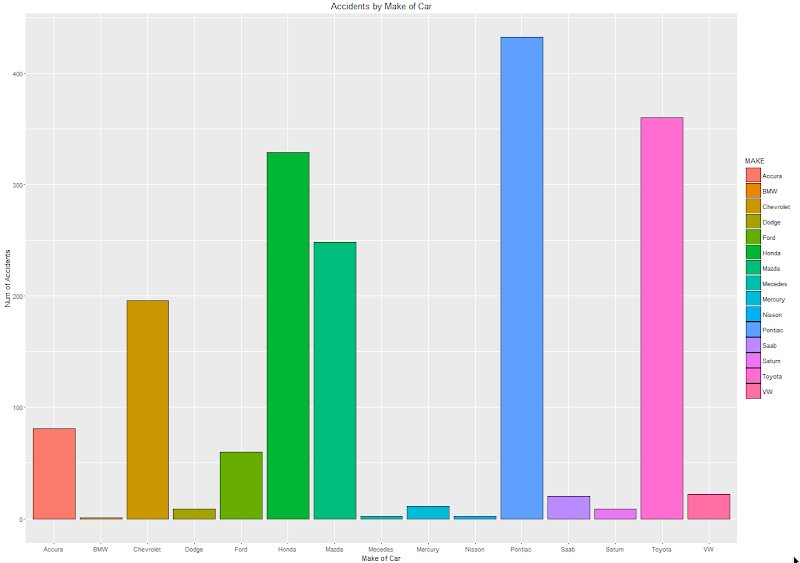
At this point we have written and tested our R code and know that it works.
3. Create a user defined R function and store it in the Oracle Database
Our next step in the process is to create an in-database user defined R function. This is were we store R code in our Oracle Database and make this available as an R function. To create the user defined R function we can use some PL/SQL to define it, and then take our R code (see above) and in it.
BEGIN
   -- sys.rqScriptDrop('demo_ggpplot');
   sys.rqScriptCreate('demo_ggpplot',
      'function(dat) {
         library(ggplot2)

         aggdata2 <- aggregate(dat$POLICYNUMBER,
                      by = list(MAKE = dat$MAKE),
                      FUN = length)

        g <-ggplot(data=aggdata2, aes(x=MAKE, y=x, fill=MAKE)) + geom_bar(color="black", stat="identity") +
                   xlab("Make of Car") + ylab("Num of Accidents") + ggtitle("Accidents by Make of Car")

        plot(g)
   }');
END;
We have to make a small addition to our R code. We need need to include a call to the plot function so that the image can be returned as a BLOB object. If you do not do this then the SQL query in step 4 will return no rows.
4. Write the SQL to call it
To call our defined R function we will need to use one of the ORE SQL API functions. In the following example we are using the rqTableEval function. The first parameter for this function passes in the data to be processed. In our case this is the data from the CLAIMS table. The second parameter is set to null. The third parameter is set to the output format and in our case we want this to be PNG. The fourth parameter is the name of the user defined R function.
select *
from table(rqTableEval( cursor(select * from claims),
                        null,
                        'PNG',
                        'demo_ggpplot'));
5. How to view the results
The SQL query in Step 4 above will return one row and this row will contain a column with a BLOB data type.

The easiest way to view the graphic that is produced is to use SQL Developer. It has an inbuilt feature that allows you to display BLOB objects. All you need to do is to double click on the BLOB cell (under the column labeled IMAGE). A window will open called ‘View Value’. In this window click the ‘View As Image’ check box on the top right hand corner of the window. When you do the R ggplot2 graphic will be displayed.

Yes the image is not 100% the same as the image produced in our R session. I will have another blog post that deals with this at a later date.
But, now you have written a SQL query, that calls R code to produce an R graphic (using ggplot2) of our data.
6. Now you can enhance the graphics (without changing your SQL)
What if you get bored with the bar chart and you want to change it to a different type of graphic? All you need to do is to change the relevant code in the user defined R function.
For example, if we want to change the graphic to a polar plot. The following is the PL/SQL code that re-defines the user defined R script.
BEGIN
   sys.rqScriptDrop('demo_ggpplot');
   sys.rqScriptCreate('demo_ggpplot',
      'function(dat) {
         library(ggplot2)

         aggdata2 <- aggregate(dat$POLICYNUMBER,
                      by = list(MAKE = dat$MAKE),
                      FUN = length)

         n <- nrow(aggdata2)
         degrees <- 360/n

        aggdata2$MAKE_ID <- 1:nrow(aggdata2)

        g<- ggplot(data=aggdata2, aes(x=MAKE, y=x, fill=MAKE)) + geom_bar(color="black", stat="identity") +
               xlab("Make of Car") + ylab("Num of Accidents") + ggtitle("Accidents by Make of Car") + coord_polar(theta="x")
        plot(g)
   }');
END;
We can use the exact same SQL query we defined in Step 4 above to call the next graphic.
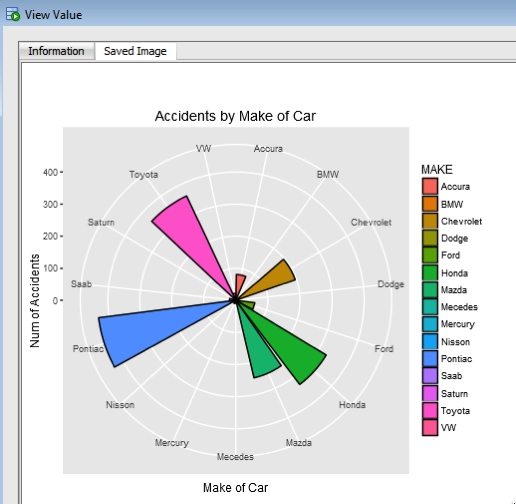
All done.
Now that was easy! Right?
I kind of is easy once you have been shown. There are a few challenges when working in-database user defined R functions and writing the SQL to call them. Most of the challenges are around the formatting of R code in the function and the syntax of the SQL statement to call it. With a bit of practice it does get easier.
7. Where/How can you use these graphics ?
Any application or program that can call and process a BLOB data type can display these images. For example, I’ve been able to include these graphics in applications developed in APEX.
PREDICTION_DETAILS function in Oracle
When building predictive models the data scientist can spend a large amount of time examining the models produced and how they work and perform on their hold out sample data sets. They do this to understand is the model gives a good general representation of the data and can identify/predict many different scenarios. When the “best” model has been selected then this is typically deployed is some sort of reporting environment, where a list is produced. This is typical deployment method but is far from being ideal. A more ideal deployment method is that the predictive models are build into the everyday applications that the company uses. For example, it is build into the call centre application, so that the staff have live and real-time feedback and predictions as they are talking to the customer.
But what kind of live and real-time feedback and predictions are possible. Again if we look at what is traditionally done in these applications they will get a predicted outcome (will they be a good customer or a bad customer) or some indication of their value (maybe lifetime value, possible claim payout value) etc.
But can we get anymore information? Information like what was reason for the prediction. This is sometimes called prediction insight. Can we get some details of what the prediction model used to decide on the predicted value. In more predictive analytics products this is not possible, as all you are told is the final out come.
What would be useful is to know some of the thinking that the predictive model used to make its thinking. The reasons when one customer may be a “bad customer” might be different to that of another customer. Knowing this kind of information can be very useful to the staff who are dealing with the customers. For those who design the workflows etc can then build more advanced workflows to support the staff when dealing with the customers.
Oracle as a unique feature that allows us to see some of the details that the prediction model used to make the prediction. This functions (based on using the Oracle Advanced Analytics option and Oracle Data Mining to build your predictive model) is called PREDICTION_DETAILS.
When you go to use PREDICTION_DETAILS you need to be careful as it will work differently in the 11.2g and 12c versions of the Oracle Database (Enterprise Editions). In Oracle Database 11.2g the PREDICTION_DETAILS function would only work for Decision Tree models. But in 12c (and above) it has been opened to include details for models created using all the classification algorithms, all the regression algorithms and also for anomaly detection.
The following gives an example of using the PREDICTION_DETAILS function.
select cust_id,
       prediction(clas_svm_1_27 using *) pred_value,
       prediction_probability(clas_svm_1_27 using *) pred_prob,
       prediction_details(clas_svm_1_27 using *) pred_details
from mining_data_apply_v;
The PREDICTION_DETAILS function produces its output in XML, and this consists of the attributes used and their values that determined why a record had the predicted value. The following gives some examples of the XML produced for some of the records.
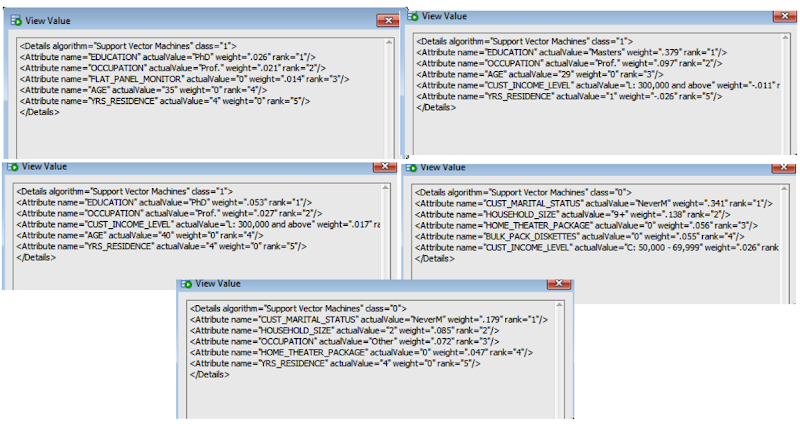
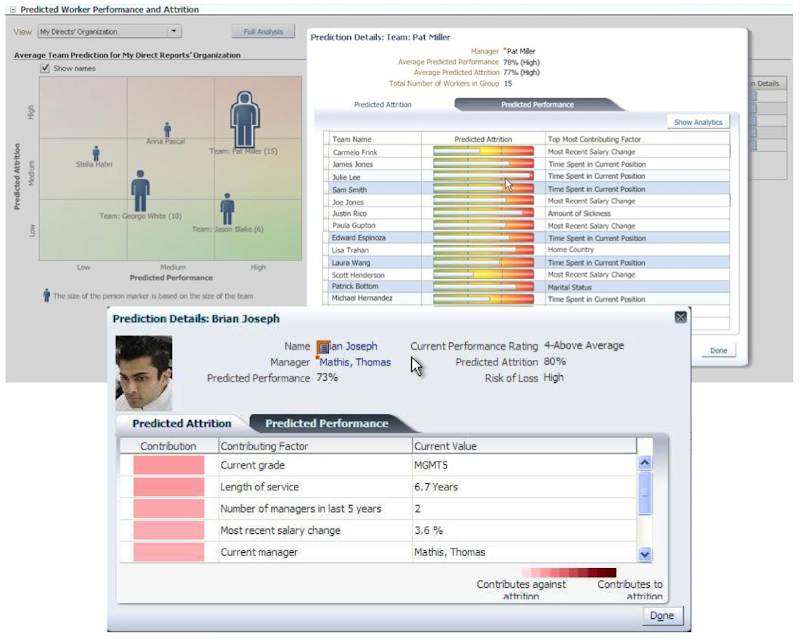
I’ve used this particular function in lots of my projects and particularly when building the applications for a particular business unit. Oracle too has build this functionality into many of their applications. The images below are from the HCM application where you can examine the details why an employee may or may not leave/churn. You can when perform real-time what-if analysis by changing some of attribute values to see if the predicted out come changes.
KScope 2016 Acceptances
I’ve never been to KScope. Yes never.
I’ve always wanted to. Each year you hear of all of these stories about how much people really enjoy KScope and how much they learn.
So back in October I decided to submit 5 presentations to KScope. 4 of these presentations are solo presentations and 1 joint presentation.
This week I have received the happy news that 2 of my solo presentations have been accepted, plus my joint presentation with Kim Berg Hansen.
So at the end of June 2016 I will be making my way to Chicago for a week of Oracle geekie fun at KScope.
My presentations will be:
- Is Oracle SQL the best language for Statistic?
- Running R in your Oracle Database using Oracle R Enterprise
and my join presentations is called
Forecasting in Oracle using the Power of SQL (this will talk about ROracle, Forecasting in R, Using Oracle R Enterprise and SQL)
I was really hoping that one of my rejected presentations would have been accepted. I really enjoy this presentation and I get to share stories about some of my predictive analytics projects. Ah well, maybe in 2017.
The last time I was in Chicago was over 15 years ago when I sent 5 days in Cellular One (The brand was sold to Trilogy Partners by AT&T in 2008 shortly after AT&T had completed its acquisition of Dobson Communications). I was there to kick off a project to build them a data warehouse and to build their first customer churn predictive model. I stayed in a hotel across the road from their office which was famous because a certain person had stayed in it why one the run. Unfortunately I didn’t get time to visit downtown Chicago.
Viewing Models Details for Decision Trees using SQL
When you are working with and developing Decision Trees by far the easiest way to visualise these is by using the Oracle Data Miner (ODMr) tool that is part of SQL Developer.
Developing your Decision Tree models using the ODMr allows you to explore the decision tree produced, to drill in on each of the nodes of the tree and to see all the statistics etc that relate to each node and branch of the tree.
But when you are working with the DBMS_DATA_MINING PL/SQL package and with the SQL commands for Oracle Data Mining you don’t have the same luxury of the graphical tool that we have in ODMr. For example here is an image of part of a Decision Tree I have and was developed using ODMr.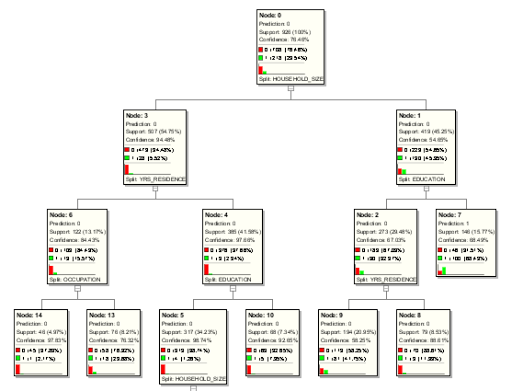
What if we are not using the ODMr tool? In that case you will be using SQL and PL/SQL. When using these you do not have luxury of viewing the Decision Tree.
So what can you see of the Decision Tree? Most of the model details can be used by a variety of functions that can apply the model to your data. I’ve covered many of these over the years on this blog.
For most of the data mining algorithms there is a PL/SQL function available in the DBMS_DATA_MINING package that allows you to see inside the models to find out the settings, rules, etc. Most of these packages have a name something like GET_MODEL_DETAILS_XXXX, where XXXX is the name of the algorithm. For example GET_MODEL_DETAILS_NB will get the details of a Naive Bayes model. But when you look through the list there doesn’t seem to be one for Decision Trees.
Actually there is and it is called GET_MODEL_DETAILS_XML. This function takes one parameter, the name of the Decision Tree model and produces an XML formatted output that contains the attributes used by the model, the overall model settings, then for each node and branch the attributes and the values used and the other statistical measures required for each node/branch.
The following SQL uses this PL/SQL function to get the Decision Tree details for model called CLAS_DT_1_59.
SELECT dbms_data_mining.get_model_details_xml(‘CLAS_DT_1_59’)
FROM dual;
If you are using SQL Developer you will need to double click on the output column and click on the pencil icon to view the full listing.
Nothing too fancy like what we get in ODMr, but it is something that we can work with.
If you examine the XML output you will see references to PMML. This refers to the Predictive Model Markup Language (PMML) and this is defined by the Data Mining Group (www.dmg.org). I will discuss the PMML in another blog post and how you can use it with Oracle Data Mining.
RIP SQL*Plus & hello SQL Command Line
Over the past couple of months Oracle has been releasing some EA (Early Adopter) versions of a new tool that is currently called SQL Command Line.
The team behind this new tool is the SQL Developer development team and they have been working on creating a new command line SQL tool that is based on some of the technology that is included in SQL Developer.
SQL Command Line in an stand alone tool and all you need to do is to download and un-zip the tile.
What I want to show in this blog post is some of new features that are available and that I have found particularly useful. But before we get onto those commands let us first have a look at how you can get setup and running with SQL Command Line.
Download & Setup
The current download of SQL Command Line can be found under the SQL Developer 4.1 EA Download page. I’m assuming when 4.1 is formally released the download for SQL Command line will be on the main SQL Developer Download web page.

After you have downloaded the file, all you need to do is to unzip the file and then copy the unzipped directory to where you want the software to be located on your client.
Now you are ready to get started with using SQL Command Line.
Connecting to your Oracle Schema
(That) Jeff Smith and Barry McGillin have a couple of good blog posts on the different connection methods and some setup or configuration you might need to consider. Check out these links for more details.
For me I did not have to do any additional setup or configuration. I was able to use the TNS Names and the EZConnect methods without any problems.
The following how to connect to my (DMUSER) schema using the EZConnect method. With this method we pass in the username, password, the host name, port number and the service name. Just like this
> sql dmuser/dmuser@localhost:1521/pdb12c
We can not have a look at the JDBC connection details.
SQL> show jdbc
— Database Info —
Database Product Name: Oracle
Database Product Version: Oracle Database 12c Enterprise Edition Release 12.1.0.2.0 – 64bit Production
With the Partitioning, OLAP, Advanced Analytics and Real Application Testing options
Database Major Version: 12
Database Minor Version: 1
— Driver Info —
Driver Name: Oracle JDBC driver
Driver Version: 12.1.0.2.0
Driver Major Version: 12
Driver Minor Version: 1
Driver URL: jdbc:oracle:thin:@localhost:1521/pdb12c
SQL>
If we have a TNSNAMES.ORA file on our computer and the directory that it is in, is on the search PATH, then we can use the service names defined in the TNSNAMES.ORA file. The following example shows you how to use this in two ways. The first shows how to enter all the details when you are starting SQL CL and the other is when SQL CL prompts you for each parameter.
> sql dmuser/dmuser@pdb12c
and when we are prompted to enter the parameters, we get the following.
> sql
SQLcl: Release 4.1.0 Beta on Thu Mar 05 15:16:12 2015
Copyright (c) 1982, 2015, Oracle. All rights reserved.
SQLcl: Release 4.1.0 Beta on Thu Mar 05 15:16:14 2015
Copyright (c) 1982, 2015, Oracle. All rights reserved.
Username? (”?) dmuser
Password? (**********?) ******
Database? (”?) pdb12c
Connected to:
Oracle Database 12c Enterprise Edition Release 12.1.0.2.0 – 64bit Production
SQL>
As you can see these work in the same way as when we use SQL*Plus.
Now that you are connected to your schema, what else can you do? The following sections are some useful commands.
Commands & Help
The following list of commands is by no means a complete list of commands available in SQL Command Line. Theoretically everything you can currently do in SQL*Plus you can also do in SQL Command Line (theoretically) But the commands I give examples of below are some of my favourites (so far).
You can get the list of commands by typing help at the SQL prompt.
SQL> help
Then to get help on a specific command you can just add the command after the help.
SQL> help cd
CD
—
Changes path to look for script at after startup.
(show SQLPATH shows the full search path currently:
– CD current directory setting set by last cd command
– baseURL (url for subscripts)
– topURL (top most url when starting script)
– Last Node opened (i.e. file in worksheet)
– Where last script started
– Last opened on sqlplus path related file chooser
– SQLPATH setting
– “.” if in SQLDeveloper UI (included in SQLPATH in command line (sdsql))
).
SQL>
Some work is still needed on the help documentation and what is listed for each command, as the current version is missing some important details.
Alais
This is by far my favourite new feature. This allows us to take some of our most common SQL statements and to create a shortcut for it.
Very soon I will not be using Oracle SQL but I will be using My SQL, as I will have created my own personalised version of SQL.
To list what aliases you have defined in your schema you can type
SQL > alais
Oracle will have a few aliases already defined in SQL CL. By having a look at some of these you can see some of what you want they can do and get ideas for what you might want to do with them. To list the contents of an alias, you can use the following command.
alias list {alias name}
for example
SQL > alias list tables
This command lists the query that is used for the ‘tables’ alias that comes with SQL CL.
I use Oracle Data Miner a lot and when you use this tool it can create a number of tables with a variety of names in your schema. Most of these you will never need to look at. So what I do is create an alias that excludes these from the list of tables in my schema.
SQL> alias tables2=select table_name from user_tables where table_name not like ‘ODMR$%’ and table_name not like ‘DM$%’ and table_name not like ‘SYS_IOT%’;
So now all I need to do to list my important data only tables (and exclude all the Oracle Data Miner tables) I can run my alias ‘table2’.
SQL> tables2
You will quickly build up a suite of commands using aliases.
info and >info+
info and info+ are the new commands to replace the DESC command.
The difference between info and info+ is that info+ gives you some statistical information about the table and the attributes in the table. This is illustrated in the following examples.
Example using ‘info’

Example using ‘info+’

CTAS & DDL
If you want to get the DDL script to create a copy of a table you have two options open to you. The first of these is the DDL command. This creates a DDL statement based on the meta data for the table, just like in the following

An alternative to this is to use the CTAS command that will give a slightly different output to DDL command. With the CTAS we also get the CREATE TABLE .. AS SELECT …
History
In SQL*Plus we had a limited scroll through our previous commands. The same kind of scrolling is available in SQL CL, but we can get to see all our previous commands using the ‘history’ command. The following illustrates how you can list all you previous commands, I’m sure it is limited to a certain number or will be otherwise it will become a very long, long list.
SQL> history
To find out how often each command has been run you can run
SQL> history usage
and to find out how long the query took to run the last time it was run
SQL> history time
There are lots more that I could show, but this post is way, way to long as it is. What I suggest you do is go and download SQL CL (Command Line) and start using it today.
Approximate Count Distinct (12.1.0.2 new feature)
With the release of the Oracle Database 12.1.0.2 there was a number of new features and options. Most of the publicity has been around the in-Memory option. But there was lots of other features for the DBA and a few for the developer.
One of the new SQL functions is the APPROX_COUNT_DISTINCT(). This function is different to the tradition count distinct, COUNT(DISTINCT expression), in that is performs an approximate count distinct. The theory is that this approximate count is a lot more efficient than performing the full count distinct.
The APPROX_COUNT_DISTINCT() function is really only suitable when you are processing very large volumes of data and when the data set contains a large number of distinct values.
The general syntax of the function is:
… APPROX_COUNT_DISTINCT(expression) …
and returns a Number.
The function returns the approximate number of records that contain distinct value for the expression.
SELECT approx_count_distinct(cust_id)
FROM mining_data_build_v;
The APPROX_COUNT_DISTINCT() function ignores records that contain a null value for the expression. Plus is performs less work on the sorting and aggregations. Just run and Explain Plan and you can see the differences.
In some of the material from Oracle the APPROX_COUNT_DISTINCT() function can be 5x to 50x++ times faster. But it depends on the number of distinct values and the complexity of the SQL query.
As the result / returned value from the function may not be 100% accurate, Oracle says that the functions has an accuracy of >97% (with 95% confidence).
The function cannot be used on the following data types: BFILE, BLOB, CLOB, LONG, LONG RAW and NCLOB
Something new in 12c: FETCH FIRST x ROWS
In this post I want to show some example of using a new feature in 12c for selecting the first X number of records from the results set of a query.
See the bottom of this post for the background and some of the reasons for this post.
Before we had the 12c Database if we only wanted to see a subset or the initial set of records from the results of a query we could add something like the following to our query
…
AND ROWNUM <= 5;
The could use the pseudo column ROWNUM to restrict the number of records that would be displayed. This was particularly useful when the results many 10s, 100s, or millions of records. It allowed us to quickly see a subset and to see if the results where what we expected.
In my book (Predictive Analytics Using Oracle Data Miner) I had lots of examples of using ROWNUM.
What I wasn’t aware of when I was writing my book was that there was a new way of doing this in 12c. We now have something like the following:
…
FETCH FIRST x ROWS ONLY;
There is an example:
SELECT * FROM mining_data_build_v
FETCH FIRST 10 ROWS ONLY;

There are a number of different ways you can use the row limiting feature. Here is the syntax for it:
[ OFFSET offset { ROW | ROWS } ]
[ FETCH { FIRST | NEXT } [ { rowcount | percent PERCENT } ]
{ ROW | ROWS } { ONLY | WITH TIES } ]
In most cases you will probably use the number of rows. But there many be cases where you might what to use the PERCENT. In previous versions of the database you would have used SAMPLE to bring back a certain percentage of records.
select CUST_GENDER from mining_data_build_v
FETCH FIRST 2 PERCENT ROWS ONLY;
This will set the first 2 percent of the records.
You can also decide from what point in the result set you want the records to be displayed from. In the previous examples above the results displayed will befing with the first records. In the following example the results set will be processed to record 60 and then the first 5 records will be selected and displayed. This will be records 61, 62, 63, 64 and 65. So the first record processed will be the OFFSET record + 1.
select CUST_GENDER from mining_data_build_v
OFFSET 60 ROWS FETCH FIRST 5 ROWS ONLY;
Similar to the PERCENT example above you can use the OFFSET value, for example.
select CUST_GENDER from mining_data_build_v
OFFSET 60 ROWS FETCH FIRST 2 PERCENT ROWS ONLY;
This query will go to records 61 and return the next 2 percent of the records.
The background to this post
There are a number of reasons that I really love attending Oracle User Group conferences. One of the challenges I set myself is to go to presentations on topics that I think I know or know very well. I can list many, many reasons for this but there are 2 main points. The first is that you are getting someone elses perspective on the topic and hence you might learn something new or understand it better. The second is that you might actually learn something new, like some new command, parameter setting or something else like that.
At Oracle Open World recently I attended the EMEA 12 things about 12c set of presentations that Debra Lilly arranged during the User Group Forum on the Sunday. During these session Alex Nuijten gave an overview of some 12c new SQL features. One of these was the command FETCH FIRST x ROWS. This blog post illustrates some of the different ways of using this command.
Tokenizing a String : Using Regular Expressions
In my previous blog post I gave some PL/SQL that performed the tokenising of a string. Check out this blog post here.
Thanks also to the people who sent me links examples of how to tokenise a string using the MODEL clause. Yes there are lots of examples of this out there on the interest.
While performing the various searches on the internet I did come across some examples of using Regular Expressions to extract the tokens. The following example is thanks to a blog post by Tanel Poder
I’ve made some minor changes to it to remove any of the special characters we want to remove.
column token format a40
define separator=” “
define mystring=”$My OTN LA Tour (2014?) will consist of Panama, CostRica and Mexico.”
define myremove=”\?|\#|\$|\.|\,|\;|\:|\&|\(|\)|\-“;
SELECT regexp_replace(REGEXP_REPLACE(
REGEXP_SUBSTR( ‘&mystring’||’&separator’, ‘(.*?)&separator’, 1, LEVEL )
, ‘&separator$’, ”), ‘&myremove’, ”) TOKEN
FROM
DUAL
CONNECT BY
REGEXP_INSTR( ‘&mystring’||’&separator’, ‘(.*?)&separator’, 1, LEVEL ) > 0
ORDER BY
LEVEL ASC
/
When we run this code we get the following output.

So we have a number of options open to use to tokenise strings using SQL and PL/SQL, using a number of approaches including substring-ing, using pipelined functions, using the Model clause and also using Regular Expressions.
BUCKET_WIDTH: Calculating the size of the bucket
Some time ago I had some blog posts introducing some of the basic Statistical function available in Oracle. Here are the links to these.
- The first blog post in the series looked at the DBMS_STAT_FUNCS PL/SQL package, what it can be used for and I give some sample code on how to use it in your data science projects. I also give some sample code that I typically run to gather some additional stats.
- The second blog post looks at some of the other statistical functions that exist in SQL that you will/may use regularly in your data science projects.
- The third blog post provides a summary of the other statistical functions that exist in the database.
Most people do not realise that Oracle has over 250+ statistical functions that are available (no addition cost) in all the database versions.
I’ve had a query about one of the functions BUCKET_WIDTH. The question was wondering if it was possible to get the width of the bucket in each case. There does not seem to be a build in feature to get this value, so we have to calculate this ourselves.
Here is an example of how to calculate the bucket width, as on the example I used in my previous blog post.
SELECT bucket, max(age)-min(age) BUCKET_WIDTH, count(*)
FROM (SELECT cust_id,
  age,
width_bucket(age,
(SELECT min(age) from mining_data_build_v),
(select max(age)+1 from mining_data_build_v),
10) bucket
FROM mining_data_build_v
GROUP BY cust_id, age )
GROUP BY bucket
ORDER BY bucket;

What this query gives is an approximate value of the size of the Bucket Width based on the values/records that are in a bucket. The actual values used cannot be determined exactly as there is not function/value in SQL that tells us the actual value.
Tokenizing a String
Over the past while I’ve been working a lot with text strings. Some of these have been short in length like tweets from Twitter, or longer pieces of text like product reviews. Plus others of various lengths.
In all these scenarios I have to break up the data into individual works or Tokens.
The examples given below illustrate how you can take a string and break it into its individual tokens. In addition to tokenising the string I’ve also included some code to remove any special characters that might be included with the string.
These include ? # $ . ; : &
This list of special characters to ignore are just an example and is not an exhaustive list. You can add whatever characters to the list yourself. To remove these special characters I’ve used regular expressions as this seemed to be the easiest way to do this.
Using PL/SQL
The following example shows a simple PL/SQL unit that will tokenise a string.
DECLARE
vDelimiter VARCHAR2(5) := ‘ ‘;
vString VARCHAR2(32767) := ‘Hello Brendan How are you today?’||vDelimiter;
vPosition PLS_INTEGER;
vToken VARCHAR2(32767);
vRemove VARCHAR2(100) := ‘\?|\#|\$|\.|\,|\;|\:|\&’;
vReplace VARCHAR2(100) := ”;
BEGIN
dbms_output.put_line(‘String = ‘||vString);
dbms_output.put_line(”);
dbms_output.put_line(‘Tokens’);
dbms_output.put_line(‘————————‘);
vPosition := INSTR(vString, vDelimiter);
WHILE vPosition > 0 LOOP
vToken := LTRIM(RTRIM(SUBSTR(vString, 1, vPosition-1)));
vToken := regexp_replace(vToken, vRemove, vReplace);
vString := SUBSTR(vString, vPosition + LENGTH(vDelimiter));
dbms_output.put_line(vPosition||’: ‘||vToken);
vPosition := INSTR(vString, vDelimiter);
END LOOP;
END;
/
When we run this (with Serveroutput On) we get the following output.

A slight adjustment is needed to the output of this code to remove the numbers or positions of the token separator/delimiter.
Tokenizer using a Function
To make this more usable we will really need to convert this into an iterative function. The following code illustrates this, how to call the function and what the output looks like.
CREATE OR replace TYPE token_list
AS TABLE OF VARCHAR2(32767);
/
CREATE OR replace FUNCTION TOKENIZER(pString IN VARCHAR2,
pDelimiter IN VARCHAR2)
RETURN token_list pipelined
AS
vPosition INTEGER;
vPrevPosition INTEGER := 1;
vRemove VARCHAR2(100) := ‘\?|\#|\$|\.|\,|\;|\:|\&’;
vReplace VARCHAR2(100) := ”;
vString VARCHAR2(32767) := regexp_replace(pString, vRemove, vReplace);
BEGIN
LOOP
vPosition := INSTR (vString, pDelimiter, vPrevPosition);
IF vPosition = 0 THEN
pipe ROW (SUBSTR(vString, vPrevPosition ));
EXIT;
ELSE
pipe ROW (SUBSTR(vString, vPrevPosition, vPosition – vPrevPosition ));
vPrevPosition := vPosition + 1;
END IF;
END LOOP;
END TOKENIZER;
/
Here are a couple of examples to show how it works and returns the Tokens.
SELECT column_value TOKEN
FROM TABLE(tokenizer(‘It is a hot and sunny day in Ireland.’, ‘ ‘))
, dual;

How if we add in some of the special characters we should see a cleaned up set of tokens.
SELECT column_value TOKEN
FROM TABLE(tokenizer(‘$$$It is a hot and sunny day in #Ireland.’, ‘ ‘))
, dual;

Running PL/SQL Procedures in Parallel
As your data volumes increase, particularly as you evolve into the big data world, you will be start to see that your Oracle Data Mining scoring functions will start to take longer and longer. To apply an Oracle Data Mining model to new data is a very quick process. The models are, what Oracle calls, first class objects in the database. This basically means that they run Very quickly with very little overhead.
But as the data volumes increase you will start to see that your Apply process or scoring the data will start to take longer and longer. As with all OLTP or OLAP environments as the data grows you will start to use other in-database features to help your code run quicker. One example of this is to use the Parallel Option.
You can use the Parallel Option to run your Oracle Data Mining functions in real-time and in batch processing mode. The examples given below shows you how you can do this.
Let us first start with some basics. What are the typical commands necessary to setup our schema or objects to use Parallel. The following commands are examples of what we can use
ALTER session enable parallel dml;
ALTER TABLE table_name PARALLEL (DEGREE 8);
ALTER TABLE table_name NOPARALLEL;
CREATE TABLE … PARALLEL degree …
ALTER TABLE … PARALLEL degree …
CREATE INDEX … PARALLEL degree …
ALTER INDEX … PARALLEL degree …
You can force parallel operations for tables that have a degree of 1 by using the force option.
ALTER SESSION ENABLE PARALLEL DDL;
ALTER SESSION ENABLE PARALLEL DML;
ALTER SESSION ENABLE PARALLEL QUERY;alter session force parallel query PARALLEL 2
You can disable parallel processing with the following session statements.
ALTER SESSION DISABLE PARALLEL DDL;
ALTER SESSION DISABLE PARALLEL DML;
ALTER SESSION DISABLE PARALLEL QUERY;
We can also tell the database what degree of Parallelism to use
ALTER SESSION FORCE PARALLEL DDL PARALLEL 32;
ALTER SESSION FORCE PARALLEL DML PARALLEL 32;
ALTER SESSION FORCE PARALLEL QUERY PARALLEL 32;
Using your Oracle Data Mining model in real-time using Parallel
When you want to use your Oracle Data Mining model in real-time, on one record or a set of records you will be using the PREDICTION and PREDICTION_PROBABILITY function. The following example shows how a Classification model is being applied to some data in a view called MINING_DATA_APPLY_V.
column prob format 99.99999
SELECT cust_id,
PREDICTION(DEMO_CLASS_DT_MODEL USING *) Pred,
PREDICTION_PROBABILITY(DEMO_CLASS_DT_MODEL USING *) Prob
FROM mining_data_apply_v
WHERE rownum <= 18
/
CUST_ID PRED PROB
———- ———- ———
100574 0 .63415
100577 1 .73663
100586 0 .95219
100593 0 .60061
100598 0 .95219
100599 0 .95219
100601 1 .73663
100603 0 .95219
100612 1 .73663
100619 0 .95219
100621 1 .73663
100626 1 .73663
100627 0 .95219
100628 0 .95219
100633 1 .73663
100640 0 .95219
100648 1 .73663
100650 0 .60061
If the volume of data warrants the use of the Parallel option then we can add the necessary hint to the above query as illustrated in the example below.
SELECT /*+ PARALLEL(mining_data_apply_v, 4) */
cust_id,
PREDICTION(DEMO_CLASS_DT_MODEL USING *) Pred,
PREDICTION_PROBABILITY(DEMO_CLASS_DT_MODEL USING *) Prob
FROM mining_data_apply_v
WHERE rownum <= 18
/
If you turn on autotrace you will see that Parallel was used. So you should now be able to use your Oracle Data Mining models to work on a Very large number of records and by adjusting the degree of parallelism you can improvements.
Using your Oracle Data Mining model in Batch mode using Parallel
When you want to perform some batch scoring of your data using your Oracle Data Mining model you will have to use the APPLY procedure that is part of the DBMS_DATA_MINING package. But the problem with using a procedure or function is that you cannot give it a hint to tell it to use the parallel option. So unless you have the tables(s) setup with parallel and/or the session to use parallel, then you cannot run your Oracle Data Mining model in Parallel using the APPLY procedure.
So how can you get the DBMA_DATA_MINING.APPLY procedure to run in parallel?
The answer is that you can use the DBMS_PARALLEL_EXECUTE package. The following steps walks you through what you need to do to use the DMBS_PARALLEL_EXECUTE package to run your Oracle Data Mining models in parallel.
The first step required is for you to put the DBMS_DATA_MINING.APPLY code into a stored procedure. The following code shows how our DEMO_CLASS_DT_MODEL can be used by the APPLY procedure and how all of this can be incorporated into a stored procedure called SCORE_DATA.
create or replace procedure score_data
is
begin
dbms_data_mining.apply(
model_name => ‘DEMO_CLAS_DT_MODEL’,
data_table_name => ‘NEW_DATA_TO_SCORE’,
case_id_column_name => ‘CUST_ID’,
result_table_name => ‘NEW_DATA_SCORED’);
end;
/
Next we need to create a Parallel Task for the DBMS_PARALLEL_EXECUTE package. In the following example this is called ODM_SCORE_DATA.
— Create the TASK
DBMS_PARALLEL_EXECUTE.CREATE_TASK (‘ODM_SCORE_DATA’);
Next we need to define the Parallel Workload Chunks details
 -- Chunk the table by ROWID
 DBMS_PARALLEL_EXECUTE.CREATE_CHUNKS_BY_ROWID('ODM_SCORE_DATA', 'DMUSER', 'NEW_DATA_TO_SCORE', true, 100);
The scheduled jobs take an unassigned workload chunk, process it and will then move onto the next unassigned chunk.
Now you are ready to execute the stored procedure for your Oracle Data Mining model, in parallel by 10.
DECLARE
l_sql_stmt varchar2(200);
BEGIN
— Execute the DML in parallel
l_sql_stmt := ‘begin score_data(); end;’;
DBMS_PARALLEL_EXECUTE.RUN_TASK(‘ODM_SCORE_DATA’, l_sql_stmt, DBMS_SQL.NATIVE,
parallel_level => 10);
END;
/
When every thing is finished you can then clean up and remove the task using
BEGIN
dbms_parallel_execute.drop_task(‘ODM_SCORE_DATA’);
END;
/
NOTE: The schema that will be running the above code will need to have the necessary privileges to run DBMS_SCHEDULER, for example
grant create job to dmuser;
Nested Tables (and Data) in Oracle & ODM
Oracle Data Mining uses Nested data types/tables to store some of its data. Oracle Data Mining creates a number of tables/objects that contain nested data when it is preparing data for input to the data mining algorithms and when outputting certain results from the algorithms. In Oracle 11.2g there are two nested data types used and in Oracle 12.1c we get an additional two nested data types. These are setup when you install the Oracle Data Miner Repository. If you log into SQL*Plus or SQL Developer you can describe them like any other table or object.
DM_NESTED_NUMERICALS

DM_NESTED_CATEGORICALS

The following two Nested data types are only available in 12.1c
DM_NESTED_BINARY_DOUBLES

DM_NESTED_BINARY_FLOATS

These Nested data types are used by Oracle Data Miner in preparing data for input to the data mining algorithms and for producing the some of the outputs from the algorithms.
Creating your own Nested Tables
To create your own Nested Data Types and Nested Tables you need to performs steps that are similar to what is illustrated in the following steps. These steps show you how to define a data type, how to create a nested table, how to insert data into the nested table and how to select the data from the nested table.
1. Set up the Object Type
Create a Type object that will defines the structure of the data. In these examples we want to capture the products and quantity purchased by a customer.
create type CUST_ORDER as object
(product_id varchar2(6),
quantity_sold number(6));
/
2. Create a Type as a Table
Now you need to create a Type as a table.
create type cust_orders_type as table of CUST_ORDER;
/
3. Create the table using the Nested Data
Now you can create the nested table.
create table customer_orders_nested (
cust_id number(6) primary key,
order_date date,
sales_person varchar2(30),
c_order CUST_ORDERS_TYPE)
NESTED TABLE c_order STORE AS c_order_table;
4. Insert a Record and Query
This insert statement shows you how to insert one record into the nested column.
insert into customer_orders_nested
values (1, sysdate, ‘BT’, CUST_ORDERS_TYPE(cust_order(‘P1’, 2)) );
When we select the data from the table we get
select * from customer_orders_nested;
CUST_ID ORDER_DAT SALES_PERSON
———- ——— ——————————
C_ORDER(PRODUCT_ID, QUANTITY_SOLD)
—————————————————–
1 19-SEP-13 BT
CUST_ORDERS_TYPE(CUST_ORDER(‘P1’, 2))
It can be a bit difficult to read the data in the nested column so we can convert the nested column into a table to display the results in a better way
select cust_id, order_date, sales_person, product_id, quantity_sold
from customer_orders_nested, table(c_order)
CUST_ID ORDER_DAT SALES_PERSON PRODUC QUANTITY_SOLD
———- ——— —————————— —— ————-
1 19-SEP-13 BT P1 2
5. Insert many Nested Data items & Query
To insert many entries into the nested column you can do this
insert into customer_orders_nested
values (2, sysdate, ‘BT2’, CUST_ORDERS_TYPE(CUST_ORDER(‘P2’, 2), CUST_ORDER(‘P3’,3)));
When we do a Select * we get
CUST_ID ORDER_DAT SALES_PERSON
———- ——— ——————————
C_ORDER(PRODUCT_ID, QUANTITY_SOLD)
————————————————————-
1 19-SEP-13 BT
CUST_ORDERS_TYPE(CUST_ORDER2(‘P1’, 2))
2 19-SEP-13 BT2
CUST_ORDERS_TYPE(CUST_ORDER2(‘P2’, 2), CUST_ORDER2(‘P3’, 3))
Again it is not easy to ready the data in the nested column, so if we convert it to a table again we now get a row being displayed for each entry in the nested column.
select cust_id, order_date, sales_person, product_id, quantity_sold
from customer_orders_nested, table(c_order);
CUST_ID ORDER_DAT SALES_PERSON PRODUC QUANTITY_SOLD
———- ——— —————————— —— ————-
1 19-SEP-13 BT P1 2
2 19-SEP-13 BT2 P2 2
2 19-SEP-13 BT2 P3 3
- ← Previous
- 1
- …
- 3
- 4
- 5
- Next →
 Ora-lytics
You must be logged in to post a comment.