
SQL
How long does it take to build a Machine Learning model using Oracle Cloud
Everyday someone talks about the the processing power needed for Machine Learning, and the vast computing needed for these tasks. It has become evident that most of these people have never created a machine learning model. Never. But like to make up stuff and try to make themselves look like an expert, or as I and others like to call them a “fake expert”.
When you question these “fake experts” about this topic, they huff and puff about lots of things and never answer the question or try to claim it is so difficult, you simply don’t understand.
Having worked in the area of machine learning for a very very long time, I’ve never really had performance issues with creating models. Yes most of the time I’ve been able to use my laptop. Yes my laptop to build models large models. In a couple of these my laptop couldn’t cope and I moved onto a server.
But over the past few years we keep hearing about using cloud services for machine learning. If you are doing machine learning you need to computing capabilities that are available with cloud services.
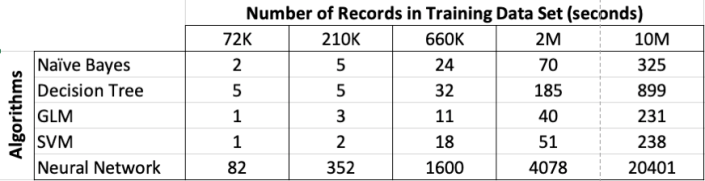
So, the results below show the results of building machine learning models, using different algorithms, with different sizes of data sets.
For this test, I used a basic cloud service. Well maybe it isn’t basic, but for others they will consider it very basic with very little compute involved.
I used an Oracle Cloud DBaaS for this experiment. I selected an Oracle 18c Extreme edition cloud service. This comes with the in-database machine learning option. This comes with 1 OCPUs, 7.5G Memory and 170GB storage. This is the basic configuration.
Next I created data sets with different sizes. These were based on one particular data set, as this ensures that as the data set size increases, the same kind of data and processing required remained consistent, instead of using completely different data sets.
The data set consisted of the following number of records, 72K, 660K, 210K, 2M, 10M and 50M.
I then created machine learning models using Decisions Tree, Naive Bayes, Support Vector Machine, Generaliszd Linear Models (GLM) and Neural Networks. Yes it was a typical classification problem.
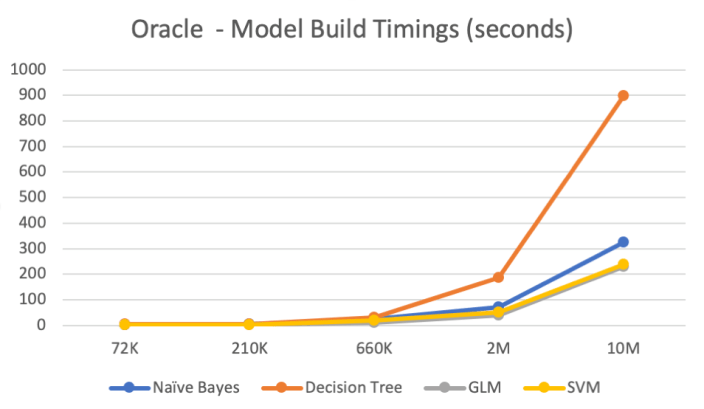
The following table below shows the length of time in seconds to build the models. All data preparations etc was done prior to this.
Note: It should be noted that Automatic Data Preparation was turned on for these algorithms. This performed additional algorithm specific data preparation for each model. That means the times given in the following tables is for some data preparation time and for building the models.
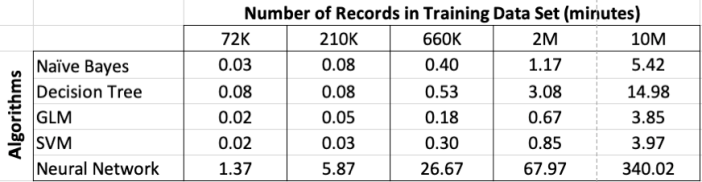
Converting the above table into minutes.
RandomForests in R, Python and SQL
I recently wrote a two part article explaining how Random Forests work and how to use them in R, Python and SQL.
These were posted on ToadWorld webpages. Check them out.
Part 1 of article
https://blog.toadworld.com/2018/08/31/random-forest-machine-learning-in-r-python-and-sql-part-1
Part 2 of article
https://blog.toadworld.com/2018/09/01/random-forest-machine-learning-in-r-python-and-sql-part-2
R vs Python vs SQL for Machine Learning (Infographic)
Next week I’ll be giving several presentation on machine learning at Oracle Open World and Oracle Code One. In one of these presentation an evaluation of using R vs Python vs SQL will be given and discussed.
Check out the infographic containing the comparisons.

OUG Ireland 2017 Presentation
Here are the slides from my presentation at OUG Ireland 2017. All about running R using SQL.
Presentations from OUGN17
Here are the presentations I gave at OUG Norway last week. These are also available on SlideShare
Formatting results from ORE script in a SELECT statement
This blog post looks at how to format the output or the returned returns from an Oracle R Enterprise (ORE), user defined R function, that is run using a SELECT statement in SQL.
Sometimes this can be a bit of a challenge to work out, but it can be relatively easy once you have figured out how to do it. The following examples works through some scenarios of different results sets from a user defined R function that is stored in the Oracle Database.
To run that user defined R function using a SELECT statement I can use one of the following ORE SQL functions.
- rqEval
- rqTableEval
- “rqGroupEval“
- rqRowEval
For simplicity we will just use the first of these ORE SQL functions to illustrate the problem and how to go about solving it. The rqEval ORE SQL function is a generate purpose function to call a user defined R script stored in the database. The function does not require any input data set and but it will return some data. You could use this to generate some dummy/test data or to find some information in the database. Here is noddy example that returns my name.
BEGIN
   --sys.rqScriptDrop('GET_NAME');
   sys.rqScriptCreate('GET_NAME',
      'function() {
         res<-data.frame("Brendan")
         res
         } ');
END;
To call this user defined R function I can use the following SQL.
select *
from table(rqEval(null,
                  'select cast(''a'' as varchar2(50))  from dual',
                  'GET_NAME') );
For text strings returned you need to cast the returned value giving a size.
If we have a numeric value being returned we can don’t have to use the cast and instead use ‘1’ as shown in the following example. This second example extends our user defined R function to return my name and a number.
BEGIN
   sys.rqScriptDrop('GET_NAME');
   sys.rqScriptCreate('GET_NAME',
      'function() {
         res<-data.frame(NAME="Brendan", YEAR=2017)
         res
         } ');
END;
To call the updated GET_NAME function we now have to process two returned columns. The first is the character string and the second is a numeric.
select *
from table(rqEval(null,
                  'select cast(''a'' as varchar2(50)) as "NAME", 1 AS YEAR  from dual',
                  'GET_NAME') );
These example illustrate how you can process character strings and numerics being returned by the user defined R script.
The key to setting up the format of the returned values is knowing the structure of the data frame being returned by the user defined R script. Once you know that the rest is (in theory) easy.
Explicit Semantic Analysis setup using SQL and PL/SQL
In my previous blog post I introduced the new Explicit Semantic Analysis (ESA) algorithm and gave an example of how you can build an ESA model and use it. Check out this link for that blog post.
In this blog post I will show you how you can manually create an ESA model. The reason that I’m showing you this way is that the workflow (in ODMr and it’s scheduler) may not be for everyone. You may want to automate the creation or recreation of the ESA model from time to time based on certain business requirements.
In my previous blog post I showed how you can setup a training data set. This comes with ODMr 4.2 but you may need to expand this data set or to use an alternative data set that is more in keeping with your domain.
Setup the ODM Settings table
As with all ODM algorithms we need to create a settings table. This settings table allows us to store the various parameters and their values, that will be used by the algorithm.
-- Create the settings table
CREATE TABLE ESA_settings (
    setting_name VARCHAR2(30),
    setting_value VARCHAR2(30));

-- Populate the settings table
-- Specify ESA. By default, Naive Bayes is used for classification.
-- Specify ADP. By default, ADP is not used. Need to turn this on.
BEGIN
    INSERT INTO ESA_settings (setting_name, setting_value)
    VALUES (dbms_data_mining.algo_name,
           dbms_data_mining.algo_explicit_semantic_analys);

    INSERT INTO ESA_settings (setting_name, setting_value)
    VALUES (dbms_data_mining.prep_auto,dbms_data_mining.prep_auto_on);

    INSERT INTO ESA_settings (setting_name, setting_value)
    VALUES (odms_sampling,odms_sampling_disable);

    commit;
END;
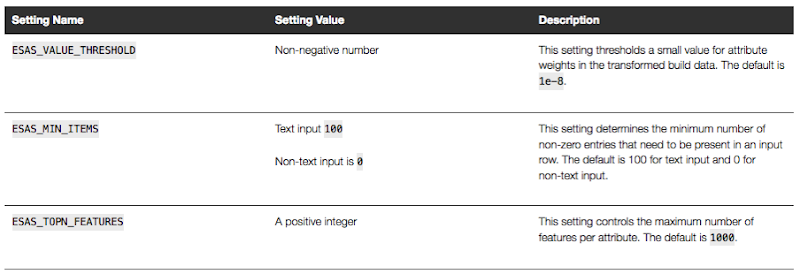
These are the minimum number of parameter setting needed to run the ESA algorithm. The other ESA algorithm setting include:
Setup the Oracle Text Policy
You also need to setup an Oracle Text Policy and a lexer for the Stopwords.
DECLARE
   v_policy_name  varchar2(30);
   v_lexer_name   varchar2(3)
BEGIN
    v_policy_name  := 'ESA_TEXT_POLICY';
    v_lexer_name   := 'ESA_LEXER';
    ctx_ddl.create_preference(v_lexer_name, 'BASIC_LEXER');
    v_stoplist_name := 'CTXSYS.DEFAULT_STOPLIST';  -- default stop list
    ctx_ddl.create_policy(policy_name => v_policy_name, lexer => v_lexer_name, stoplist => v_stoplist_name);
END;
Create the ESA model
Once we have the settings table created with the parameter values set for the algorithm and the Oracle Text policy created, we can now create the model.
To ensure that the Oracle Text Policy is applied to the text we want to analyse we need to create a transformation list and add the Text Policy to it.
We can then pass the text transformation list as a parameter to the CREATE_MODEL, procedure.
DECLARE
   v_xlst              dbms_data_mining_transform.TRANSFORM_LIST;
   v_policy_name       VARCHAR2(130) := 'ESA_TEXT_POLICY';
   v_model_name        varchar2(50) := 'ESA_MODEL_DEMO_2';
BEGIN
   v_xlst := dbms_data_mining_transform.TRANSFORM_LIST();
   DBMS_DATA_MINING_TRANSFORM.SET_TRANSFORM(v_xlst, '"TEXT"', NULL, '"TEXT"', '"TEXT"', 'TEXT(POLICY_NAME:'||v_policy_name||')(MAX_FEATURES:3000)(MIN_DOCUMENTS:1)(TOKEN_TYPE:NORMAL)');

    DBMS_DATA_MINING.DROP_MODEL(v_model_name, TRUE);
    DBMS_DATA_MINING.CREATE_MODEL(
        model_name          => v_model_name,
        mining_function     => DBMS_DATA_MINING.FEATURE_EXTRACTION,
        data_table_name     => 'WIKISAMPLE',
        case_id_column_name => 'TITLE',
        target_column_name  => NULL,
        settings_table_name => 'ESA_SETTINGS',
        xform_list          => v_xlst);
END;
NOTE: Yes we could have merged all of the above code into one PL/SQL block.
Use the ESA model
We can now use the FEATURE_COMPARE function to use the model we just created, just like I did in my previous blog post.
SELECT FEATURE_COMPARE(ESA_MODEL_DEMO_2
               USING 'Oracle Database is the best available for managing your data' text
               AND USING 'The SQL language is the one language that all databases have in common' text) similarity
FROM DUAL;
Go give the ESA algorithm a go and see where you could apply it within your applications.
Auditing Oracle Data Mining model usage
In a previous blog post I talked about how you can rename and comment your Oracle Data Mining models. This is to allow you to easily to see and understand the intended use of the data mining model.
Another feature available to you is to audit the usage of the the data mining models. As your data mining environment grows to many 10s or more typically 100s of models, you will need to have some way of tracking their usage. This can allow you to discover what models are frequently being used and those that are not being used in-frequently. You can then use this information to investigate if there are any issues. Or in some companies I’ve seen an internal charging scheme in place for each time the models are used.
The following outlines the steps required to setup the auditing of your models and how to inspect the usage.
Note: You will need to the AUDIT_ADMIN role to audit the models.
First create an audit policy for the data mining model in a particular schema.
CREATE AUDIT POLICY oaa_odm_audit_usage
ACTIONS ALL
ON MINING MODEL dmuser.high_value_churn_clas_svm;
This creates a policy that monitors all activity on the data mining model HIGH_VALUE_CHURN_CLAS_SVM in the DMUSER schema.
Now we need to enable the policy and allow to to tract all activity on the model.
AUDIT POLICY oaa_odm_audit_usage BY oaa_model_user;
This will track all usage of the data mining model by the schema call OAA_MODEL_USER. We can then use the following query to search for the audit records for the OAA_MODEL_USER schema.
SELECT dbusername,
       action_name,
       systemm_privilege_used,
       return_code,
       object_schema,
       object_name,
       sql_text
FROM  unified_audit_trail
WHERE object_name = 'HIGH_VALUE_CHURN_CLAS_SVM';
But there is a little problem with using what I’ve just shown you above. The problem is that it will track all activity on the data mining model. Perhaps this isn’t what we really want. Perhaps we only want to track only certain activity of the data mining model. Instead of creating the policy using ‘ACTIONS ALL’, we can list out the actions or operations we want to track. For example, we want to tract when it is used in a SELECT. The following shows how you can set this up for just SELECT.
CREATE AUDIT POLICY oaa_odm_audit_select
ACTIONS SELECT
ON MINING MODEL dmuser.high_value_churn_clas_svm;

AUDIT POLICY oaa_odm_audit_select BY oaa_model_user;
The list of individual audit events you can use include:
- AUDIT
- COMMENT
- GRANT
- RENAME
- SELECT
A policy can be setup to tract one or more of these events. For example, if we wanted a policy to track SELECT and GRANT, we would have list each event separated by a comma.
CREATE AUDIT POLICY oaa_odm_audit_select_grant
ACTIONS SELECT
ON MINING MODEL dmuser.high_value_churn_clas_svm,
ACTIONS GRANT
ON MINING MODEL dmuser.high_value_churn_clas_svm,
;

AUDIT POLICY oaa_odm_audit_select_grant BY oaa_model_user;
Renaming & Commenting Oracle Data Mining Models
As your company evolves with their data mining projects, the number of models produced and in use in production will increase dramatically.
Care needs to be taken when it comes to managing these. This includes using meaningful names, adding descriptions of what the model is about or for, and being able to track their usage, etc.
I will look at tracking the usage of the models in another blog post, but the following gives examples of how to rename Oracle Data Mining models and how to add comments or descriptions to these models. This is particularly useful because our data analytics teams have a constant turn over or it has been many months since you last worked on a model and you want a quick idea of what purpose of the model was for.
If you have been using the Oracle Data Mining tool (part of SQL Developer) will will see your model being created with some sort of sequencing numbers. For example for a Support Vector Machine (SVM) model you might see it labelled for classification:
CLAS_SVM_5_22
While you are working on this project you will know and understand what it was about and why it is being used. But afterward you may forget as you will be dealing with many hundreds of models. Yes you could check your documentation for the purpose of this model but that can take some time.
What if you could run a SQL query to find out?
But first we need to rename the model.
DBMS_DATA_MINING.RENAME_MODEL('CLAS_SVM_5_22', 'HIGH_VALUE_CHURN_CLAS_SVM');
Next we will want to add a longer description of what the model is about. We can do this by adding a comment to the model.
COMMENT ON MINING MODEL high_value_churn_clas_svm IS
'Classification Model to Predict High Value Customers most likely to Churn';
We can now see these updated details when we query the Oracle Data Mining models in a user schema.
SELECT model_name, mining_function, algorithm, comments
FROM user_mining_models;
These are two very useful commands.
Evaluating Cluster Dispersion in Oracle Data Mining
When working with the Clustering algorithms, and particularly k-Means, in the Oracle Data Miner tool there is no way of seeing how compact or dispersed the data is within a cluster.
There are a number of measures typically used in various tools and algorithms, but with Oracle Data Miner we are not presented with any of this information.
But if we flip from using the Oracle Data Miner tool to using SQL we can get to see some more details of the clusters produced by the k-Means algorithm along with some additional and useful information.
As I said there are a number of different measures used to evaluate clusters. The one that Oracle uses is called Dispersion. Now there are a few different definitions of what this could be and I haven’t been able to locate what is Oracle’s own definition of it in any of the documentation.
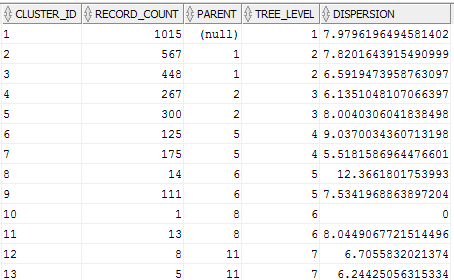
We can use the Dispersion value as a measure of how compact or how spread out the data is within a cluster. The Dispersion value is a number greater than 0. The lower the value of the more compact the cluster is i.e. the data points are close the the centroid of the cluster. The larger the value the more disperse or spread out the data points are.
The DBMS_DATA_MINING PL/SQL package comes with a function called GET_MODEL_DETAILS_KM. This function returns a record of the form DM_CLUSTERS.
(id                   NUMBER,
 cluster_id           VARCHAR2(4000),
 record_count         NUMBER,
 parent               NUMBER,
 tree_level           NUMBER,
 dispersion           NUMBER,
 split_predicate      DM_PREDICATES,
 child                DM_CHILDREN,
 centroid             DM_CENTROIDS,
 histogram            DM_HISTOGRAMS,
 rule                 DM_RULE)
We can not use the following query to get the Dispersion value for each of the clusters from an ODM cluster model.
SELECT cluster_id,
       record_count,
       parent,
       tree_level,
       dispersion
FROM  table(dbms_data_mining.get_model_details_km('CLUS_KM_3_2'));
Using the Identity column for Oracle Data Miner
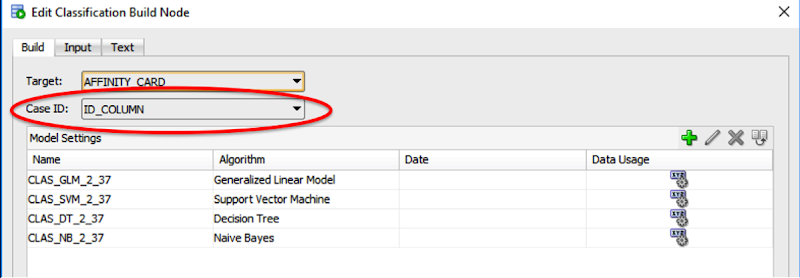
If you are a user of the Oracle Data Miner tool (the workflow data mining tool that is part of SQL Developer), then you will have noticed that for many of the algorithms you can specify a Case Id attribute along with, say, the target attribute.
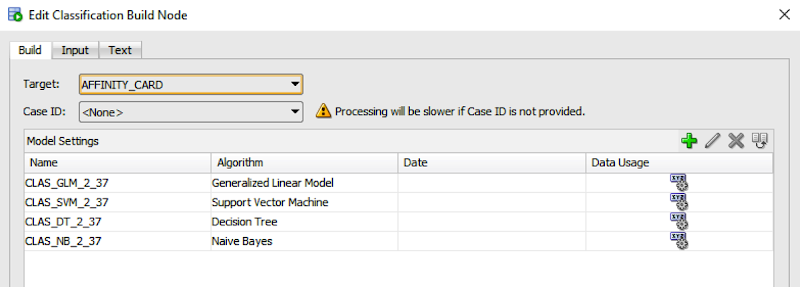
The idea is that you have one attribute that is a unique identifier for each case record. This may or may not be the case in your data model and you may have a multiple attribute primary key or case record identifier.
But what is the Case Id field used for in Oracle Data Miner?
Based on the documentation this field does not need to have a value. But it is recommended that you do identify an attribute for the Case Id, as this will allow for reproducible results. What this means is that if we run our workflow today and again in a few days time, on the exact same data, we should get the same results. So the Case Id allows this to happen. But how? Well it looks like the attribute used or specified for the Case Id is used as part of the Hashing algorithm to partition the data into a train and test data set, for classification problems.
So if you don’t have a single attribute case identifier in your data set, then you need to create one. There are a few options open to you to do this.
- Create one: write some code that will generate a unique identifier for each of your case records based on some defined rule.
- Use a sequence: and update the records to use this sequence.
- Use ROWID: use the unique row identifier value. You can write some code to populate this value into an attribute. Or create a view on the table containing the case records and add a new attribute that will use the ROWID. But if you move the data, then the next time you use the view then you will be getting different ROWIDs and that in turn will mean we may have different case records going into our test and training data sets. So our workflows will generate different results. Not what we want.
- Use ROWNUM: This is kind of like using the ROWID. Again we can have a view that will select ROWNUM for each record. Again we may have the same issues but if we have our data ordered in a way that ensures we get the records returned in the same order then this approach is OK to use.
- Use Identity Column: In Oracle 12c we have a new feature called Identify Column. This kind of acts like a sequence but we can defined an attribute in a table to be an Identity Column, and as records are inserted into the the data (in our scenario our case table) then this column will automatically generate a unique number for our data. Again if we need to repopulate the case table, you will need to drop and recreate the table to get the Identity Column to reset, otherwise the newly inserted records will start with the next number of the Identity Column
Here is an example of using the Identity Column in a case table.
CREATE TABLE case_table (
id_column	NUMBER GENERATED ALWAYS AS IDENTITY,
affinity_card 	NUMBER,
age		NUMBER,
cust_gender	VARCHAR2(5),
country_name	VARCHAR2(20)
...
);
You can now use this Identity Column as the Case Id in your Oracle Data Miner workflows.
Checking out the Oracle Reserved Words using V$RESERVED_WORDS
When working with SQL or PL/SQL we all know there are some words we cannot use in our code or to label various parts of it. These languages have a number of reserved words that form the language.
Somethings it can be a challenge to know what is or isn’t a reserved word. Yes we can check the Oracle documentation for the SQL reserved words and the PL/SQL reserved words. There are other references and list in the Oracle documentation listing the reserved and key words.
But we also have the concept of Key Words (as opposed to reserved words). In the SQL documentation these are are not listed. In the PL/SQL documentation most are listed.
What is a Key Word in Oracle ?
Oracle SQL keywords are not reserved. BUT Oracle uses them internally in specific ways. If you use these words as names for objects and object parts, then your SQL statements may be more difficult to read and may lead to unpredictable results.
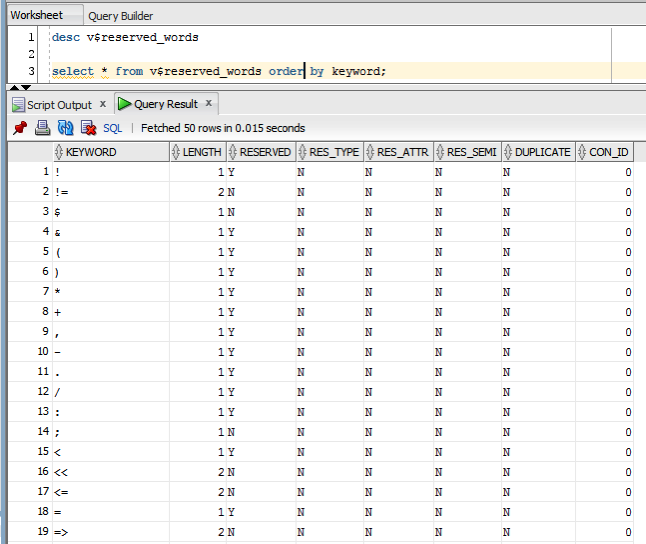
But if we didn’t have access to the documentation (or google) how can we find out what the key words are. You can use the data dictionary view called V$RESERVED_WORDS.
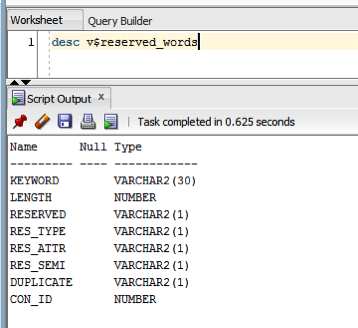
But this view isn’t available to version. So if you want to get your hands on it you will need the SYS user. Alternatively if you are a DBA you could share this with all your developers.
When we query this view we get 2,175 entries (for 12.1.0.2 Oracle Database).
 Ora-lytics
You must be logged in to post a comment.