
OUG Ireland 2017 Presentation
Here are the slides from my presentation at OUG Ireland 2017. All about running R using SQL.
Presentations from OUGN17
Here are the presentations I gave at OUG Norway last week. These are also available on SlideShare
Blog posts on Oracle Advanced Analytics features in 12.2
A couple of days ago Oracle finally provided us with an on-premises download for Oracle 12.2 Database.
Go and download load it from here
or
Download the Database App Development VM with 12.2 (This is what I did)
Over the past couple of months I’ve been using the DBaaS of 12.2, trying out some of the new Advanced Analytics option new features, and other new features. Here are the links to the blog posts on these new 12.2 new features. There will be more coming over the next few months.
New OAA features in Oracle 12.2 Database
Explicit Semantic Analysis in Oracle 12.2c Database
Explicit Semantic Analysis setup using SQL and PL/SQL
and slightly related is the new SQL Developer 4.2
Join the Oracle Scene Editorial Team
Are you a member of UKOUG?
How would you like to join the editorial team of Oracle Scene magazine as a deputy editor?
If you are interested we are looking to recruit 1 deputy editor to cover the Applications area and 2 deputy editors to cover the Tech area (DBA, Developer, BA, etc)
How much time is required? about 4 hours per edition, or maybe less.
What does a deputy editor do?
As part of the editorial team you will be expected to:
– Article Review
Articles submitted are uploaded to the review panel on Basecamp. During this time the editors should become familiar with the articles and have an idea of which ones would be appropriate for publication. Time approx 1.5hrs over a 2 week period.
– Editorial Call
After the review period has closed the editors come together for an editorial call (approx 1hr) to go through the feedback received on the articles, it is the editors job to validate any comments and select which articles should be chosen for publication. Time approx 1hr.
Some articles may need further rework by the authors and the editors provide comments & instructions as to the amends needed, in some cases the editors will take on the amends themselves or if they hold the relationship with the author they may wish to approach them direct. If any articles have been held over from the previous edition, the editors will relook at the articles and if any of the content needs to be updated they will advise. If we do not have articles submitted at this stage so the editors may need to source some additional content.
– Editorial Review
Once the selected articles are edited they are passed to the designer for layout, editors will then receive a first copy of the magazine where they will read the articles relevant to them (Apps or Tech) marking up on the pdf any errors in the text or images found. We try to build in time over a weekend for this with the comments due by 9am on the Monday. This is generally the last time the editors see the magazine, the next time being the digital version. Time approx 2hrs.
– Promotion
When the digital version is ready to be sent out – the editors & review panel are notified to help raise awareness of the magazine among their network.
– Article Sourcing
Call for articles is open all year as we will just hold those submitted in between the planning timeline over to the next edition. If there are particular topics that we feel would make good articles the editors are expected to help source potential authors and of course if they see good presentations again encourage those speakers to turn their presentation in to text.
– Flying the flag
Throughout the year the editors are expected to positively “fly the flag” of Oracle Scene, as a volunteer this will include, at the annual conference, taking part in the community networking to encourage future authors amongst the community.
If you are interested in a deputy editor role then submit your application now.

Check out UKOUG webpage for more details.
Formatting results from ORE script in a SELECT statement
This blog post looks at how to format the output or the returned returns from an Oracle R Enterprise (ORE), user defined R function, that is run using a SELECT statement in SQL.
Sometimes this can be a bit of a challenge to work out, but it can be relatively easy once you have figured out how to do it. The following examples works through some scenarios of different results sets from a user defined R function that is stored in the Oracle Database.
To run that user defined R function using a SELECT statement I can use one of the following ORE SQL functions.
- rqEval
- rqTableEval
- “rqGroupEval“
- rqRowEval
For simplicity we will just use the first of these ORE SQL functions to illustrate the problem and how to go about solving it. The rqEval ORE SQL function is a generate purpose function to call a user defined R script stored in the database. The function does not require any input data set and but it will return some data. You could use this to generate some dummy/test data or to find some information in the database. Here is noddy example that returns my name.
BEGIN
   --sys.rqScriptDrop('GET_NAME');
   sys.rqScriptCreate('GET_NAME',
      'function() {
         res<-data.frame("Brendan")
         res
         } ');
END;
To call this user defined R function I can use the following SQL.
select *
from table(rqEval(null,
                  'select cast(''a'' as varchar2(50))  from dual',
                  'GET_NAME') );
For text strings returned you need to cast the returned value giving a size.
If we have a numeric value being returned we can don’t have to use the cast and instead use ‘1’ as shown in the following example. This second example extends our user defined R function to return my name and a number.
BEGIN
   sys.rqScriptDrop('GET_NAME');
   sys.rqScriptCreate('GET_NAME',
      'function() {
         res<-data.frame(NAME="Brendan", YEAR=2017)
         res
         } ');
END;
To call the updated GET_NAME function we now have to process two returned columns. The first is the character string and the second is a numeric.
select *
from table(rqEval(null,
                  'select cast(''a'' as varchar2(50)) as "NAME", 1 AS YEAR  from dual',
                  'GET_NAME') );
These example illustrate how you can process character strings and numerics being returned by the user defined R script.
The key to setting up the format of the returned values is knowing the structure of the data frame being returned by the user defined R script. Once you know that the rest is (in theory) easy.
Explicit Semantic Analysis setup using SQL and PL/SQL
In my previous blog post I introduced the new Explicit Semantic Analysis (ESA) algorithm and gave an example of how you can build an ESA model and use it. Check out this link for that blog post.
In this blog post I will show you how you can manually create an ESA model. The reason that I’m showing you this way is that the workflow (in ODMr and it’s scheduler) may not be for everyone. You may want to automate the creation or recreation of the ESA model from time to time based on certain business requirements.
In my previous blog post I showed how you can setup a training data set. This comes with ODMr 4.2 but you may need to expand this data set or to use an alternative data set that is more in keeping with your domain.
Setup the ODM Settings table
As with all ODM algorithms we need to create a settings table. This settings table allows us to store the various parameters and their values, that will be used by the algorithm.
-- Create the settings table
CREATE TABLE ESA_settings (
    setting_name VARCHAR2(30),
    setting_value VARCHAR2(30));

-- Populate the settings table
-- Specify ESA. By default, Naive Bayes is used for classification.
-- Specify ADP. By default, ADP is not used. Need to turn this on.
BEGIN
    INSERT INTO ESA_settings (setting_name, setting_value)
    VALUES (dbms_data_mining.algo_name,
           dbms_data_mining.algo_explicit_semantic_analys);

    INSERT INTO ESA_settings (setting_name, setting_value)
    VALUES (dbms_data_mining.prep_auto,dbms_data_mining.prep_auto_on);

    INSERT INTO ESA_settings (setting_name, setting_value)
    VALUES (odms_sampling,odms_sampling_disable);

    commit;
END;
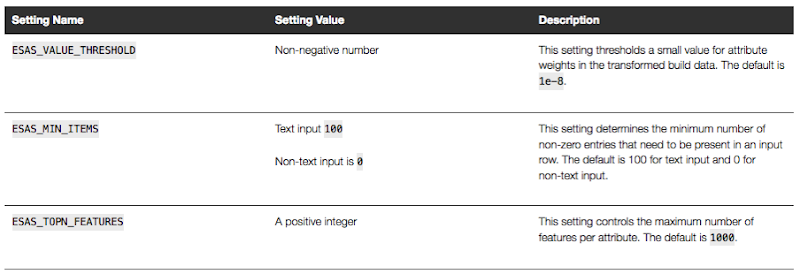
These are the minimum number of parameter setting needed to run the ESA algorithm. The other ESA algorithm setting include:
Setup the Oracle Text Policy
You also need to setup an Oracle Text Policy and a lexer for the Stopwords.
DECLARE
   v_policy_name  varchar2(30);
   v_lexer_name   varchar2(3)
BEGIN
    v_policy_name  := 'ESA_TEXT_POLICY';
    v_lexer_name   := 'ESA_LEXER';
    ctx_ddl.create_preference(v_lexer_name, 'BASIC_LEXER');
    v_stoplist_name := 'CTXSYS.DEFAULT_STOPLIST';  -- default stop list
    ctx_ddl.create_policy(policy_name => v_policy_name, lexer => v_lexer_name, stoplist => v_stoplist_name);
END;
Create the ESA model
Once we have the settings table created with the parameter values set for the algorithm and the Oracle Text policy created, we can now create the model.
To ensure that the Oracle Text Policy is applied to the text we want to analyse we need to create a transformation list and add the Text Policy to it.
We can then pass the text transformation list as a parameter to the CREATE_MODEL, procedure.
DECLARE
   v_xlst              dbms_data_mining_transform.TRANSFORM_LIST;
   v_policy_name       VARCHAR2(130) := 'ESA_TEXT_POLICY';
   v_model_name        varchar2(50) := 'ESA_MODEL_DEMO_2';
BEGIN
   v_xlst := dbms_data_mining_transform.TRANSFORM_LIST();
   DBMS_DATA_MINING_TRANSFORM.SET_TRANSFORM(v_xlst, '"TEXT"', NULL, '"TEXT"', '"TEXT"', 'TEXT(POLICY_NAME:'||v_policy_name||')(MAX_FEATURES:3000)(MIN_DOCUMENTS:1)(TOKEN_TYPE:NORMAL)');

    DBMS_DATA_MINING.DROP_MODEL(v_model_name, TRUE);
    DBMS_DATA_MINING.CREATE_MODEL(
        model_name          => v_model_name,
        mining_function     => DBMS_DATA_MINING.FEATURE_EXTRACTION,
        data_table_name     => 'WIKISAMPLE',
        case_id_column_name => 'TITLE',
        target_column_name  => NULL,
        settings_table_name => 'ESA_SETTINGS',
        xform_list          => v_xlst);
END;
NOTE: Yes we could have merged all of the above code into one PL/SQL block.
Use the ESA model
We can now use the FEATURE_COMPARE function to use the model we just created, just like I did in my previous blog post.
SELECT FEATURE_COMPARE(ESA_MODEL_DEMO_2
               USING 'Oracle Database is the best available for managing your data' text
               AND USING 'The SQL language is the one language that all databases have in common' text) similarity
FROM DUAL;
Go give the ESA algorithm a go and see where you could apply it within your applications.
next OUG Ireland Meet-up on 12th Janiary

Our next OUG Ireland Meet-up with be on Thursday 12th January, 2017.
The theme for this meet up is DevOps and How to Migrate to the Cloud.
Come along on the night here about these topics and how companies in Ireland are doing these things.
Venue : Bank of Ireland, Grand Canal Dock, Dublin.
The agenda for the meet-up is:
18:00-18:20 Sign-in, meet and greet, networking, grab some refreshments, etc
18:20-18:30 : Introductions & Welcome, Agenda, what is OUG Ireland, etc.
18:30-19:00 : Dev Ops and Oracle PL/SQL development – Alan McClean
Abstract
In recent years the need to deliver changes to production as soon as possible has led to the rise of continuous delivery; continuous integration and continuous deployment. These issues have become standards in the application development, particularly for code developed in languages such as Java. However, database development has lagged behind in supporting this paradigm. There are a number of steps that can be taken to address this. This presentation examines how database changes can be delivered in a similar manner to other languages. The presentation will look at unit testing frameworks, code reviews and code quality as well as tools for managing database deployment.
19:00-1930 : Simplifying the journey to Oracle Cloud : Decision makers across Managers, DBA’s and Cloud Architects who need to progress an Oracle Cloud Engagement in the organization – Ken MacMahon, Head of Oracle Cloud Services at Version1
Abstract
The presentation will cover the 5 steps that Version 1 use to try and help customers with Oracle Cloud adoption in the organisation. By attending you will hear, how to deal with cloud adoption concerns, choose candidates for cloud migration, how to design the cloud architecture, how to use automation and agility in your Cloud adoption plans, and finally how to manage your Cloud environment.
This event is open to all, you don’t have to be a member of the user group and best of all it is a free event. So spread the word with all your Oracle developer, DBAs, architects, data warehousing, data vizualisations, etc people.
We hope you can make it! and don’t forget to register for the event.
Oracle Data Miner 4.2 New Features
Oracle Data Miner 4.2 (part of SQL Developer 4.2) got released as an Early Adopter versions (EA) a few weeks ago.
With the new/updated Oracle Data Miner (ODMr) there are a number of new features. These can be categories as 1) features all ODMr users can use now, 2) New features that are only usable when using Oracle 12.2 Database, and 3) Updates to existing algorithms that have been exposed via the ODMr tool.
The following is a round up of the main new features you can enjoy as part of ODMr 4.2 (mainly covering points 1 and 2 above)
- You can now schedule workflows to run based on a defined schedule
- Support for additional data types (RAW, ROWID, UROWID, URITYPE)
- Better support for processing JSON data in the JSON Query node
- Additional insights are displayed as part of the Model Details View
- Additional alert monitoring and reporting
- Better support for processing in-memory data
- A new R Model node that allows you to include in-database ORE user defined R function to support model build, model testing and applying of new model.
- New Explicit Semantic Analysis node (Explicit Feature Extraction)
- New Feature Compare and Test nodes
- New workflow status profiling perfoance improvements
- Refresh the input data definition in nodes
- Attribute Filter node now allows for unsupervised attribute importance ranking
- The ability to build Partitioned data mining models
Look out for the blog posts on most of these new features over the coming months.
WARNING: Most of these new features requires an Oracle 12.2 Database.
2016: A review of the year
As 2016 draws to a close I like to look back at what I have achieved over the year. Most of the following achievements are based on my work with the Oracle User Group community. I have some other achievements are are related to the day jobs (Yes I have multiple day jobs), but I won’t go into those here.
As you can see from the following 2016 was another busy year. There was lots of writing, which I really enjoy and I’ll be continuing with in 2017. As they say, watch this space for writing news in 2017.
Books
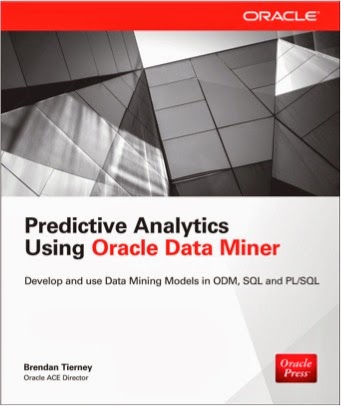
Yes 2016 was a busy year for writing and most of the later half of 2015 and the first half of 2016 was taken up writing two books. Yes two books. One of the books was on Oracle R Enterprise and this book compliments my previous published book on Oracle Data Mining. I now have the books that cover both components of the Oracle Advanced Analytics Option.
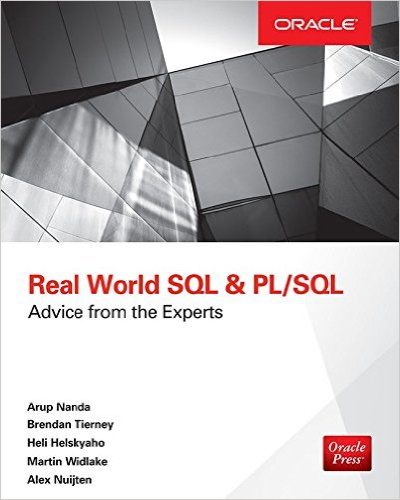
I also co-wrote a book with legends of Oracle community. These were Arup Nada, Martin Widlake, Heli Helskyaho and Alex Nuijten.

More news coming in 2017.
Blog Posts
One of the things I really enjoy doing is playing with various features of Oracle and then writing some blog posts about them. When writing the books I had to cut back on writing blog posts. I was luck to be part of the 12.2 Database beta this year and over the past few weeks I’ve been playing with 12.2 in the cloud. I’ve already written a blog post or two already on this and I also have an OTN article on this coming out soon. There will be more 12.2 analytics related blog posts in 2017.
In 2016 I have written 55 blog posts (including this one). This number is a little bit less when compared with previous years. I’ll blame the book writing for this. But more posts are in the works for 2017.
Articles
In 2016 I’ve written articles for OTN and for Toad World. These included:
OTN
- Oracle Advanced Analytics : Kicking the Tires/Tyres
- Kicking the Tyres of Oracle Advanced Analytics Option – Using SQL and PL/SQL to Build an Oracle Data Mining Classification Model
- Kicking the Tyres of Oracle Advanced Analytics Option – Overview of Oracle Data Miner and Build your First Workflow
- Kicking the Tyres of Oracle Advanced Analytics Option – Using SQL to score/label new data using Oracle Data Mining Models
- Setting up and configuring RStudio on the Oracle 12.2 Database Cloud Service
ToadWorld
- Introduction to Oracle R Enterprise
- ORE 1.5 – User Defined R Scripts
Conferences
- January – Yes SQL Summit, NoCOUG Winter Conference, Redwood City, CA, USA **
- January – BIWA Summit, Oracle HQ, Redwood City, CA, USA **
- March – OUG Ireland, Dublin, Ireland
- June – KScope, Chicago, USA (3 presentations)
- September – Oracle Open World (part of EMEA ACEs session) **
- December – UKOUG Tech16 & APPs16
** for these conferences the Oracle ACE Director programme funded the flights and hotels. All other expenses and other conferences I paid for out of my own pocket.
OUG Activities
I’m involved in many different roles in the user group. The UKOUG also covers Ireland (incorporating OUG Ireland), and my activities within the UKOUG included the following during 2016:
- Editor of Oracle Scene: We produced 4 editions in 2016. Thank you to all who contributed and wrote articles.
- Created the OUG Ireland Meetup. We had our first meeting in October. Our next meetup will be in January.
- OUG Ireland Committee member of TECH SIG and BI & BA SIG.
- Committee member of the OUG Ireland 2 day Conference 2016.
- Committee member of the OUG Ireland conference 2017.
- KScope17 committee member for the Data Visualization & Advanced Analytics track.
I’m sure I’ve forgotten a few things, I usually do. But it gives you a taste of some of what I got up to in 2016.
Auditing Oracle Data Mining model usage
In a previous blog post I talked about how you can rename and comment your Oracle Data Mining models. This is to allow you to easily to see and understand the intended use of the data mining model.
Another feature available to you is to audit the usage of the the data mining models. As your data mining environment grows to many 10s or more typically 100s of models, you will need to have some way of tracking their usage. This can allow you to discover what models are frequently being used and those that are not being used in-frequently. You can then use this information to investigate if there are any issues. Or in some companies I’ve seen an internal charging scheme in place for each time the models are used.
The following outlines the steps required to setup the auditing of your models and how to inspect the usage.
Note: You will need to the AUDIT_ADMIN role to audit the models.
First create an audit policy for the data mining model in a particular schema.
CREATE AUDIT POLICY oaa_odm_audit_usage
ACTIONS ALL
ON MINING MODEL dmuser.high_value_churn_clas_svm;
This creates a policy that monitors all activity on the data mining model HIGH_VALUE_CHURN_CLAS_SVM in the DMUSER schema.
Now we need to enable the policy and allow to to tract all activity on the model.
AUDIT POLICY oaa_odm_audit_usage BY oaa_model_user;
This will track all usage of the data mining model by the schema call OAA_MODEL_USER. We can then use the following query to search for the audit records for the OAA_MODEL_USER schema.
SELECT dbusername,
       action_name,
       systemm_privilege_used,
       return_code,
       object_schema,
       object_name,
       sql_text
FROM  unified_audit_trail
WHERE object_name = 'HIGH_VALUE_CHURN_CLAS_SVM';
But there is a little problem with using what I’ve just shown you above. The problem is that it will track all activity on the data mining model. Perhaps this isn’t what we really want. Perhaps we only want to track only certain activity of the data mining model. Instead of creating the policy using ‘ACTIONS ALL’, we can list out the actions or operations we want to track. For example, we want to tract when it is used in a SELECT. The following shows how you can set this up for just SELECT.
CREATE AUDIT POLICY oaa_odm_audit_select
ACTIONS SELECT
ON MINING MODEL dmuser.high_value_churn_clas_svm;

AUDIT POLICY oaa_odm_audit_select BY oaa_model_user;
The list of individual audit events you can use include:
- AUDIT
- COMMENT
- GRANT
- RENAME
- SELECT
A policy can be setup to tract one or more of these events. For example, if we wanted a policy to track SELECT and GRANT, we would have list each event separated by a comma.
CREATE AUDIT POLICY oaa_odm_audit_select_grant
ACTIONS SELECT
ON MINING MODEL dmuser.high_value_churn_clas_svm,
ACTIONS GRANT
ON MINING MODEL dmuser.high_value_churn_clas_svm,
;

AUDIT POLICY oaa_odm_audit_select_grant BY oaa_model_user;
Renaming & Commenting Oracle Data Mining Models
As your company evolves with their data mining projects, the number of models produced and in use in production will increase dramatically.
Care needs to be taken when it comes to managing these. This includes using meaningful names, adding descriptions of what the model is about or for, and being able to track their usage, etc.
I will look at tracking the usage of the models in another blog post, but the following gives examples of how to rename Oracle Data Mining models and how to add comments or descriptions to these models. This is particularly useful because our data analytics teams have a constant turn over or it has been many months since you last worked on a model and you want a quick idea of what purpose of the model was for.
If you have been using the Oracle Data Mining tool (part of SQL Developer) will will see your model being created with some sort of sequencing numbers. For example for a Support Vector Machine (SVM) model you might see it labelled for classification:
CLAS_SVM_5_22
While you are working on this project you will know and understand what it was about and why it is being used. But afterward you may forget as you will be dealing with many hundreds of models. Yes you could check your documentation for the purpose of this model but that can take some time.
What if you could run a SQL query to find out?
But first we need to rename the model.
DBMS_DATA_MINING.RENAME_MODEL('CLAS_SVM_5_22', 'HIGH_VALUE_CHURN_CLAS_SVM');
Next we will want to add a longer description of what the model is about. We can do this by adding a comment to the model.
COMMENT ON MINING MODEL high_value_churn_clas_svm IS
'Classification Model to Predict High Value Customers most likely to Churn';
We can now see these updated details when we query the Oracle Data Mining models in a user schema.
SELECT model_name, mining_function, algorithm, comments
FROM user_mining_models;
These are two very useful commands.
12.2 DBaaS (Extreme Edition) possible bug/issue with the DB install/setup
A few weeks ago the 12.2 Oracle Database was released on the cloud. I immediately set an account and got my 12.2 DBaaS setup. This was a relatively painless process and quick.
For me I wanted to test out all the new Oracle Advanced Analytics new features and the new features in SQL Developer 4.2 that only become visible when you are using the 12.2 Database.
When you are go to use the Oracle Data Miner (GUI tool) in SQL Developer 4.2, it will check to see if the ODMr repository is installed in the database. If it isn’t then you will be promoted for the SYS password.
This is the problem. In previous version of the DBaaS (12.1, etc) this was not an issue.
When you go to create your DBaaS you are asked for a password that will be used for the admin accounts of the database.
But when I entered the password for SYS, I got an error saying invalid password.
After using ssh to create a terminal connection to the DBaaS I was able to to connect to the container using
sqlplus / as sysdba
and also using
sqlplus sys/ as sysdba
Those worked fine. But when I tried to connect to the PDB1 I got the invalid username and/or password error.
sqlplus sys/@pdb1 as sysdba
I reconnected as follows
sqlplus / as sysdba
and then changed the password for SYS with containers=all
This command completed without errors but when I tried using the new password to connect the the PDB1 I got the same error.
After 2 weeks working with Oracle Support they eventually pointed me to the issue of the password file for the PDB1 was missing. They claim this is due to an error when I was creating/installing the database.
But this was a DBaaS and I didn’t install the database. This is a problem with how Oracle have configured the installation.
The answer was to create a password file for the PDB1 using the following


You must be logged in to post a comment.