
Oracle
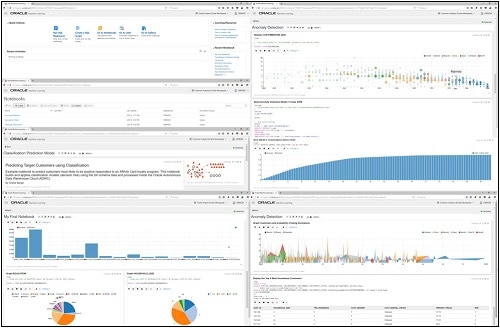
Oracle Machine Learning notebooks
With the recent release of Oracle’s Autonomous Data Warehouse Cloud (ADWC), Oracle has given data scientists a new tool for data discovery and machine learning on the ADWC. Oracle Machine Learning is based on Apache Zeppelin and gives us a new machine learning tool for accessing the in-database machine learning algorithms and in-database statistical functions.
Oracle Machine Learning (OML) SQL notebooks provide easy access to Oracle’s parallelized, scalable in-database implementations of a library of Oracle Advanced Analytics’ machine learning algorithms (classification, regression, anomaly detection, clustering, associations, attribute importance, feature extraction, times series, etc.), SQL, PL/SQL and Oracle’s statistical and analytical SQL functions. Oracle Machine Learning SQL notebooks and Oracle Advanced Analytics’ library of machine learning SQL functions combined with PL/SQL allow companies to automate their discovery of new insights, generate predictions and add “AI” to data viz dashboards and enterprise applications.
The key features of Oracle Machine Learning include:
- Collaborative SQL notebook UI for data scientists
- Packaged with Oracle Autonomous Data Warehouse Cloud
- Easy access to shared notebooks, templates, permissions, scheduler, etc.
- Access to 30+ parallel, scalable in-database implementations of machine learning algorithms
- SQL and PL/SQL scripting language supported
- Enables and Supports Deployments of Enterprise Machine Learning Methodologies in ADWC
Here is a list of key resources for Oracle Machine Learning:
- Oracle Machine Learning Notebooks
- Video overview of Oracle Machine Learning
- Download sample Oracle Machine Learning notebooks
- Quick Start Tutorial for getting started with Oracle Machine Learning
- Documentation: Using Oracle Machine Learning
Oracle Code Presentation March 2018
Last week I was presenting at Oracle Code in New York. I’ve presented at a few Oracle Code events over the past 12 months and it is always interesting to meet and talk with developers from around the World.
The title of my presentation this time was ‘SQL: The one language to rule all your data’.
I’ve given this presentation a few times at different events (POUG, OOW, Oracle Code). I take the contents of this presentation for granted and that most people know these things. But the opposite is true. Well a lot of people do know these things, but a magnitude more do not seem to know.
For example, at last weeks Oracle Code event, I had about 100 people in the room. I started out by asking the attendees ‘How many of you write SQL every day?’. About 90% put up their hand. Then a few minutes later after I start talking about various statistical functions in the database, I then ask them to ‘Count how many statistical functions they have used?’ I then asked them to raise their hands if they use over five statistical functions. About eight people put up their hands. Then I asked how many people use over ten functions. To my surprise only one (yes one) person put up their hand.
The first half of the presentation talks about statistical, analytical and machine learning in the database.
The second half covers some (not all) of the various data types and locations of data that can be accessed from the database.
The presentation then concludes with the title of the presentation about SQL being the one language to rule all your data.
Based on last weeks experience, it looks like a lot more people need to hear it !
Hopefully I’ll get the chance to share this presentation with other events and Oracle User Group conferences.
Two of the key take away messages are:
- Google makes us stupid
- We need to RTFM more often
Here is a link to the slides on SlideShare
And I recorded a short video about the presentation with Bob from OTN/ODC.
Python and Oracle : Fetching records and setting buffer size
If you used other languages, including Oracle PL/SQL, more than likely you will have experienced having to play buffering the number of records that are returned from a cursor. Typically this is needed when you are processing more than a few hundred records. The default buffering size is relatively small and by increasing the size of the number of records to be buffered can dramatically improve the performance of your code.
As with all things in coding and IT, the phrase “It Depends” applies here and changing the buffering size may not be what you need and my not help you to gain optimal performance for your code.
There are lots and lots of examples of how to test this in PL/SQL and other languages, but what I’m going to show you here in this blog post is to change the buffering size when using Python to process data in an Oracle Database using the Oracle Python library cx_Oracle.
Let us begin with taking the defaults and seeing what happens. In this first scenario the default buffering is used. Here we execute a query and the process the records in a FOR loop (yes these is a row-by-row, slow-by-slow approach.
import time

i = 0
# define a cursor to use with the connection
cur2 = con.cursor()
# execute a query returning the results to the cursor
print("Starting cursor at", time.ctime())
cur2.execute('select * from sh.customers')
print("Finished cursor at", time.ctime())

# for each row returned to the cursor, print the record
print("Starting for loop", time.ctime())
t0 = time.time()
for row in cur2:
    i = i+1
    if (i%10000) == 0:
        print(i,"records processed", time.ctime())


t1 = time.time()
print("Finished for loop at", time.ctime())
print("Number of records counted = ", i)

ttime = t1 - t0
print("in ", ttime, "seconds.")
This gives us the following output.
Starting cursor at  10:11:43
Finished cursor at  10:11:43
Starting for loop  10:11:43
10000 records processed  10:11:49
20000 records processed  10:11:54
30000 records processed  10:11:59
40000 records processed  10:12:05
50000 records processed  10:12:09
Finished for loop at  10:12:11
Number of records counted =  55500
in  28.398550033569336 seconds.
Processing the data this way takes approx. 28 seconds and this corresponds to the buffering of approx 50-75 records at a time. This involves many, many, many round trips to the the database to retrieve this data. This default processing might be fine when our query is only retrieving a small number of records, but as our data set or results set from the query increases so does the time it takes to process the query.
But we have a simple way of reducing the time taken, as the number of records in our results set increases. We can do this by increasing the number of records that are buffered. This can be done by changing the size of the ‘arrysize’ for the cursor definition. This reduces the number of “roundtrips” made to the database, often reducing networks load and reducing the number of context switches on the database server.
The following gives an example of same code with one additional line.
cur2.arraysize = 500
Here is the full code example.
# Test : Change the arraysize and see what impact that has
import time

i = 0
# define a cursor to use with the connection
cur2 = con.cursor()
cur2.arraysize = 500
# execute a query returning the results to the cursor
print("Starting cursor at", time.ctime())
cur2.execute('select * from sh.customers')
print("Finished cursor at", time.ctime())

# for each row returned to the cursor, print the record
print("Starting for loop", time.ctime())
t0 = time.time()
for row in cur2:
    i = i+1
    if (i%10000) == 0:
        print(i,"records processed", time.ctime())


t1 = time.time()
print("Finished for loop at", time.ctime())
print("Number of records counted = ", i)

ttime = t1 - t0
print("in ", ttime, "seconds.")
Now the response time to process all the records is.
Starting cursor at 10:13:02
Finished cursor at 10:13:02
Starting for loop 10:13:02
10000 records processed 10:13:04
20000 records processed 10:13:06
30000 records processed 10:13:08
40000 records processed 10:13:10
50000 records processed 10:13:12
Finished for loop at 10:13:13
Number of records counted = 55500
in 11.780734777450562 seconds.
All done in just under 12 seconds, compared to 28 seconds previously.
Here is another alternative way of processing the data and retrieves the entire results set, using the ‘fetchall’ command, and stores it located in ‘res’.
Oracle 18c DBaaS Cloud Setup
The 18c Oracle DBaaS is now available. This is the only place that Oracle 18c will be available until later in 2018. So if you want to try it out, then you are going to need to get some Oracle Cloud credits, or you may already have a paying account for Oracle Cloud.

The following outlines the steps you need to go through to gets Oracle 18c setup.
1. Log into your Oracle Cloud
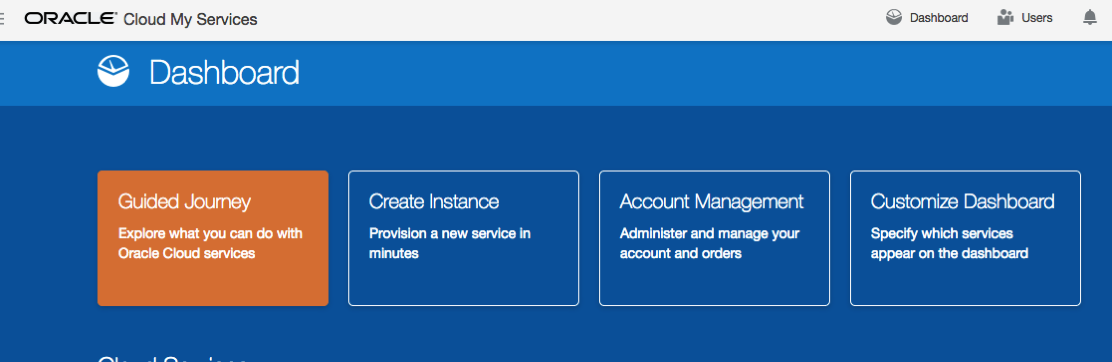
Log into your Oracle Cloud environment. Depending on your access path you will get to your dashboard.
Select Create Instance from the dashboard.
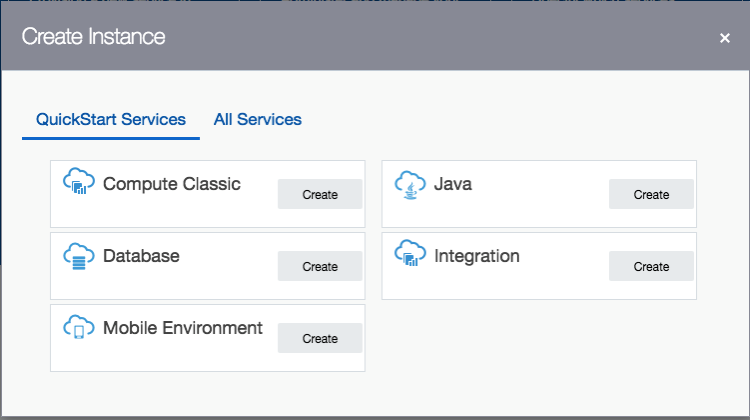
2. Create a new Database
From the list of services to create, select Database.
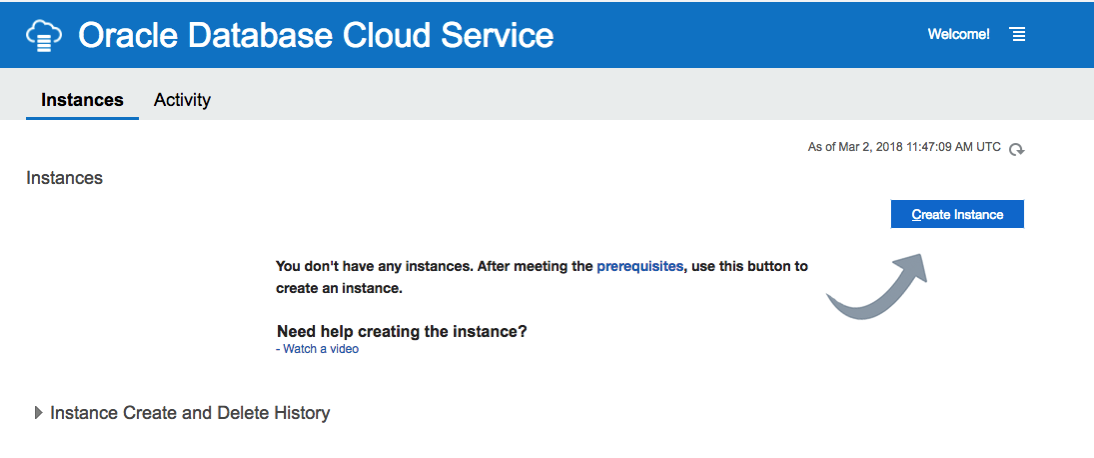
3. Click ‘Create Instance’
4. Enter the Database Instance details
Enter the details for your new Oracle 18c Database. I’ve called mine ‘db18c’.
Then for the Software Release dropdown list, select ‘Oracle Database 18c’.
Next select the Software Edition from the dropdown list.
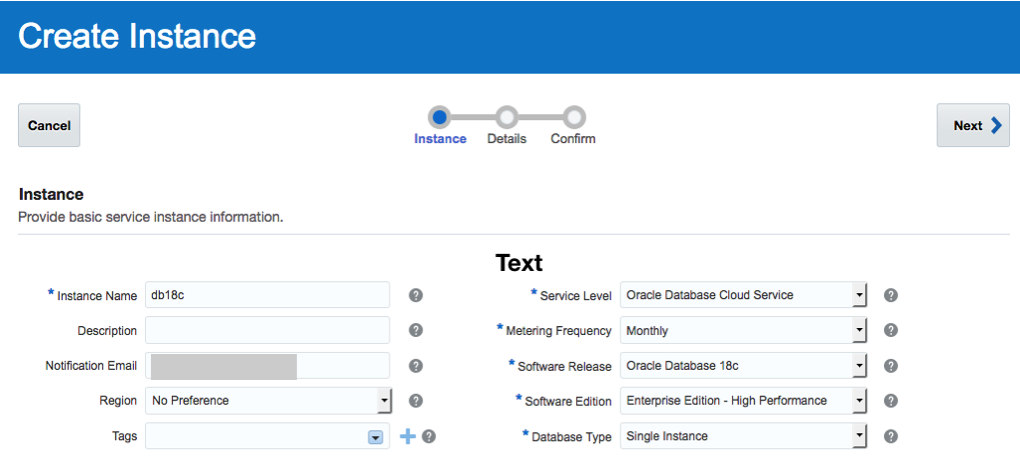
5. Fill in the Instance Details
Fill in the details for ‘DB Name’, ‘PDB Name’, ‘Administration Password’, ‘Confirm Password’, setup the SSH Public Key, and then decide if you need the Backup and Recovery option.
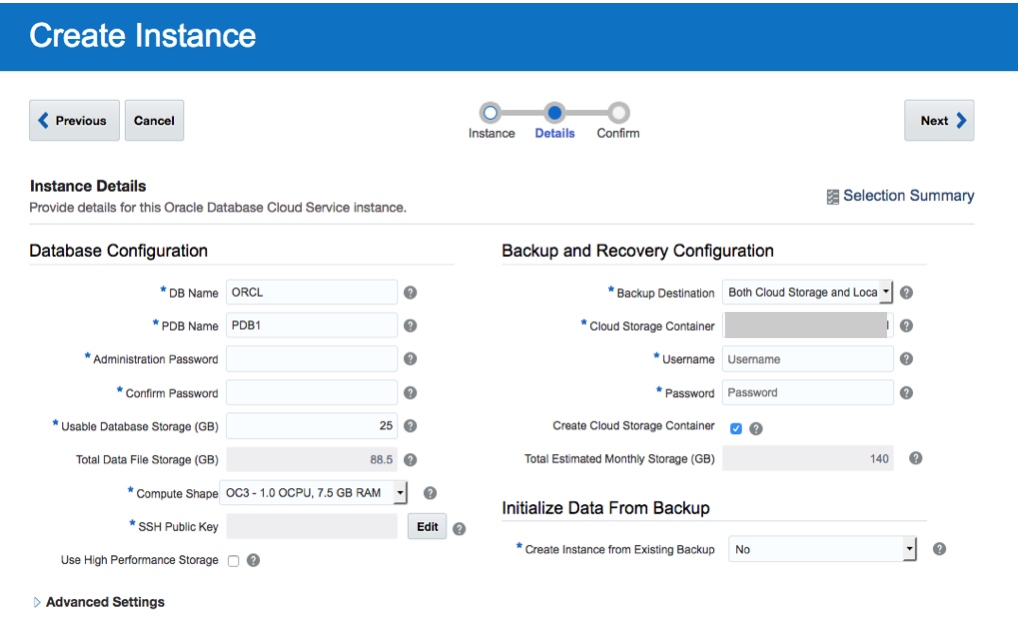 <
<
6. Create the DBaaS
Double check everything and when ready click on the ‘Create’ button.
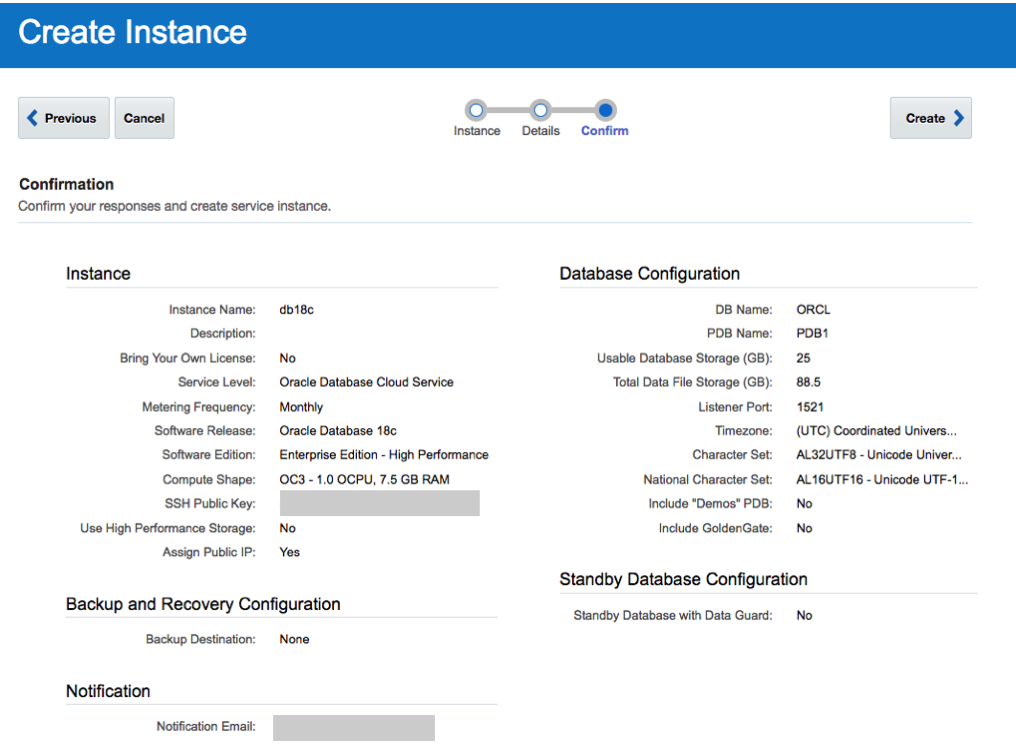
7. Wait for Everything to be Create
Now is the time to be patient and wait while your cloud service is created.
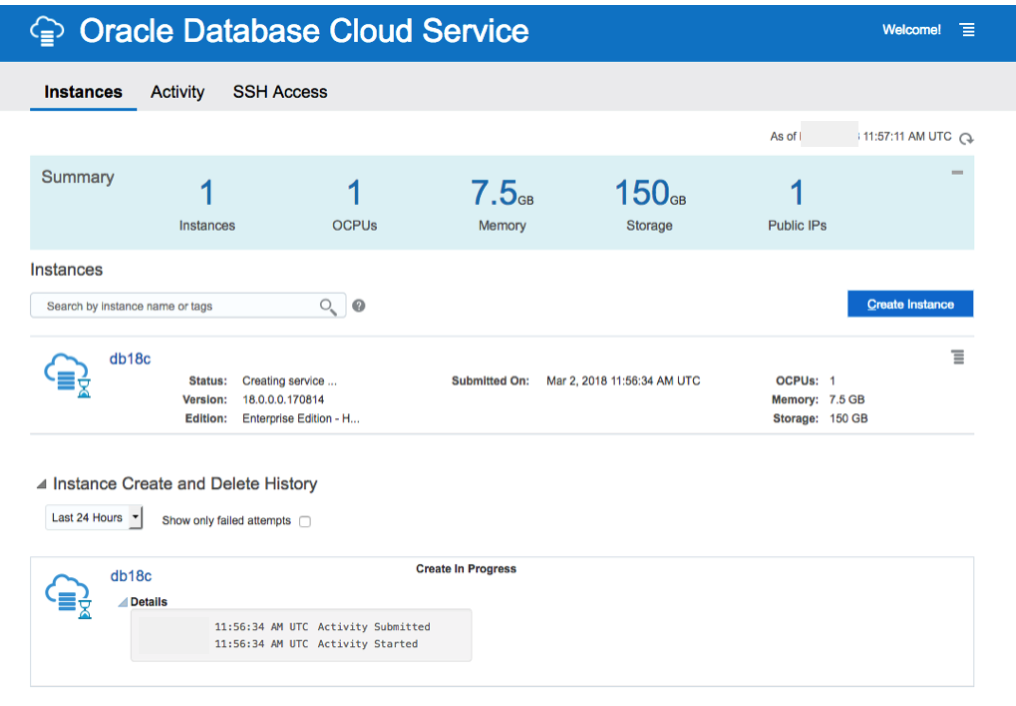
I’ve created two different version of the 18c Oracle DBaaS. The Enterprise Edition to 30 minutes to complete and the High Performance service too 47 minutes.
No it’s time to go play.
18c is now available (but only on the Cloud)
On Friday afternoon (16th February) we started to see tweets and blog posts from people in Oracle saying that Oracle 18c was now available. But is only available on Oracle Cloud and Engineered Systems.
It looks like we will have to wait until the Autumn before we can install it ourselves on our own servers 😦
Here is the link to the official announcement for Oracle 18c.
Oracle 18c is really Oracle 12.2.0.2. The next full new release of the Oracle database is expected to be Oracle 19.
The new features and incremental enhancements in Oracle 18c are:
- Multitenant
- In-Memory
- Sharding
- Memory Optimized Fetches
- Exadata RAC Optimizations
- High Availability
- Security
- Online Partition Merge
- Improved Machine Learning (OAA)
- Polymorphic Table Functions
- Spatial and Graph
- More JSON improvements
- Private Temporary Tablespaces
- New mode for Connection Manager
And now the all important links to the documentation.
To give Oracle 18c a try you will need to go to cloud.oracle.com and select Database from the drop down list from the Platform menu. Yes you are going to need an Oracle Cloud account and some money or some free credit. Go and get some free cloud credits at the upcoming Oracle Code events.
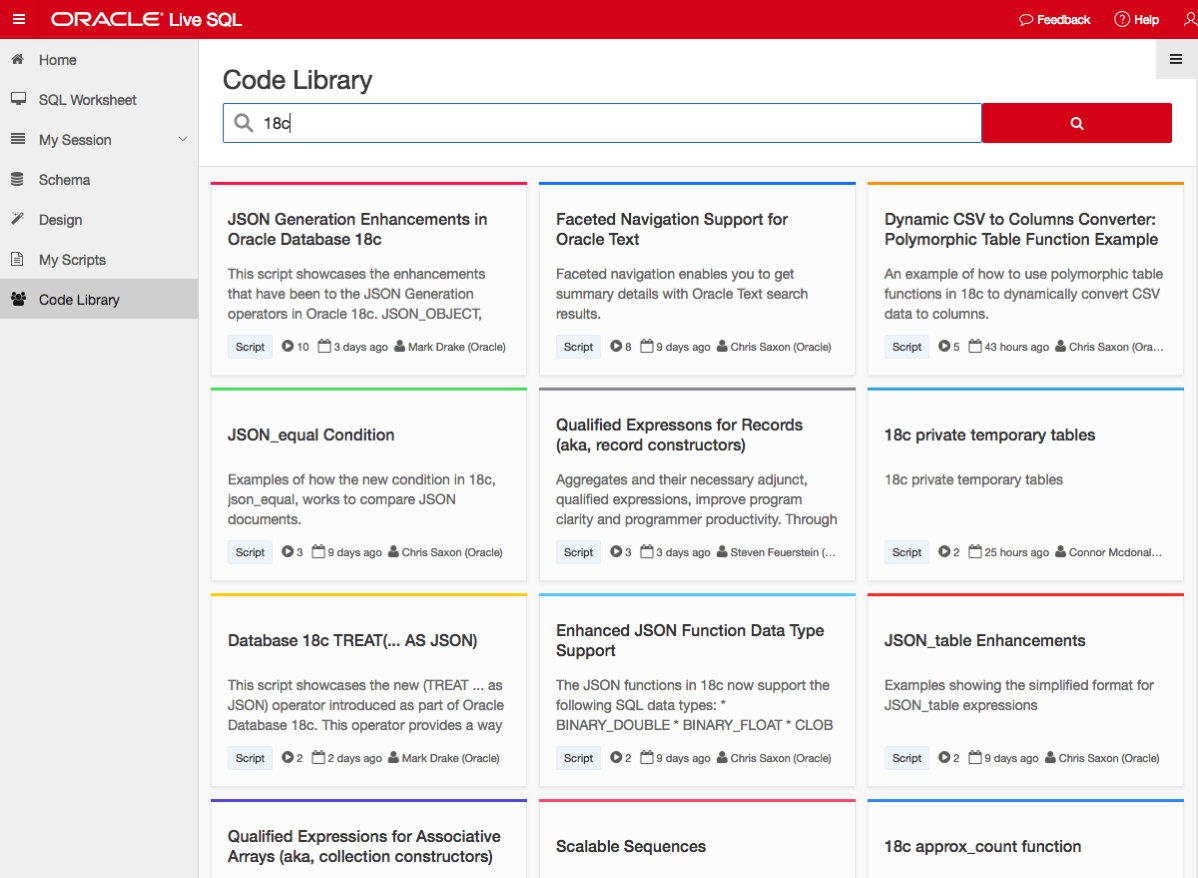
If you want a ‘free’ way of trying out Oracle 18c, you can use Oracle Live SQL. They have setup some examples of the new features for you to try.
NOTE: Oracle 18c is not Autonomous. Check out Tim Hall’s blog posts about this. The Autonomous Oracle Database is something different, and we will be hearing more about this going forward.
Oracle and Python setup with cx_Oracle
Is Python the new R?
Maybe, maybe not, but that I’m finding in recent months is more companies are asking me to use Python instead of R for some of my work.
In this blog post I will walk through the steps of setting up the Oracle driver for Python, called cx_Oracle. The documentation for this drive is good and detailed with plenty of examples available on GitHub. Hopefully there isn’t anything new in this post, but it is my experiences and what I did.
1. Install Oracle Client
The Python driver requires Oracle Client software to be installed. Go here, download and install. It’s a straightforward install. Make sure the directories are added to the search path.
2. Download and install cx_Oracle
You can use pip3 to do this.
pip3 install cx_Oracle

Collecting cx_Oracle
  Downloading cx_Oracle-6.1.tar.gz (232kB)
    100% |████████████████████████████████| 235kB 679kB/s
Building wheels for collected packages: cx-Oracle
  Running setup.py bdist_wheel for cx-Oracle ... done
  Stored in directory: /Users/brendan.tierney/Library/Caches/pip/wheels/0d/c4/b5/5a4d976432f3b045c3f019cbf6b5ba202b1cc4a36406c6c453
Successfully built cx-Oracle
Installing collected packages: cx-Oracle
Successfully installed cx-Oracle-6.1
3. Create a connection in Python
Now we can create a connection. When you see some text enclosed in angled brackets <>, you will need to enter your detailed for your schema and database server.
# import the Oracle Python library
import cx_Oracle

# define the login details
p_username = ""
p_password = ""
p_host = ""
p_service = ""
p_port = "1521"

# create the connection
con = cx_Oracle.connect(user=p_username, password=p_password, dsn=p_host+"/"+p_service+":"+p_port)

# an alternative way to create the connection
# con = cx_Oracle.connect('/@/:1521')

# print some details about the connection and the library
print("Database version:", con.version)
print("Oracle Python version:", cx_Oracle.version)


Database version: 12.1.0.1.0
Oracle Python version: 6.1
4. Query some data and return results to Python
In this example the query returns the list of tables in the schema.
# define a cursor to use with the connection
cur = con.cursor()
# execute a query returning the results to the cursor
cur.execute('select table_name from user_tables')
# for each row returned to the cursor, print the record
for row in cur:
    print("Table: ", row)

Table:  ('DECISION_TREE_MODEL_SETTINGS',)
Table:  ('INSUR_CUST_LTV_SAMPLE',)
Table:  ('ODMR_CARS_DATA',)
Now list the Views available in the schema.
# define a second cursor
cur2 = con.cursor()
# return the list of Views in the schema to the cursor
cur2.execute('select view_name from user_views')
# display the list of Views
for result_name in cur2:
    print("View: ", result_name)

View:  ('MINING_DATA_APPLY_V',)
View:  ('MINING_DATA_BUILD_V',)
View:  ('MINING_DATA_TEST_V',)
View:  ('MINING_DATA_TEXT_APPLY_V',)
View:  ('MINING_DATA_TEXT_BUILD_V',)
View:  ('MINING_DATA_TEXT_TEST_V',)
5. Query some data and return to a Panda in Python
Pandas are commonly used for storing, structuring and processing data in Python, using a data frame format. The following returns the results from a query and stores the results in a panda.
# in this example the results of a query are loaded into a Panda
# load the pandas library
import pandas as pd

# execute the query and return results into the panda called df
df = pd.read_sql_query("SELECT * from INSUR_CUST_LTV_SAMPLE", con)

# print the records returned by query and stored in panda
print(df.head())

 CUSTOMER_ID     LAST    FIRST STATE     REGION SEX    PROFESSION  \
0     CU13388     LEIF   ARNOLD    MI    Midwest   M        PROF-2
1     CU13386     ALVA   VERNON    OK    Midwest   M       PROF-18
2      CU6607   HECTOR  SUMMERS    MI    Midwest   M  Veterinarian
3      CU7331  PATRICK  GARRETT    CA       West   M       PROF-46
4      CU2624  CAITLYN     LOVE    NY  NorthEast   F      Clerical

  BUY_INSURANCE  AGE  HAS_CHILDREN   ...     MONTHLY_CHECKS_WRITTEN  \
0            No   70             0   ...                          0
1            No   24             0   ...                          9
2            No   30             1   ...                          2
3            No   43             0   ...                          4
4            No   27             1   ...                          4

   MORTGAGE_AMOUNT  N_TRANS_ATM  N_MORTGAGES  N_TRANS_TELLER  \
0                0            3            0               0
1             3000            4            1               1
2              980            4            1               3
3                0            2            0               1
4             5000            4            1               2

  CREDIT_CARD_LIMITS  N_TRANS_KIOSK  N_TRANS_WEB_BANK       LTV  LTV_BIN
0               2500              1                 0  17621.00   MEDIUM
1               2500              1               450  22183.00     HIGH
2                500              1               250  18805.25   MEDIUM
3                800              1                 0  22574.75     HIGH
4               3000              2              1500  17217.25   MEDIUM

[5 rows x 31 columns]
6. Wrapping it up and closing things
Finally we need to wrap thing up and close our cursors and our connection to the database.
# close the cursors
cur2.close()
cur.close()

# close the connection to the database
con.close()
Useful links
Watch out for more blog posts on using Python with Oracle, Oracle Data Mining and Oracle R Enterprise.
Oracle Code Online December 2017
This week Oracle Code will be having an online event consisting of 5 tracks and with 3 presentations on each track.
This online Oracle Code event will be given in 3 different geographic regions on 12th, 13th and 14th December.
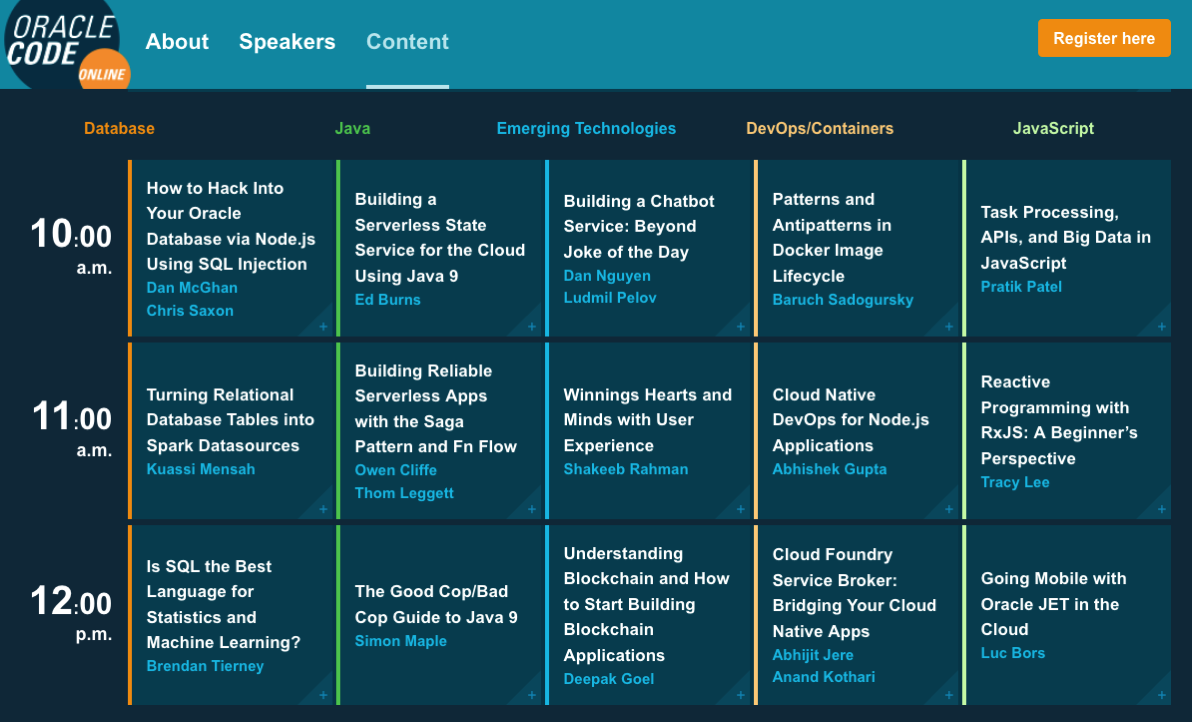
I’ve been selected to give one of these talks, and I’ve given this talk at some live Oracle Code events and at JavaOne back in October.
The present is pre-recorded and I recorded this video back in September.
I hope to be online at the end of some of these presentations to answer any questions, but unfortunately due to changes with my work commitments I may not be able to be online for all of them.
The moderator for these events will take your questions (or you can send them to me here) and I will write a blog post answering all your questions.
Irish people presenting at OOW
Here is a list of presentations at Oracle Open World and JavaOne in 2017, that will be given by people and partners based in Ireland.
(I’ll update this list if I find additional presentations)
table.myTable { border-collapse:collapse; }
table.myTable td, table.myTable th { border:1px solid black;padding:5px; }
| Day | Time | Presentation | Location |
|---|---|---|---|
| Sunday | 13:45-14:30 | SQL: One Language to Rule All Your Data [OOW SUN1238]
Brendan Tierney, Oralytics SQL is a very powerful language that has been in use for almost 40 years. SQL comes with many powerful techniques for analyzing your data, and you can analyze data outside the database using SQL as well. Using the new Oracle Big Data SQL it is now possible to analyze data that is stored in a database, in Hadoop, and in NoSQL all at the same time. This session explores the capabilities in Oracle Database that allow you to work with all your data. Discover how SQL really is the unified language for processing all your data, allowing you to analyze, process, run machine learning, and protect all your data. Hopefully this presentation will be a bit of Fun! For those who have been working with the database for a long time, we can sometimes forget what we can really do. For those starting out in the career may not realise what the database can do. The presentation delivers an important message while having a laugh or two (probably at me). | Marriott Marquis (Golden Gate Level) – Golden Gate C1/C2 |
| Monday | 16:30-17:15 | ESB Networks Automates Core IT Infrastructure and Grid Operations [CON7878]
Simon Holt, DBA / Technical Architect, ESB Networks Andrew Walsh, OMS Application Support, ESB In this session learn how ESB Networks deployed Oracle Utilities Network Management System Release 1.12 on a complete Oracle SuperCluster. Hear about the collaboration between multiple Oracle business units and the in-house expertise that delivered an end-to-end solution. This upgrade is an important step toward expanding ESB Network’s future network operations vision. Her about the challenges, the process of choosing a COTS solution, cybersecurity, and implementation. The session also explores the benefits the new system delivered when managing the effects of large-scale weather events, as well as the technical challenges of deploying a combined hardware and software solution. |
Park Central (Floor 2) – Metropolitan I |
| Monday | 16:45-17:30 | Automation and Innovation for Application Management and Support [CON7862]
Raja Roy, Associate Partner, IBM Ireland Automation and innovation are transforming the way application support and development projects are being executed. Market trends show three fundamental shifts: innovation to improve quality of service delivery, the emergence of knowledge-based systems with capabilities for self-service and self-heal, and leveraging the power of the cloud to move capital expenditures to operating expenditures for enhanced functionality. In this session see how IBM introduced innovation in deployments globally to help customers achieve employee and business productivity and enhanced quality of services. |
Moscone West – Room 3022 |
| Tuesday | 12:15-13:00 | DMigrating Oracle E-Business Suite to Oracle IaaS: A Customer Journey [CON1848]
Ken MacMahon, IT, Version 1 Ken Lynch, Head of IT, Irish Life Simon Joyce, Consultant / Contractor, Version 1 Software In this session hear about a leading global insurance provider’s experience of migrating Oracle E-Business Suite to Oracle Cloud. This session includes a discussion of the considerations for Oracle Iaas/PaaS vs. alternatives, the total cost of ownership for Oracle IaaS vs. on-premises solutions, the key project and support issues, the benefits of IaaS, and tips and tricks. Gain insights that can help others on their journey with Oracle IaaS generally and with Oracle E-Business Suite specifically. |
Moscone West – Room 2001 |
| Wednesday | 14:00-14:45 | Ireland’s An Post: Customer Analytics Using Oracle Analytics Cloud [CON7176]
Tony Cassidy, CEO, Vertice John Hagerty, Oracle An Post, the Republic of Ireland’s state-owned provider of postal services, is an organization in transformation. It has used data and analytics to create innovations that led to cost savings and better sustainability. The current focus—customer analytics for a new line of business called Parcels and Packets—utilizes Oracle Analytics Cloud to externalize pertinent data to clients through a portal in a secure, effective, and easy-to-manage environment. In this session hear from An Post and its partner, Vertice, as they discuss the architecture and solution, along with recommendations for ensuring success using Oracle Analytics Cloud. |
Moscone West – Room 3009 |
| Thursday | 13:45-14:30 | Is SQL the Best Language for Statistics and Machine Learning? [OOW and JavaOne CON7350]
Brendan Tierney, Oralytics Did you know that Oracle Database comes with more than 300 statistical functions? And most of these statistical functions are available in all versions of Oracle Database? Most people do not seem to know this. When we hear about people performing statistical analytics, we hear them talking about Excel and R, but what if we could do statistical analysis in the database without having to extract any data onto client machines? This presentation explores the various statistical areas available in Oracle Database and gives several demonstrations. We can also greatly expand our statistical capabilities by using Oracle R Enterprise with the embedded capabilities in SQL. This presentation is just one of the 14 presentations that are scheduled for the Thursday! I believe this session is already fully booked, but you can still add yourself to the wait list. |
Marriott Marquis (Golden Gate Level) – Golden Gate B |
My Oracle Open World 2017 Presentations
Oracle Open World 2017 will be happening very soon (1st-5th October). Still lots to do before I can get on that plane to San Francisco.
This year I’ll be giving 2 presentations (see table below). One on the Sunday during the User Groups Sunday sessions. I’ve been accepted on the EMEA track. I then get a few days off to enjoy and experience OOW until Thursday when I have my second presentation that is part of JavaOne (I think!)
My OOW kicks off on Friday 29th September with the ACE Director briefing at Oracle HQ, after flying to SFO on Thursday 28th. This year it is only for one day instead of two days. I really enjoy this event as we get to learn and see what Oracle will be announcing at OOW as well as some things that will be coming out during the following few months.
table.myTable { border-collapse:collapse; }
table.myTable td, table.myTable th { border:1px solid black;padding:5px; }
| Day | Time | Presentation | Location |
|---|---|---|---|
| Sunday | 13:45-14:30 | SQL: One Language to Rule All Your Data [OOW SUN1238]
SQL is a very powerful language that has been in use for almost 40 years. SQL comes with many powerful techniques for analyzing your data, and you can analyze data outside the database using SQL as well. Using the new Oracle Big Data SQL it is now possible to analyze data that is stored in a database, in Hadoop, and in NoSQL all at the same time. This session explores the capabilities in Oracle Database that allow you to work with all your data. Discover how SQL really is the unified language for processing all your data, allowing you to analyze, process, run machine learning, and protect all your data. Hopefully this presentation will be a bit of Fun! For those who have been working with the database for a long time, we can sometimes forget what we can really do. For those starting out in the career may not realise what the database can do. The presentation delivers an important message while having a laugh or two (probably at me). | Marriott Marquis (Golden Gate Level) – Golden Gate C1/C2 |
| Thursday | 13:45-14:30 | Is SQL the Best Language for Statistics and Machine Learning?
[OOW and JavaOne CON7350] Did you know that Oracle Database comes with more than 300 statistical functions? And most of these statistical functions are available in all versions of Oracle Database? Most people do not seem to know this. When we hear about people performing statistical analytics, we hear them talking about Excel and R, but what if we could do statistical analysis in the database without having to extract any data onto client machines? This presentation explores the various statistical areas available in Oracle Database and gives several demonstrations. We can also greatly expand our statistical capabilities by using Oracle R Enterprise with the embedded capabilities in SQL. This presentation is just one of the 14 presentations that are scheduled for the Thursday! I believe this session is already fully booked, but you can still add yourself to the wait list. |
Marriott Marquis (Golden Gate Level) – Golden Gate C3 |
My flights and hotel have been paid by OTN as part of the Oracle ACE Director program. Yes this costs a lot of money and there is no way I’d be able to pay these costs. Thank you.
My diary for OOW is really full. No it is completely over booked. It is just mental. Between attending conference session, meeting with various product teams (we only get to meet at OOW), attending various community meet-ups, this year I get to attend some events for OUG leaders (representing UKOUG), spending some time on the EMEA User Group booth, various meetings with people to discuss how they can help or contribute to the UKOUG, then there is Oak Table World, trying to check out the exhibition hall, spend some time at the OTN/ODC hangout area, getting a few OTN t-shirts, doing some book promotions at the Oracle Press shop, etc., etc., etc. I’m exhausted just thinking about it. Mosts days start at 7am and then finish around 10pm.
I’ll need a holiday when I get home! but it will be straight back to work 😦
If you are at OOW and want to chat then contact me via DM on Twitter or WhatsApp (these two are best) or via email (this will be the slowest way).
I’ll have another blog post listing the presentations from various people and partners from the Republic of Ireland who are speaking at OOW.
12.2 DBaaS (Extreme Edition) possible bug/issue with the DB install/setup
A few weeks ago the 12.2 Oracle Database was released on the cloud. I immediately set an account and got my 12.2 DBaaS setup. This was a relatively painless process and quick.
For me I wanted to test out all the new Oracle Advanced Analytics new features and the new features in SQL Developer 4.2 that only become visible when you are using the 12.2 Database.
When you are go to use the Oracle Data Miner (GUI tool) in SQL Developer 4.2, it will check to see if the ODMr repository is installed in the database. If it isn’t then you will be promoted for the SYS password.
This is the problem. In previous version of the DBaaS (12.1, etc) this was not an issue.
When you go to create your DBaaS you are asked for a password that will be used for the admin accounts of the database.
But when I entered the password for SYS, I got an error saying invalid password.
After using ssh to create a terminal connection to the DBaaS I was able to to connect to the container using
sqlplus / as sysdba
and also using
sqlplus sys/ as sysdba
Those worked fine. But when I tried to connect to the PDB1 I got the invalid username and/or password error.
sqlplus sys/@pdb1 as sysdba
I reconnected as follows
sqlplus / as sysdba
and then changed the password for SYS with containers=all
This command completed without errors but when I tried using the new password to connect the the PDB1 I got the same error.
After 2 weeks working with Oracle Support they eventually pointed me to the issue of the password file for the PDB1 was missing. They claim this is due to an error when I was creating/installing the database.
But this was a DBaaS and I didn’t install the database. This is a problem with how Oracle have configured the installation.
The answer was to create a password file for the PDB1 using the following
Examining predicted Clusters and Cluster details using SQL
In a previous blog post I gave some details of how you can examine some of the details behind a prediction made using a classification model. This seemed to spark a lot of interest. But before I come back to looking at classification prediction details and other information, this blog post is the first in a 4 part blog post on examining the details of Clusters, as identified by a cluster model created using Oracle Data Mining.
The 4 blog posts will consist of:
- 1 – (this blog post) will look at how to determine the predicted cluster and cluster probability for your record.
- 2 – will show you how to examine the details behind and used to predict the cluster.
- 3 – A record could belong to many clusters. In this blog post we will look at how you can determine what clusters a record can belong to.
- 4 – Cluster distance is a measure of how far the record is from the cluster centroid. As a data point or record can belong to many clusters, it can be useful to know the distances as you can build logic to perform different actions based on the cluster distances and cluster probabilities.
Right. Let’s have a look at the first set of these closer functions. These are CLUSTER_ID and CLUSTER_PROBABILITY.
CLUSER_ID : Returns the number of the cluster that the record most closely belongs to. This is measured by the cluster distance to the centroid of the cluster. A data point or record can belong or be part of many clusters. So the CLUSTER_ID is the cluster number that the data point or record most closely belongs too.
CLUSTER_PROBABILITY : Is a probability measure of the likelihood of the data point or record belongs to a cluster. The cluster with the highest probability score is the cluster that is returned by the CLUSTER_ID function.
Now let us have a quick look at the SQL for these two functions. This first query returns the cluster number that each record most strong belongs too.
SELECT customer_id,
       cluster_id(clus_km_1_37 USING *) as Cluster_Id,
FROM   insur_cust_ltv_sample
WHERE  customer_id in ('CU13386', 'CU6607', 'CU100');

Now let us add in the cluster probability function.
SELECT customer_id,
       cluster_id(clus_km_1_37 USING *) as Cluster_Id,
       cluster_probability(clus_km_1_37 USING *) as cluster_Prob
FROM   insur_cust_ltv_sample
WHERE  customer_id in ('CU13386', 'CU6607', 'CU100');
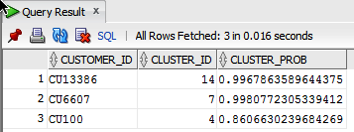
These functions gives us some insights into what the cluster predictive model is doing. In the remaining blog posts in this series I will look at how you can delve deeper into the predictions that the cluster algorithm is make.
PREDICTION_DETAILS function in Oracle
When building predictive models the data scientist can spend a large amount of time examining the models produced and how they work and perform on their hold out sample data sets. They do this to understand is the model gives a good general representation of the data and can identify/predict many different scenarios. When the “best” model has been selected then this is typically deployed is some sort of reporting environment, where a list is produced. This is typical deployment method but is far from being ideal. A more ideal deployment method is that the predictive models are build into the everyday applications that the company uses. For example, it is build into the call centre application, so that the staff have live and real-time feedback and predictions as they are talking to the customer.
But what kind of live and real-time feedback and predictions are possible. Again if we look at what is traditionally done in these applications they will get a predicted outcome (will they be a good customer or a bad customer) or some indication of their value (maybe lifetime value, possible claim payout value) etc.
But can we get anymore information? Information like what was reason for the prediction. This is sometimes called prediction insight. Can we get some details of what the prediction model used to decide on the predicted value. In more predictive analytics products this is not possible, as all you are told is the final out come.
What would be useful is to know some of the thinking that the predictive model used to make its thinking. The reasons when one customer may be a “bad customer” might be different to that of another customer. Knowing this kind of information can be very useful to the staff who are dealing with the customers. For those who design the workflows etc can then build more advanced workflows to support the staff when dealing with the customers.
Oracle as a unique feature that allows us to see some of the details that the prediction model used to make the prediction. This functions (based on using the Oracle Advanced Analytics option and Oracle Data Mining to build your predictive model) is called PREDICTION_DETAILS.
When you go to use PREDICTION_DETAILS you need to be careful as it will work differently in the 11.2g and 12c versions of the Oracle Database (Enterprise Editions). In Oracle Database 11.2g the PREDICTION_DETAILS function would only work for Decision Tree models. But in 12c (and above) it has been opened to include details for models created using all the classification algorithms, all the regression algorithms and also for anomaly detection.
The following gives an example of using the PREDICTION_DETAILS function.
select cust_id,
       prediction(clas_svm_1_27 using *) pred_value,
       prediction_probability(clas_svm_1_27 using *) pred_prob,
       prediction_details(clas_svm_1_27 using *) pred_details
from mining_data_apply_v;
The PREDICTION_DETAILS function produces its output in XML, and this consists of the attributes used and their values that determined why a record had the predicted value. The following gives some examples of the XML produced for some of the records.
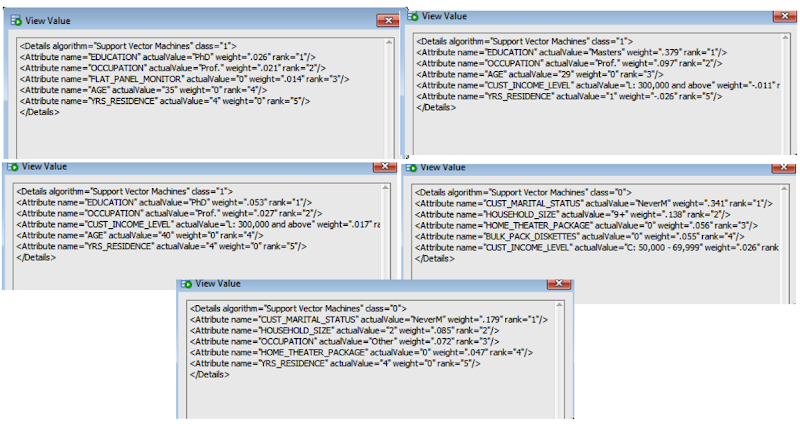
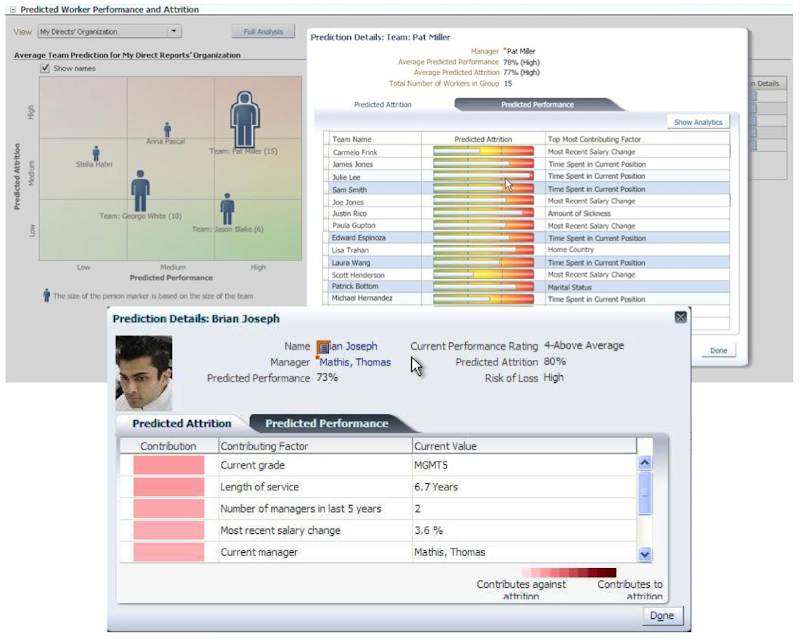
I’ve used this particular function in lots of my projects and particularly when building the applications for a particular business unit. Oracle too has build this functionality into many of their applications. The images below are from the HCM application where you can examine the details why an employee may or may not leave/churn. You can when perform real-time what-if analysis by changing some of attribute values to see if the predicted out come changes.
- ← Previous
- 1
- …
- 3
- 4
- 5
- Next →
 Ora-lytics
You must be logged in to post a comment.