
Month: September 2022
OML4R available on ADB
Oracle Machine Learning for R (OML4R) is available on Oracle Autonomous Database. Finally. After waiting for way, way too long we can now run R code in the Autonomous Database (in the Cloud). It’s based on using Oracle R Distribution 4.0.5 (which is based on R 4.0.5). This product was previously called Oracle R Enterprise, which I was a fan of many few years ago, so much so I wrote a book about it.
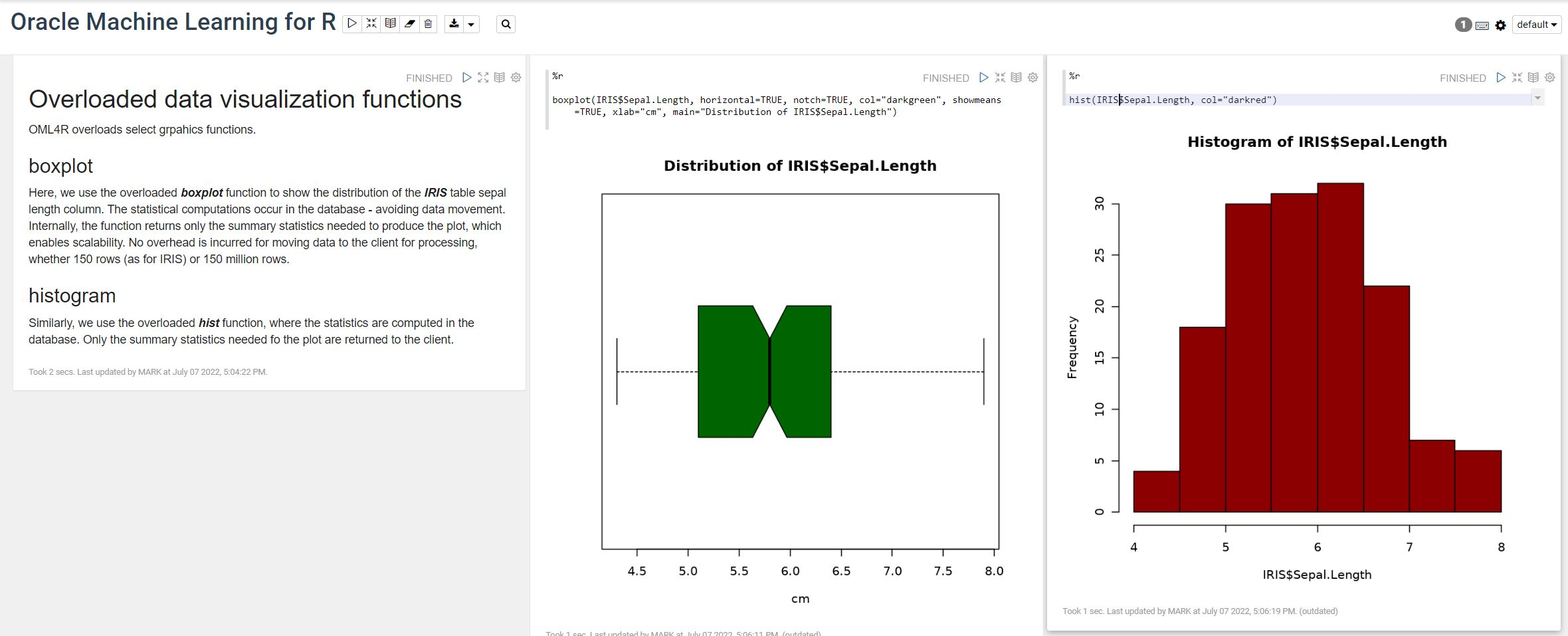
OML4R comes with all (or most) of the benefits of Oracle R Enterprise, whereby you can connect to, in this case an Oracle Autonomous Database (in the Cloud), allowing data scientists work with R code and manipulate data in the database instead of in their local environment. Embed R code in the database and enable other database users (and applications) to call this R code. Although with OML4R on ADB (in the Cloud) does come with some limitations and restrictions, which will put people/customers off from using it.
Waiting for OML4R reminds me of Eurovision Song Contest winning song by Johnny Logan titled,
I’ve been waiting such a long time
Looking out for you
But you’re not here
What’s another year
It has taken Oracle way, way too long to migrate OML4R to ADB. They’ve probably just made it available because one or two customers needed/asked it.
As the lyrics from Johnny Logan says (changing I’ve to We’ve), We’ve been waiting such a long time, most customers have moved to other languages, tools and other cloud data science platforms for their data science work. The market has moved on, many years ago.
Hopefully over the next few months, and with Oracle 23c Database, we might see some innovation, or maybe their data science and AI focus lies elsewhere within Oracle development teams.
Running Oracle Database on Docker on Apple M1 Chip
Click on this link to see the latest way to run Oracle 23ai Database on Docker. The instructions below are a bit obsolete, although they work for M1. To run Oracle 23ai Database on Docker on Apple Scilcon check out the instructions on this link.
This post is for you if you have an Apple M1 laptop and cannot get Oracle Database to run on Docker.
The reason Oracle Database, and lots of other software, doesn’t run on the new Apple Silicon is their new chip uses a different instruction set to what is used by Intel chips. Most of the Database vendors have come out to say they will not be porting their Databases to the M1 chip, as most/all servers out there run on x86 chips, and the cost of porting is just not worth it, as there is zero customers.
Are you using an x86 Chip computer (Windows or Macs with intel chips)? If so, follow these instructions (and ignore this post)
If you have been using Apple for your laptop for some time and have recently upgraded, you are now using the M1 chip, and you have probably found some of your software doesn’t run. In my scenario (and with many other people) you can no longer run an Oracle Database 😦
But there does seem to be a possible solution and this has been highlighted by Tom de Vroomen on his blog. A workaround is to spin up an x86 container using Colima. Tom has given some instructions on his blog, and what I list below is an extended set of instructions to get fully set up and running with Oracle on Docker on M1 chip.
1-Install Homebrew
You might have Homebrew installed, but if not run the following to install.
/bin/bash -c "$(curl -fsSL https://raw.githubusercontent.com/Homebrew/install/HEAD/install.sh)"2-Install colima
You can now install Colima using Homebrew. This might take a minute or two to run.
brew install colima3-Start colima x86 container
With Colima installed, we can now start an x86 container.
colima start --arch x86_64 --memory 4
The container will be based on x86, which is an important part of what we need. The memory is 4GB, but you can probably drop that a little.
The above command should start within a second or two.
4-Install Oracle Database for Docker
The following command will create an Oracle Database docker image using the image created by Gerald Venzi.
docker run -d -p 1521:1521 -e ORACLE_PASSWORD=<your password> -v oracle-volume:/opt/oracle/oradata gvenzl/oracle-xe
23c Database – If you want to use the 23c Database, Check out this post for the command to install
I changed <your password> to SysPassword1.
This will create the docker image and will allow for any changes to the database to be persisted after you shutdown docker. This is what you want to happen.
5-Log-in to Oracle as System
Open the docker client to see if the Oracle Database image is running. If not click on the run button.

When it finishes starting up, open the command line (see icon to the left of the run button), and log in as the SYSTEM user.
sqlplus system/SysPassword1@//localhost/XEPDB1
You are now running Oracle Database on Docker on an M1 chip laptop 🙂
6-Create new user
You shouldn’t use the System user, as that is like using root for everything. You’ll need to create a new user/schema in the database for you to use for your work. Run the following.
create user brendan identified by BTPassword1 default tablespace usersgrant connect, resource to brendan;If these run without any errors you now have your own schema in the Oracle Database on Docker (on M1 chip)
7-Connect using SQL*Plus & SQL Developer
Now let’s connect to the schema using sqlplus.
sqlplus brendan/BTPassword1@//localhost/XEPDB1That should work for you and you can now proceed using the command line tool.
If you refer to use a GUI tool then go install SQL Developer. Jeff Smith has a blog post about installing SQL Developer on M1 chip. Here is the connection screen with all the connection details entered (using the username and password given/used above)

You can now use the command line as well as SQL Developer to connect to your Oracle Database (on docker on M1).
8-Stop Docker and Colima
After you have finished using the Oracle Database on Docker you will want to shut it down until the next time you want to use it. There are two steps to follow. The first is to stop the Docker image. Just go to the Docker Desktop and click on the Stop button. It might take a few seconds for it to shutdown.
The second thing you need to do is to stop Colima.
colima stopThat’s it all done.
9-What you need to run the next time (and every time after that)
For the second and subsequent time you want to use the Oracle Docker image all you need to do is the following
(a) Start Colima
colima start --arch x86_64 --memory 4
(b) Start Oracle on Docker
Open Docker Desktop and click on the Run button [see Docker Desktop image above]
And to stop everything
(a) Stop the Oracle Database on Docker Desktop
(b) Stop Colima by running ‘colima stop’ in a terminal
Oracle Database In-Memory – simple example
In a previous post, I showed how to enable and increase the memory allocation for use by Oracle In-Memory. That example was based on using the Pre-built VM supplied by Oracle.
To use In-Memory on your objects, you have a few options.
Enabling the In-Memory attribute on the EXAMPLE tablespace by specifying the INMEMORY attribute
SQL> ALTER TABLESPACE example INMEMORY;Enabling the In-Memory attribute on the sales table but excluding the “prod_id” column
SQL> ALTER TABLE sales INMEMORY NO INMEMORY(prod_id);Disabling the In-Memory attribute on one partition of the sales table by specifying the NO INMEMORY clause
SQL> ALTER TABLE sales MODIFY PARTITION SALES_Q1_1998 NO INMEMORY;Enabling the In-Memory attribute on the customers table with a priority level of critical
SQL> ALTER TABLE customers INMEMORY PRIORITY CRITICAL;You can also specify the priority level, which helps to prioritise the order the objects are loaded into memory.

A simple example to illustrate the effect of using In-Memory versus not.
Create a table with, say, 11K records. It doesn’t really matter what columns and data are.
Now select all the records and display the explain plan
select count(*) from test_inmemory;
Now, move the table to In-Memory and rerun your query.
alter table test_inmemory inmemory PRIORITY critical;
select count(*) from test_inmemory;  -- again
There you go!
We can check to see what object are In-Memory by
SELECT table_name, inmemory, inmemory_priority, inmemory_distribute,
       inmemory_compression, inmemory_duplicate
FROM user_tables
WHERE inmemory = 'ENABLED’
ORDER BY table_name;
To remove the object from In-Memory
SQL > alter table test_inmemory no inmemory; -- remove the table from in-memory
This is just a simple test and lots of other things can be done to improve performance
But, you do need to be careful about using In-Memory. It does have some limitations and scenarios where it doesn’t work so well. So care is needed
CAO Points 2022 – Grade inflation, deflation or in-line
Last week I wrote a blog post analysing the Leaving Cert results over the past 3-8 years. Part of that post also looked at the claim from the Dept of Education saying the results in 2022 would be “in-line on aggregate” with the results from 2021. The outcome of the analysis was grade deflation was very evident in many subjects, but when analysed and profiled at a very high level, they did look similar.
I didn’t go into how that might impact on the CAO (Central Applications Office) Points. If there was deflation in some of the core and most popular subjects, then you might conclude there could be some changes in the profile of CAO Points being awarded, and that in turn would have a small change on the CAO Points needed for a lot of University courses. But not all of them, as we saw last week, the increased number of students who get grades in the H4-H7 range. This could mean a small decrease in points for courses in the 520+ range, and a small increase in points needed in the 300-500-ish range.
The CAO have published the number of students of each 10 point range. I’ve compared the 2022 data, with each year going back to 2015. The following table is a high level summary of the results in 50 point ranges.
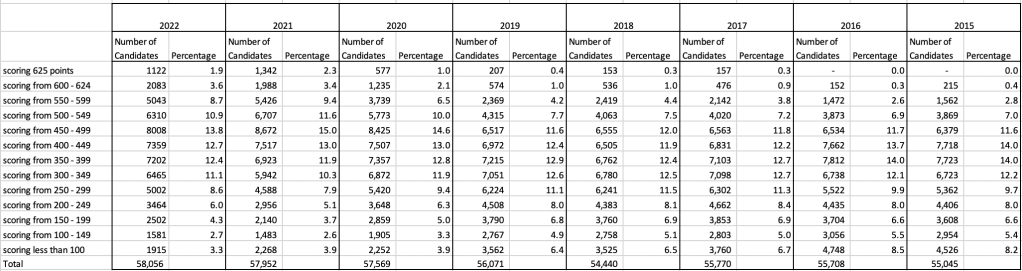
An initial look at these numbers and percentages might look like points are similar to last year and even 2020. But for 2015-2019 the similarity is closer. Again looking back at the previous blog post, we can see the results profiles for 20215-2019 are broadly similar and does indicate some normalisation might have been happening each year. The following chart illustrate the percentage of students who achieved points in each range.
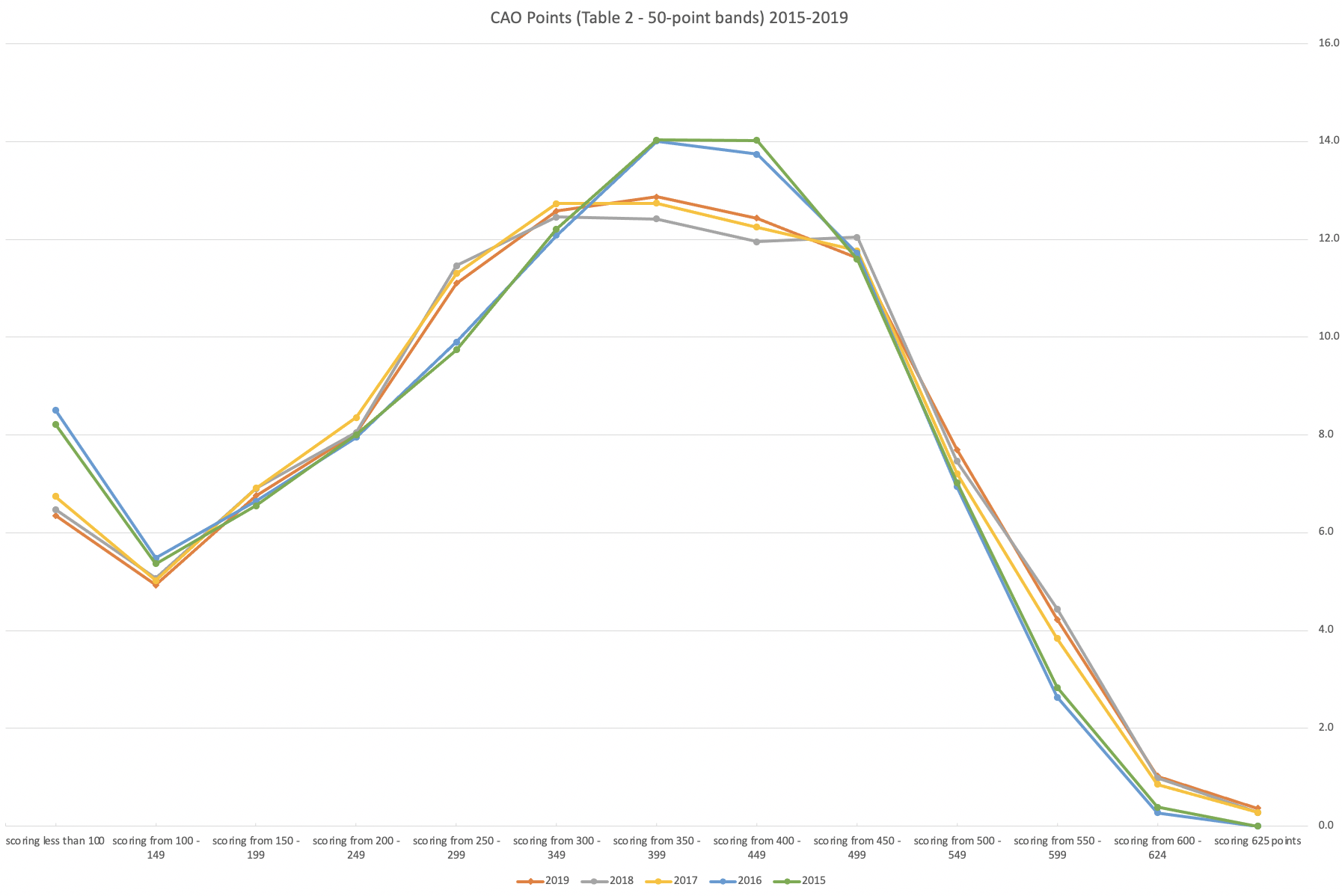
From the above we can see the profile is similar across 2015-2019, although there does seem to be a flattening of the curve between 2015-2016!
Let’s now have a look at 2019 (the last pre-coivd year), 2021 and 2022. This will allow use to compare the “inflated” years to the last “normal” year.
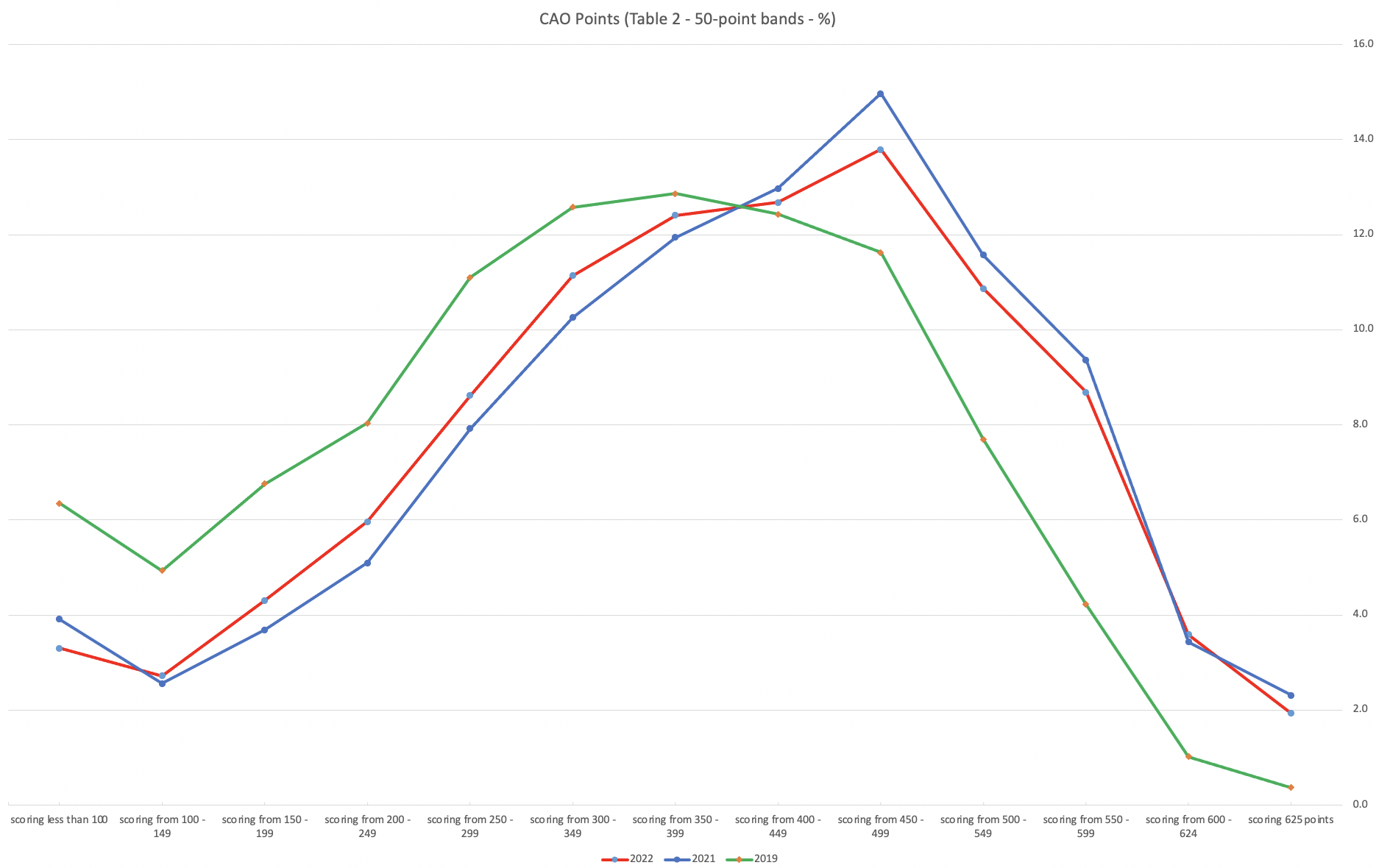
This chart clearly shows a shifting of the profile to the left for the red line which represents 2022. This also supports my blog post last week, and that the Dept of Education has started the process of deflating marks.
Based on this shifting/deflating of marks, we could see the grade/CAO Points profiles reverting back to almost 2019 profile by 2025. For students sitting the Leaving Cert in 2023, there will be another shift to the left, and with another similar shift in 2024. In 2024, the students will be the last group to sit the Leaving Cert who were badly affected during the Covid years. Many of them lost large chunks on school and many didn’t sit the Junior Cert. I’d predict 2025 will see the first time the marks/points profiles will match pre-covid years.
For this analysis I’ve used a variety of tools including Excel, Python and Oracle Analytics.
The Dataset used can be found under Dataset menu, and listed as ‘CAO Points Profiles 2015-2022’. Also, check out the Leaving Certificate 2015-2022 dataset.
Leaving Cert 2022 Results – Inflation, deflation or in-line!
The Leaving Certificate 2022 results are out. Up and down the country there are people who are delighted with their results, while others are disappointed, and lots of other emotions.
The Leaving Certificate is the terminal examination for secondary education in Ireland, with most students being examined in seven subjects, with their best six grades counting towards their “points”, which in turn determines what university course they might get. Check out this link for learn more about the Leaving Certificate.
The Dept of Education has been saying, for several months, this results this year (2022) will be “in-line on aggregate” with the results from 2021. There has been some concerns about grade inflation in 2021 and the impact it will have on the students in 2022 and future years. At some point the Dept of Education needs to address this grade inflation and look to revert back to the normal profile of grades pre-Covid.
Let’s have a look to see if this is true, and if it is true when we look a little deeper. Do the aggregate results hide grade deflation in some subjects.
For the analysis presented in this blog post, I’ve just looked at results at Higher Level across all subjects, and for the deeper dive I’ll look at some of the most popular subjects.
Firstly let’s have a quick look at the distribution of grades by subject for 2022 and 2021.
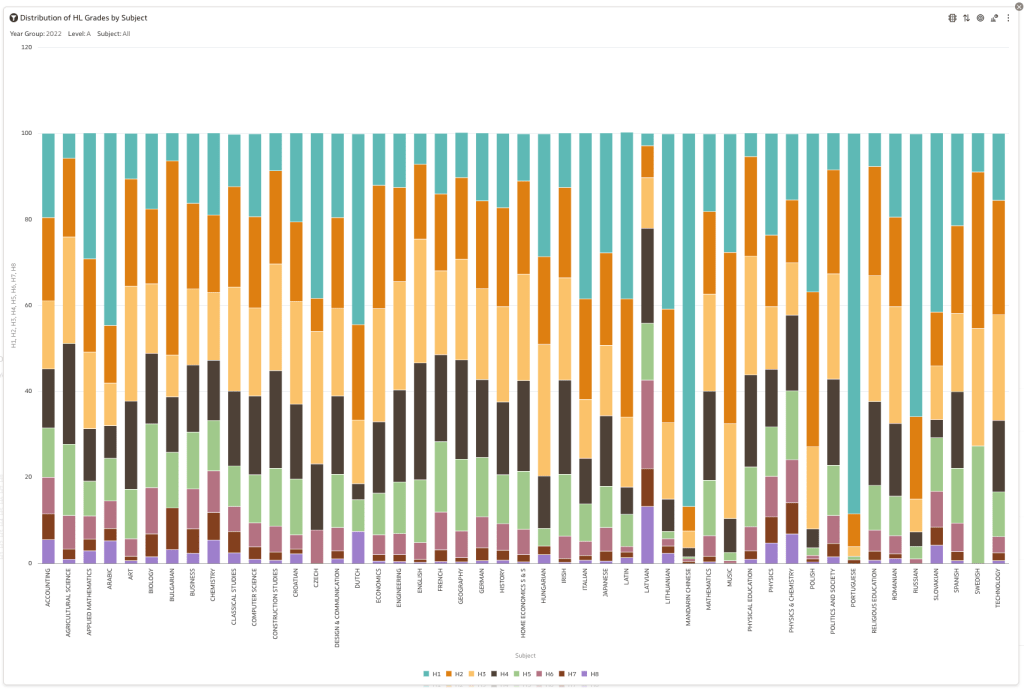
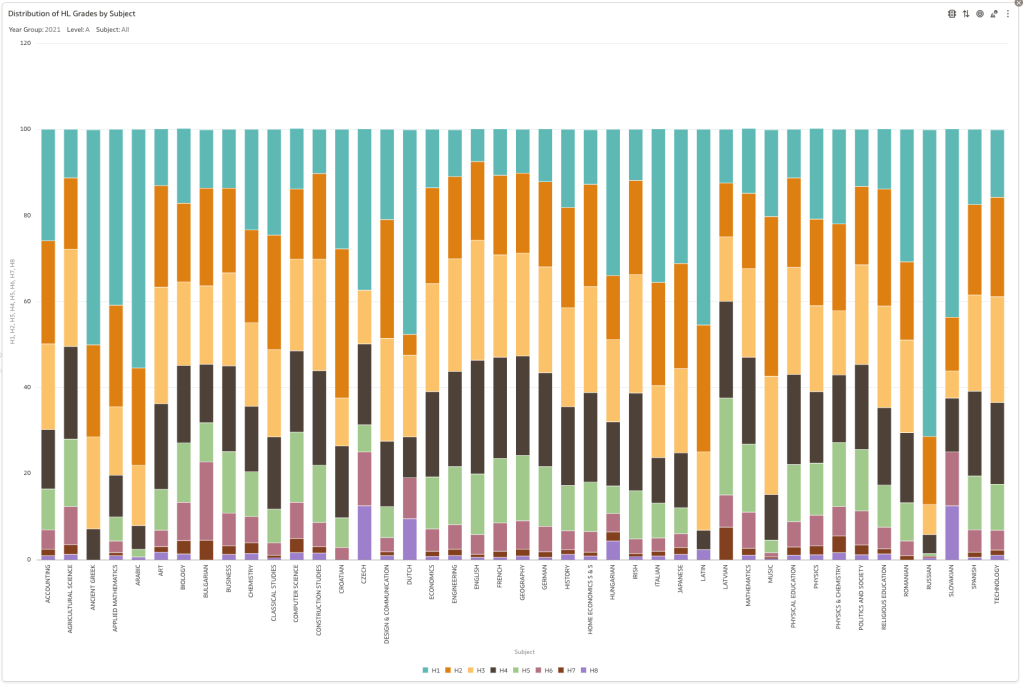
Remember the Dept of Education said the 2022 results should be in-line with the results of 2021. This required them to apply some adjustments, after marking the exam scripts, to give an updated profile. The following chart shows this comparison between the two years. On initial inspection we can see it is broadly similar. This is good, right? It kind of is and at a high level things look broadly in-line and maybe we can believe the Dept of Education. Looking a little closer we can see a small decrease in the H2-H4 range, and a slight increase in the H5-H8.
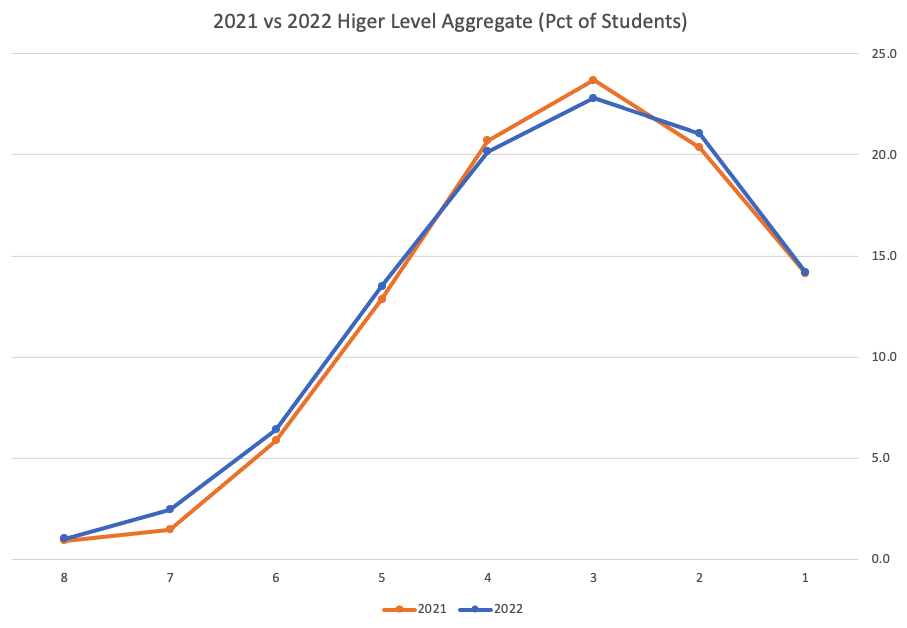
Let’s dive a little deeper. When we look at the grade profile of students in 2021 and 2022, How many subjects increased the number of students at each grade vs How many subjects decreased grades vs How many approximately stated the same. The table below shows the results and only counts a change if it is greater than 1% (to allow for minor variations between years).

This table in very interesting in that more subjects decreased their H1s, with some variation for the H2-H4s, while for the lower range of H5-H7 we can see there has been an increase in grades. If I increased the margin to 3% we get a slightly different results, but only minor changes.
“in-line on aggregate” might be holding true, although it appears a slight increase on the numbers getting the lower grades. This might indicate either more of an adjustment to weaker students and/or a bit of a down shifting of grades from the H2-H4 range. But at the higher end, more subjects reduced than increase. The overall (aggregate) numbers are potentially masking movements in grade profiles.
Let’s now have a look at some of the core subjects of English, Irish and Mathematics.
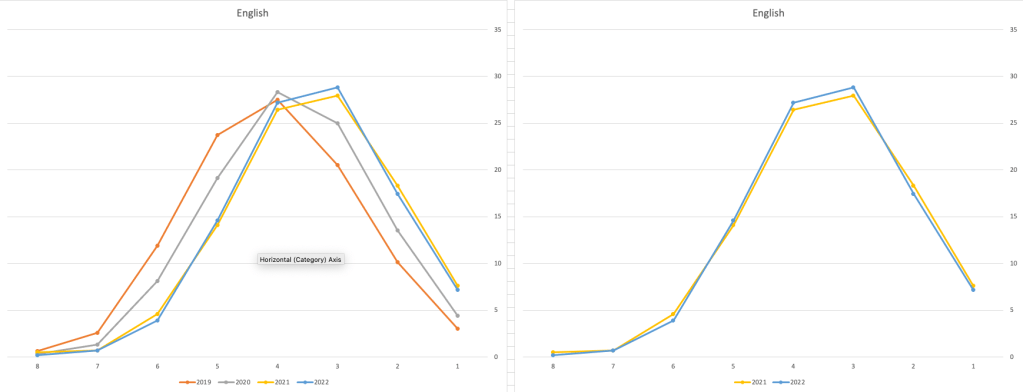
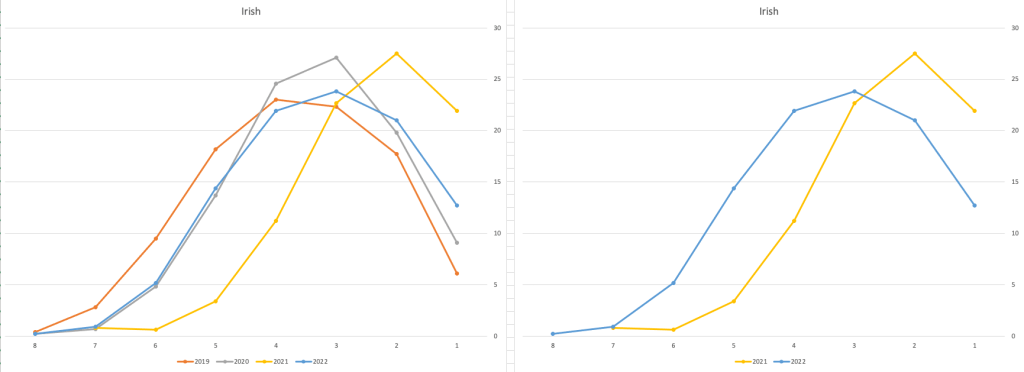
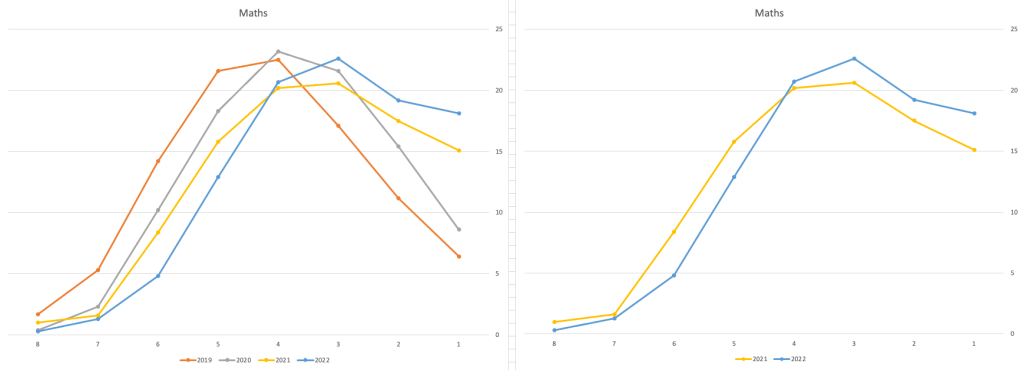
For English, it looks like they fitted to the curve perfectly! keeping grades in-line between the two years. Mathematics is a little different with a slight increase in grades. But when you look at Irish we can see there was definite grade deflation. For each of these subjects, the chart on the left contains four years of data including 2019 when the last “normal” leaving certificate occurred. With Irish the grade profile has been adjusted (deflated) significantly and is closer to 2019 profile than it is to 2021. There was been lots and lots of discussions nationally about how and when grades will revert to normal profile. The 2022 profile for Irish seems to show this has started to happen in this subject, which raises the question if this is occurring in any other subjects, and is hidden/masked by the “in-line on aggregate” figures.
This blog post would become just too long if I was to present the results profile for each of the 42+ subjects.
Let’s have a look as two of the most common foreign languages, French and Spanish.
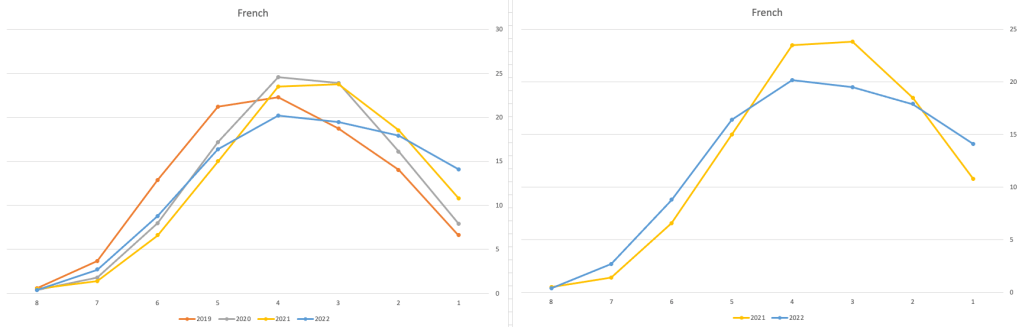
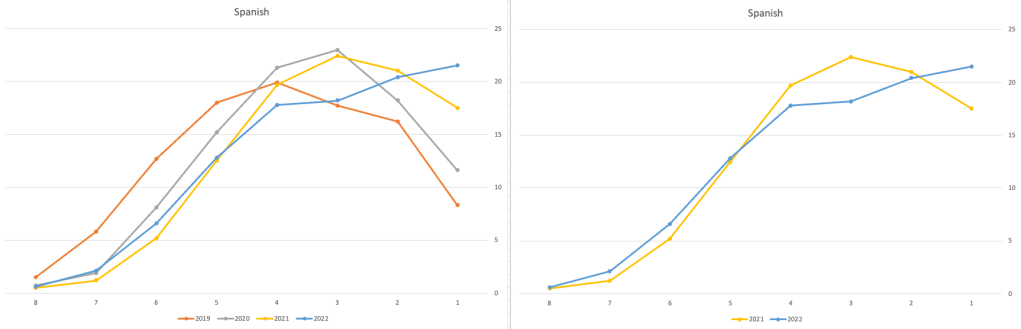
Again we can see some grade deflation, although not to be same extent as Irish. For both French and Spanish, we have reduced numbers for the H2-H4 range and a slight increase for H5-H7, and shift to the left in the profile. A slight exception is for those getting a H1 for both subjects. The adjustment in the results profile is more pronounced for French, and could indicate some deflation adjustments.
Next we’ll look at some of the science subjects of Physics, Chemistry and Biology.
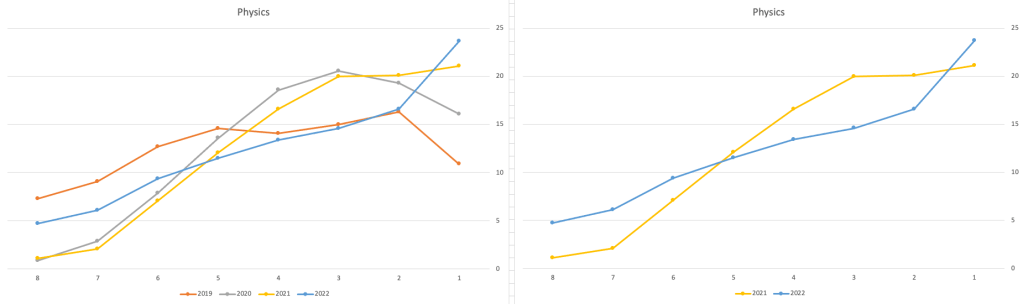
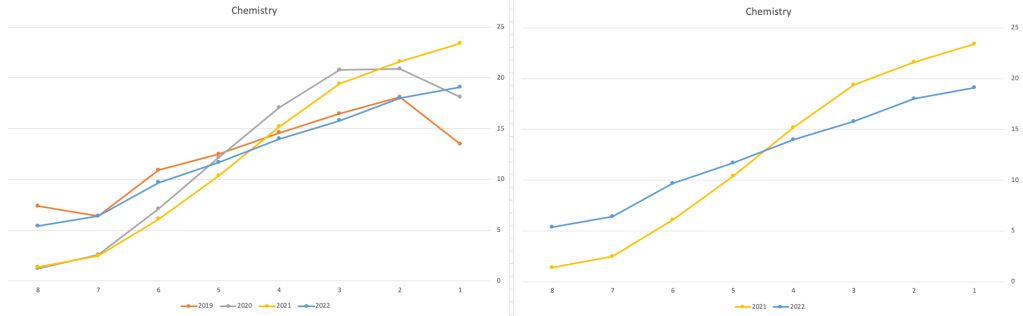
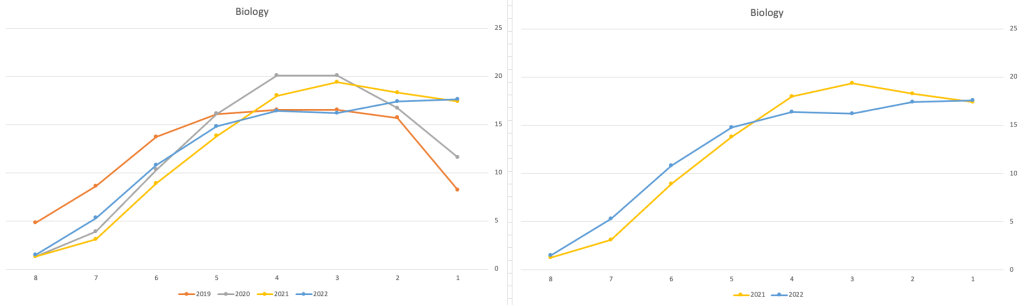
These three subjects also indicate some adjusts back towards the pre-Covid profile, with exception of H1 grades. We can see the 2022 profile almost reflect the 2019 profile (excluding H1s) and for Biology appears to be at a half way point between 2019 and 2022 (excluding H1s)
Just one more example of grade deflation, and this with Design, Communication and Graphics (or DCG)
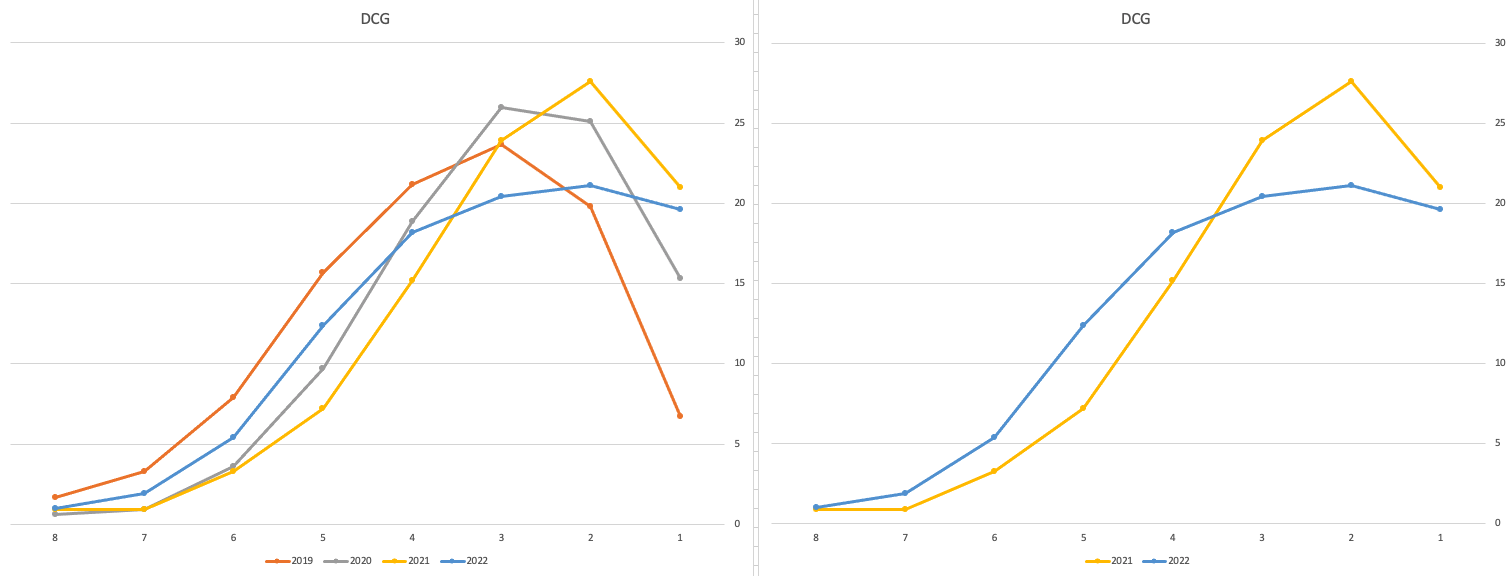
Yes there is obvious grade deflation and almost back to 2019 profile, with the exception of H1s again.
I’ve mentioned some possible grade deflation in various subjects, but there are also subjects where the profile very closely matches the 2021 profile. We have seen above English is one of those. Others include Technology, Art and Computer Science.
I’ve analyzed many more subjects and similar shifting of the profile is evident in those. Has the Dept of Education and State Examinations Commission taken steps to start deflating grades from the highs of 2021? I’d said the answer lies in the data, and the data I’ve looked at shows they have started the deflation process. This might take another couple of years to work out of the system and we will be back to “normal” pre-covid profiles. Which raises another interesting question, Was the grade profile for subjects, pre-covid, fitted to the curve? For the core set of subjects and for many of the more popular subjects, the data seems to indicate this. Maybe the “normal” distribution of marks is down to the “normal” distribution of abilities of the student population each year, or have grades been normalised in some way each year, for years, even decades?
For this analysis I’ve used a variety of tools including Excel, Python and Oracle Analytics.
The Dataset used can be found under Dataset menu, and listed as ‘Leaving Certificate 2015-2022’. An additional Dataset, I’ll be adding soon, will be for CAO Points Profiles 2015-2022.
 Ora-lytics
You must be logged in to post a comment.