
EU AI Act adopts OECD Definition of AI
Over the recent months, the EU AI Act has been making progress through the various hoop in the EU. Various committees and working groups have examined different parts of the AI Act and how it will impact the wider population. Their recommendations have been added to the EU Act and it has now progressed to the next stage for ratification in the EU Parliament which should happen in a few months time.
There are lots of terms within the EU AI Act which needed defining, with the most crucial one being the definition of AI, and this definition underpins the entire act, and all the other definitions of terms throughout the EU AI Act. Back in March of this year, the various political groups working on the EU AI Act reached an agreement on the definition of AI (Artificial Intelligence). The EI AI Act adopts, or is based on, the OECD definition of AI.
“Artificial intelligence system’ (AI system) means a machine-based system that is designed to operate with varying levels of autonomy and that can, for explicit or implicit objectives, generate output such as predictions, recommendations, or decisions influencing physical or virtual environments”

The working groups wanted the AI definition to be closely aligned with the work of international organisations working on artificial intelligence to ensure legal certainty, harmonisation and wide acceptance. The wording includes reference to predictions includes content, this is to ensure generative AI models like ChatGPT are included in the regulation.
Other definitions included are, significant risk, biometric authentication and identification.
“‘Significant risk’ means a risk that is significant in terms of its severity, intensity, probability of occurrence, duration of its effects, and its ability to affect an individual, a plurality of persons or to affect a particular group of persons,” the document specifies.
Remote biometric verification systems were defined as AI systems used to verify the identity of persons by comparing their biometric data against a reference database with their prior consent. That is distinguished by an authentication system, where the persons themselves ask to be authenticated.
On biometric categorisation, a practice recently added to the list of prohibited use cases, a reference was added to inferring personal characteristics and attributes like gender or health.
Machine Learning App Migration to Oracle Cloud VM
Over the past few years, I’ve been developing a Stock Market prediction algorithm and made some critical refinements to it earlier this year. As with all analytics, data science, machine learning and AI projects, testing is vital to ensure its performance, accuracy and sustainability. Taking such a project out of a lab environment and putting it into a production setting introduces all sorts of different challenges. Some of these challenges include being able to self-manage its own process, logging, traceability, error and event management, etc. Automation is key and implementing all of these extra requirements tasks way more code and time than developing the actual algorithm. Typically, the machine learning and algorithms code only accounts for less than five percent of the actual code, and in some cases, it can be less than one percent!
I’ve come to the stage of deploying my App to a production-type environment, as I’ve been running it from my laptop and then a desktop for over a year now. It’s now 100% self-managing so it’s time to deploy. The environment I’ve chosen is using one of the Virtual Machines (VM) available on the Oracle Free Tier. This means it won’t cost me a cent (dollar or more) to run my App 24×7.
My App has three different components which use a core underlying machine learning predictions engine. Each is focused on a different set of stock markets. These marks operate in the different timezone of US markets, European Markets and Asian Markets. Each will run on a slightly different schedule than the rest.
The steps outlined below take you through what I had to do to get my App up and running the VM (Oracle Free Tier). It took about 20 minutes to complete everything
The first thing you need to do is create a ssh key file. There are a number of ways of doing this and the following is an example.
ssh-keygen -t rsa -N "" -b 2048 -C "myOracleCloudkey" -f myOracleCloudkey
This key file will be used during the creation of the VM and for logging into the VM.
Log into your Oracle Cloud account and you’ll find the Create Instances Compute i.e. create a virtual machine/

Complete the Create Instance form and upload the ssh file you created earlier. Then click the Create button. This assumes you have networking already created.

It will take a minute or two for the VM to be created and you can monitor the progress.
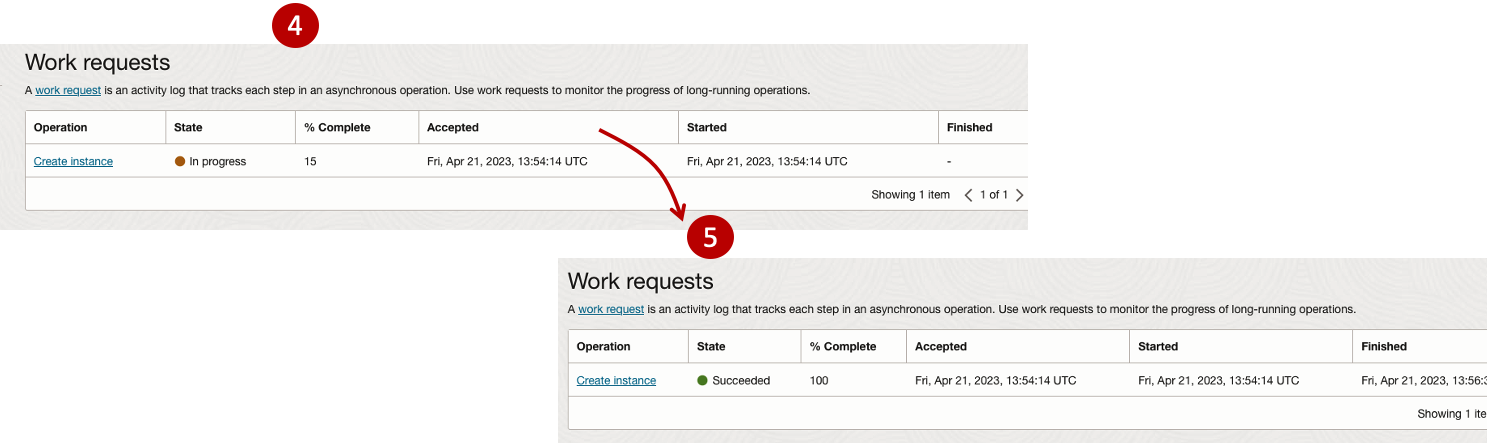
After it has been created you need to click on the start button to start the VM.
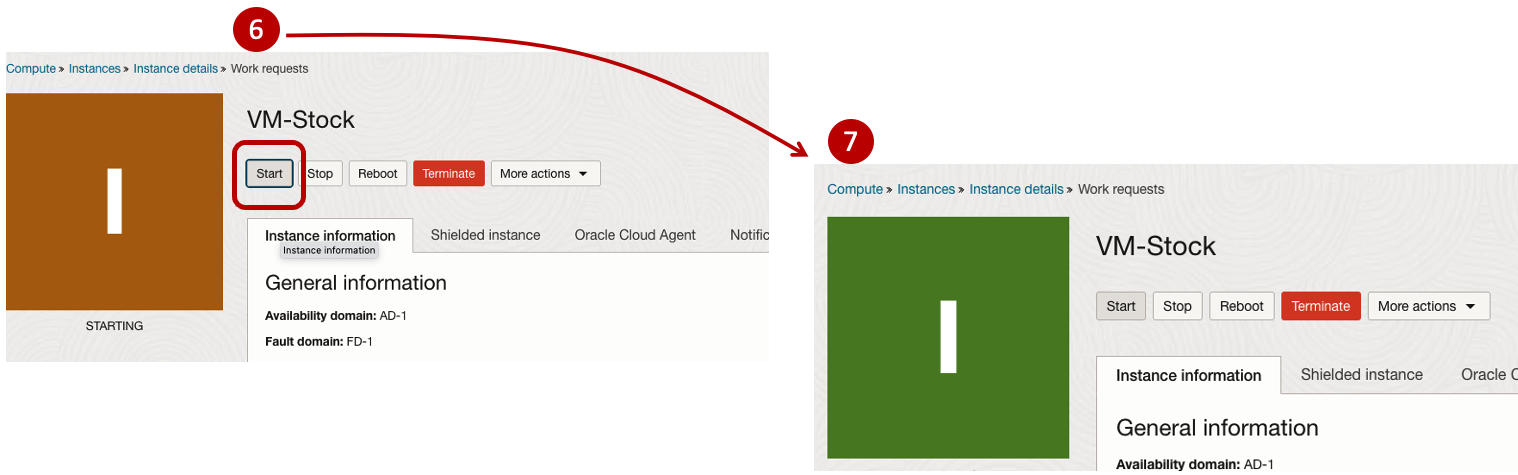
After it has started you can now log into the VM from a terminal window, using the public IP address
ssh -i myOracleCloudKey opc@xxx.xxx.xxx.xxxAfter you’ve logged into the VM it’s a good idea to run an update.
[opc@vm-stocks ~]$ sudo yum -y update
Last metadata expiration check: 0:13:53 ago on Fri 21 Apr 2023 14:39:59 GMT.
Dependencies resolved.
========================================================================================================================
 Package                         Arch       Version                                          Repository            Size
========================================================================================================================
Installing:
 kernel-uek                      aarch64    5.15.0-100.96.32.el8uek                          ol8_UEKR7            1.4 M
 kernel-uek-core                 aarch64    5.15.0-100.96.32.el8uek                          ol8_UEKR7             47 M
 kernel-uek-devel                aarch64    5.15.0-100.96.32.el8uek                          ol8_UEKR7             19 M
 kernel-uek-modules              aarch64    5.15.0-100.96.32.el8uek                          ol8_UEKR7             59 M
Upgrading:
 NetworkManager                  aarch64    1:1.40.0-6.0.1.el8_7                             ol8_baseos_latest    2.1 M
 NetworkManager-config-server    noarch     1:1.40.0-6.0.1.el8_7                             ol8_baseos_latest    141 k
 NetworkManager-libnm            aarch64    1:1.40.0-6.0.1.el8_7                             ol8_baseos_latest    1.9 M
 NetworkManager-team             aarch64    1:1.40.0-6.0.1.el8_7                             ol8_baseos_latest    156 k
 NetworkManager-tui              aarch64    1:1.40.0-6.0.1.el8_7                             ol8_baseos_latest    339 k
...
...
The VM is now ready to setup and install my App. The first step is to install Python, as all my code is written in Python.
[opc@vm-stocks ~]$ sudo yum install -y python39
Last metadata expiration check: 0:20:35 ago on Fri 21 Apr 2023 14:39:59 GMT.
Dependencies resolved.
========================================================================================================================
 Package                         Architecture  Version                                        Repository           Size
========================================================================================================================
Installing:
 python39                        aarch64       3.9.13-2.module+el8.7.0+20879+a85b87b0         ol8_appstream        33 k
Installing dependencies:
 python39-libs                   aarch64       3.9.13-2.module+el8.7.0+20879+a85b87b0         ol8_appstream       8.1 M
 python39-pip-wheel              noarch        20.2.4-7.module+el8.6.0+20625+ee813db2         ol8_appstream       1.1 M
 python39-setuptools-wheel       noarch        50.3.2-4.module+el8.5.0+20364+c7fe1181         ol8_appstream       497 k
Installing weak dependencies:
 python39-pip                    noarch        20.2.4-7.module+el8.6.0+20625+ee813db2         ol8_appstream       1.9 M
 python39-setuptools             noarch        50.3.2-4.module+el8.5.0+20364+c7fe1181         ol8_appstream       871 k
Enabling module streams:
 python39                                      3.9

Transaction Summary
========================================================================================================================
Install  6 Packages

Total download size: 12 M
Installed size: 47 M
Downloading Packages:
(1/6): python39-pip-20.2.4-7.module+el8.6.0+20625+ee813db2.noarch.rpm                    23 MB/s | 1.9 MB     00:00
(2/6): python39-pip-wheel-20.2.4-7.module+el8.6.0+20625+ee813db2.noarch.rpm             5.5 MB/s | 1.1 MB     00:00
...
...
Next copy the code to the VM, setup the environment variables and create any necessary directories required for logging. The final part of this is to download the connection Wallett for the Database. I’m using the Python library oracledb, as this requires no additional setup.
Then install all the necessary Python libraries used in the code, for example, pandas, matplotlib, tabulate, seaborn, telegram, etc (this is just a subset of what I needed). For example here is the command to install pandas.
pip3.9 install pandasAfter all of that, it’s time to test the setup to make sure everything runs correctly.
The final step is to schedule the App/Code to run. Before setting the schedule just do a quick test to see what timezone the VM is running with. Run the date command and you can see what it is. In my case, the VM is running GMT which based on the current time locally, the VM was showing to be one hour off. Allowing for this adjustment and for day-light saving time, the time +/- markets openings can be set. The following example illustrates setting up crontab to run the App, Monday-Friday, between 13:00-22:00 and at 5-minute intervals. Open crontab and edit the schedule and command. The following is an example
> contab -e

*/5 13-22 * * 1-5 python3.9 /home/opc/Stocks.py >Stocks.txt
For some stock market trading apps, you might want it to run more frequently (than every 5 minutes) or less frequently depending on your strategy.
After scheduling the components for each of the Geographic Stock Market areas, the instant messaging of trades started to appear within a couple of minutes. After a little monitoring and validation checking, it was clear everything was running as expected. It was time to sit back and relax and see how this adventure unfolds.
For anyone interested, the App does automated trading with different brokers across the markets, while logging all events and trades to an Oracle Autonomous Database (Free Tier = no cost), and sends instant messages to me notifying me of the automated trades. All I have to do is Nothing, yes Nothing, only to monitor the trade notifications. I mentioned earlier the importance of testing, and with back-testing of the recent changes/improvements (as of the date of post), the App has given a minimum of 84% annual return each year for the past 15 years. Most years the return has been a lot more!
Image Augmentation (Pencil & Cartoon) with OpenCV #SYM42
OpenCV has been with us for over two decades and provides us with a rich open-source library for performing image processing.
In this post I’m going to illustrate how you can use it to convert images (of people) into pencil sketches and cartoon images. As with most examples you find on such technologies there are things it is good at and some things this isn’t good at. Using the typical IT phrase, “It Depends” comes into play with image processing. What might work with one set of images, might not work as well with others.
The example images below consist of the Board of a group called SYM42, or Symposium42. Yes, they said I could use their images and show the output from using OpenCV 🙂 This group was formed by a community to support the community, was born out of an Oracle Community but is now supporting other technologies. They are completely independent of any Vendor which means they can be 100% honest about which aspects of any product do or do not work and are not influenced by the current sales or marketing direction of any company. Check out their About page.
Let’s get started. After downloading the images to process, let’s view them.
import cv2
import matplotlib.pyplot as plt
import numpy as np

dir = '/Users/brendan.tierney/Dropbox/6-Screen-Background/'
file = 'SYM42-Board-Martin.jpg'

image = cv2.imread(dir+file)
img_name = 'Original Image'
#Show the image with matplotlib
#plt.imshow(image)

#OpenCV uses BGR color scheme whereas matplotlib uses RGB colors scheme
#convert BGR image to RGB by using the following
plt.imshow(cv2.cvtColor(image, cv2.COLOR_BGR2RGB))
plt.axis(False)
plt.show()

I’m using Jupyter Notebooks for this work. In the above code, you’ll see I’ve commented out the line [#plt.imshow(image)]. This comment doesn’t really work in Jupyter Notebooks and instead you need to swap to using Matplotlib to display the images
To convert to a pencil sketch, we need to convert to pencil sketch, apply a Gaussian Blur, invert the image and perform bit-wise division to get the final pencil sketch.
#convert to grey scale
#cvtColor function
grey_image = cv2.cvtColor(image, cv2.COLOR_BGR2GRAY)
#invert the image
invert_image = cv2.bitwise_not(grey_image)

#apply Gaussian Blue : adjust values until you get pencilling effect required
blur_image=cv2.GaussianBlur(invert_image, (21,21),0)  #111,111

#Invert Blurred Image
#Repeat previous step
invblur_image=cv2.bitwise_not(blur_image)

#The sketch can be obtained by performing bit-wise division between
# the grayscale image and the inverted-blurred image.
sketch_image=cv2.divide(grey_image, invblur_image, scale=256.0)

#display the pencil sketch
plt.imshow(cv2.cvtColor(sketch_image, cv2.COLOR_BGR2RGB))
plt.axis(False)
plt.show()
The following code listing contains the same as above and also includes the code to convert to a cartoon style.
import os
import glob
import cv2
import matplotlib.pyplot as plt
import numpy as np

def edge_mask(img, line_size, blur_value):
  gray = cv2.cvtColor(img, cv2.COLOR_BGR2GRAY)
  gray_blur = cv2.medianBlur(gray, blur_value)
  edges = cv2.adaptiveThreshold(gray_blur, 255, cv2.ADAPTIVE_THRESH_MEAN_C, cv2.THRESH_BINARY, line_size, blur_value)
  return edges

def cartoon_image(img_cartoon):
    img=img_cartoon

    line_size = 7
    blur_value = 7
    edges = edge_mask(img, line_size, blur_value)

    #Clustering - (K-MEANS)
    imgf=np.float32(img).reshape(-1,3)
    criteria=(cv2.TERM_CRITERIA_EPS+cv2.TERM_CRITERIA_MAX_ITER,20,1.0)
    compactness,label,center=cv2.kmeans(imgf,5,None,criteria,10,cv2.KMEANS_RANDOM_CENTERS)
    center=np.uint8(center)
    final_img=center[label.flatten()]
    final_img=final_img.reshape(img.shape)

    cartoon=cv2.bitwise_and(final_img,final_img,mask=edges)

    return cartoon

def sketch_image(image_file, blur):
    import_image = cv2.imread(image_file)

    #cvtColor function
    grey_image = cv2.cvtColor(import_image, cv2.COLOR_BGR2GRAY)
    #invert the image
    invert_image = cv2.bitwise_not(grey_image)

    blur_image=cv2.GaussianBlur(invert_image, (blur,blur),0)   #111,111

    #Invert Blurred Image
    #Repeat previous step
    invblur_image=cv2.bitwise_not(blur_image)

    sketch_image=cv2.divide(grey_image, invblur_image, scale=256.0)
    cartoon_img=cartoon_image(import_image)

    #plot images
#    plt.figure(figsize=(9,6))
    plt.rcParams["figure.figsize"] = (12,8)

    #plot cartoon
    plt.subplot(1,3,3)
    plt.imshow(cv2.cvtColor(cartoon_img, cv2.COLOR_BGR2RGB))
    plt.title('Cartoon Image', size=12, color='red')
    plt.axis(False)

    #plot sketch
    plt.subplot(1,3,2)
    plt.imshow(cv2.cvtColor(sketch_image, cv2.COLOR_BGR2RGB))
    plt.title('Sketch Image', size=12, color='red')
    plt.axis(False)
    #plot original image
    plt.subplot(1,3,1)
    plt.imshow(cv2.cvtColor(import_image, cv2.COLOR_BGR2RGB))
    plt.title('Original Image', size=12, color='blue')
    plt.axis(False)

    #plot show
    plt.show()

for filepath in glob.iglob(dir+'SYM42-Board*.*'):
    #print(filepath)
    #import_image = cv2.imread(dir+file)
    sketch_image(filepath, 23)
For the SYM42 Board members, we get the following output.

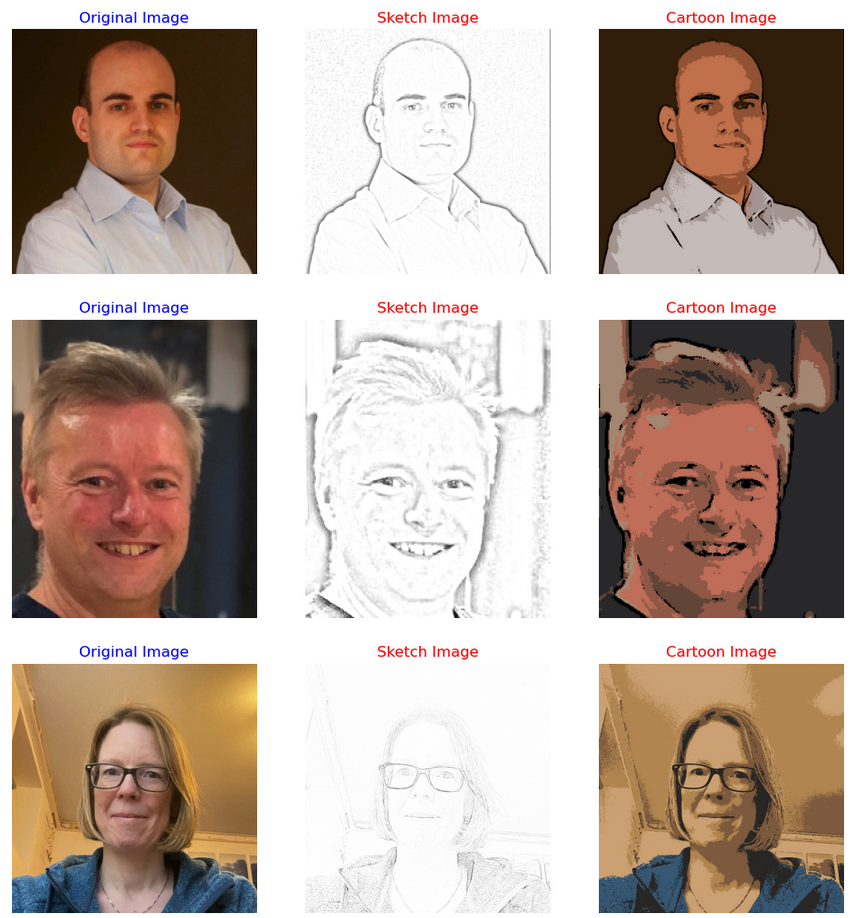
As you can see from these images, some are converted in a way you would expect. While others seem to give little effect.
Thanks to the Board of SYM42 for allowing me to use their images.
EU Digital Services Act
The Digital Services Act (DSA) applies to a wide variety of online services, ranging from websites to social networks and online platforms, with a view to “creating a safer digital space in which the fundamental rights of all users of digital services are protected”.
In November 2020, the European Union introduced a new legislation called the Digital Services Act (DSA) to regulate the activities of tech companies operating within the EU. The aim of the DSA is to create a safer and more transparent online environment for EU citizens by imposing new rules and responsibilities on digital service providers. This includes online platforms such as social media, search engines, e-commerce sites, and cloud services. The provisions in the DSA Act will apply from 17th February 2024, thus giving affected parties time to ensure compliance.
The DSA aims to address a number of issues related to digital services, including:
- Ensuring that digital service providers take responsibility for the content on their platforms and that they have effective measures in place to combat illegal content, such as hate speech, terrorist content, and counterfeit goods.
- Requiring digital service providers to be more transparent about their advertising practices, and to disclose more information about the algorithms they use to recommend content.
- Introducing new rules for online marketplaces to prevent the sale of unsafe products and to ensure that consumers are protected when buying online.
- Strengthening the powers of national authorities to enforce these rules and to hold digital service providers accountable for any violations.
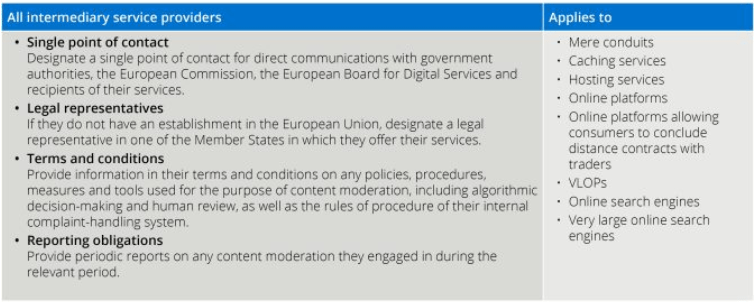
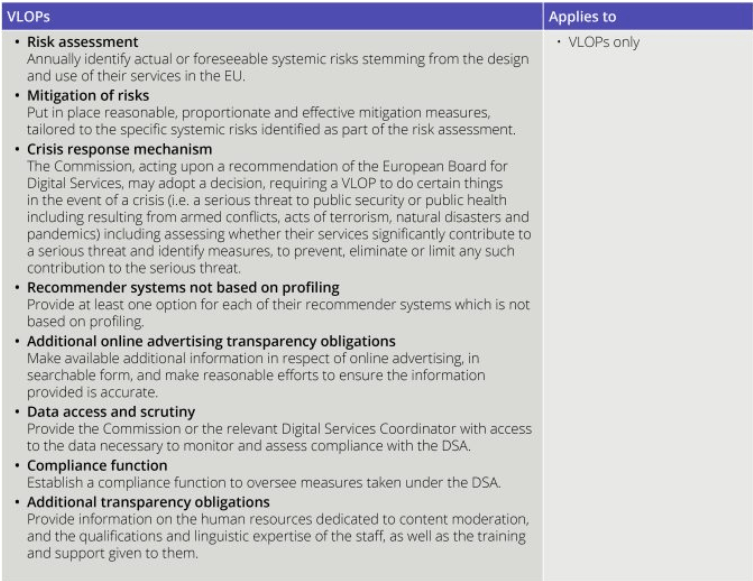
The DSA takes a layered approach to regulation. The basic obligations under the DSA apply to all online intermediary service providers, additional obligations apply to providers in other categories, with the heaviest regulation applying to very large online platforms (VLOPs) and very large online service engines (VLOSEs).
The four categories are:
- Intermediary service providers are online services which consist of either a “mere conduit” service, a “caching” service; or a “hosting” service. Examples include online search engines, wireless local area networks, cloud infrastructure services, or content delivery networks.
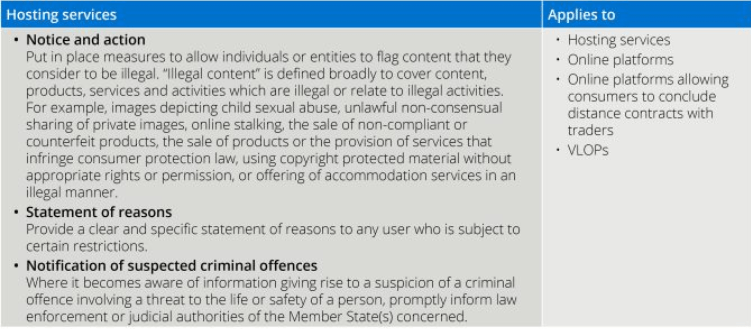
- Hosting services are intermediary service providers who store information at the request of the service user. Examples include cloud services and services enabling sharing information and content online, including file storage and sharing.
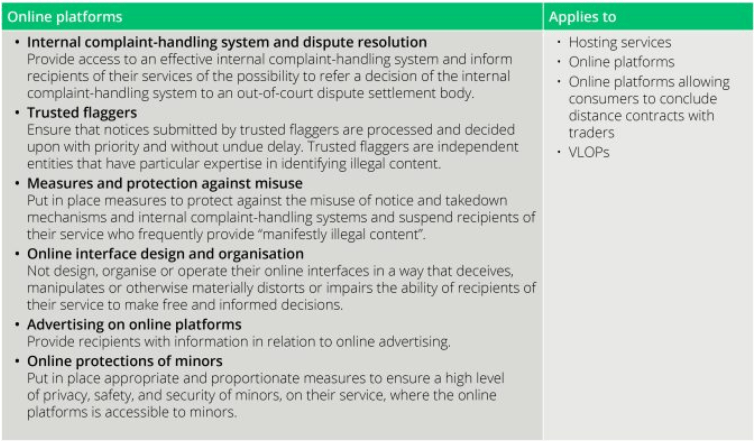
- Online Platforms are hosting services which also disseminate the information they store to the public at the user’s request. Examples include social media platforms, message boards, app stores, online forums, metaverse platforms, online marketplaces and travel and accommodation platforms.
- (a) VLOPs are online platforms having more than 45 million active monthly users in the EU (representing 10% of the population of the EU). (b) VLOSEs are online search engines having more than 45 million active monthly users in the EU (representing 10% of the population of the EU).
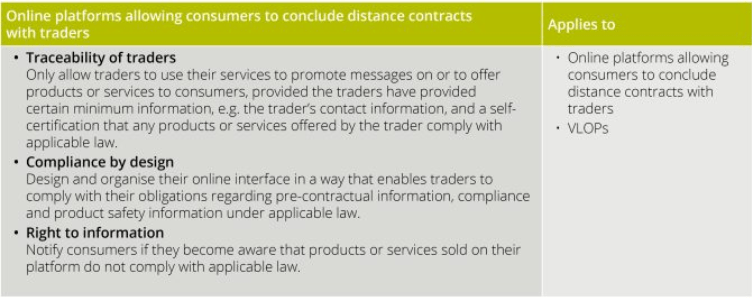
Arther Cox provide a useful table of obligations for each of these categories.
Morse Code with Python
Morse code is a method used in telecommunication to encode text characters as standardized sequences of two different signal duration, called dots and dashes. Morse code is named after Samuel Morse, one of the inventors of the telegraph (wikipedia).
The example code below illustrates taking input from the terminal, converting it into Morse code, playing the Morse code sound signal, then converts the Morse code back into plain text and prints this to the screen. This is a base set of code you can use and can be easily extended to make it more interactive.
When working with sound and audio in Python there are lots of different libraries available for this. But some of the challenges is trying to pick a suitable one, and one that is still supported in more recent times. One of the most commonly referenced library is called Winsound, but that is for Windows based computers. Not everyone uses Windows machines, just like myself using a Mac. So Winsound wasn’t an option. I selected to use the playsound library, mainly based on how commonly referenced it is.
To play the dots and dashs, I needed some sound files and these were originally sources from Wikimedia. The sound files are available on wikimedia, but these come in ogg file formats. I’ve converted the dot and dash files to mp3 files and theses can be downloaded from here, dot download and dash download. I also included a Error sound file in my code for when an error occurs! Error download.
When you download the code and sound files, you might need to adjust the timing for playing the Morse code sound files, as this might be dependent on your computer
The Morse code mapping was setup as a dictionary and a reverse mapping of this dictionary was used to translate morse code into plain text.
import time
from playsound import playsound

toMorse = {'a': ".-",    'b': "-...",
           'c': "-.-.",  'd': "-..",
           'e': ".",     'f': "..-.",
           'g': "--.",   'h': "....",
           'i': "..",    'j': ".---",
           'k': "-.-",   'l': ".-..",
           'm': "--",    'n': "-.",
           'o': "---",   'p': ".--.",
           'q': "--.-",  'r': ".-.",
           's': "...",   't': "-",
           'u': "..-",   'v': "...-",
           'w': ".--",   'x': "-..-",
           'y': "-.--",  'z': "--..",
           '1': ".----", '2': "..---",
           '3': "...--", '4': "....-",
           '5': ".....", '6': "-....",
           '7': "--...", '8': "---..",
           '9': "----.", '0': "-----",
           ' ': " ",   '.': ".-.-.-",
           ',': "--..--", '?': "..--..",
           "'": ".----.", '@': ".--.-.",
           '-': "-....-", '"': ".-..-.",
           ':': "---...", ';': "---...",
           '=': "-...-",  '!': "-.-.--",
           '/': "-..-.",  '(': "-.--.",
           ')': "-.--.-", 'á': ".--.-",
           'é': "..-.."}

#sounds from https://commons.wikimedia.org/wiki/Morse_code
soundPath = "/Users/brendan.tierney/Dropbox/4-Datasets/morse_code_audio/"
#adjust this value to change time between dots/dashes
tBetween = 0.1

def play_morse_beep():
    playsound(soundPath + 'Dot_morse_code.mp3')
    time.sleep(1 * tBetween)

def play_morse_dash():
    playsound(soundPath + 'Dash_morse_code.mp3')
    time.sleep(2 * tBetween)

def play_morse_space():
    time.sleep(2 * tBetween)

def play_morse_error():
    playsound(soundPath + 'Error_invalid_char.mp3')
    time.sleep(2 * tBetween)

def text_to_morse(inStr):
    mStr = ""
    for c in [x for x in inStr]:
        m = toMorse[c]
        mStr += m + ' '

    print("morse=",mStr)
    return mStr

def play_morse(inMorse):
    for m in inMorse:
        if m == ".":
            play_morse_beep()
        elif m == "-":
            play_morse_dash()
        elif m == " ":
            play_morse_space()
        else:
            play_morse_error()

#Get Input Text
from colorama import Fore, Back, Style

print(Fore.RED + '')

inputStr = input("Enter text -> morse :").lower() #.strip()
print(Fore.BLACK + '' + inputStr)

mStr = text_to_morse(inputStr)
play_morse(mStr)

play_morse(mStr)
Then to reverse the Morse code.
#reverse the k,v
mToE = {}
for key, value in toMorse.items():
        mToE[value] = key

def morse_to_english(inStr):
    inStr = inStr.split(" ")
    engStr = []
    for c in inStr:
        if c in mToE:
            engStr.append(mToE[c])

    return "".join(engStr)

x=morse_to_english(mStr)
print(x)Oracle 23c Free – Developer Release
Oracle 23c if finally available, in the form of Oracle 23c FREE – Developer Release. There was lots of excitement in some parts of the IT community about this release, some of which is to do with people having to wait a while for this release, given 22c was never released due to Covid!
But some caution is needed and reining back on the excitement is needed.

Why? This release isn’t the full bells and whistles full release of 23c Database. There has been several people from Oracle emphasizing the name of this release is Oracle 23c Free – Developer Release. There are a few things to consider with this release. It isn’t a GA (General Available) Release which is due later this year (maybe). Oracle 23c Free – Developer Release is an early release to allow developers to start playing with various developer focused new features. Some people have referred to this as the 23c Beta version 2 release, and this can be seen in the DB header information. It could be viewed in a similar way as the XE releases we had previously. XE was always Free, so we now we have a rename and emphasis of this. These have been many, many organizations using the XE release to build applications. Also the the XE releases were a no cost option, or what most people would like to say, the FREE version.
For the full 23c Database release we will get even more features, but most of these will probably be larger enterprise scale scenarios.
Now it’s time you to go play with 23c Free – Developer Release. Here are some useful links
- Product Release Official Announcement
- Post by Gerald Venzi
- See link for Docker installation below
- VirtualBox Virtual Machine
- You want to do it old school – Download RPM files
- New Features Guide
I’ll be writing posts on some of the more interesting new features and I’ll add the links to those below. I’ll also add some links to post by other people:
- Docker Installation (Intel and Apple Chip)
- 23 Free Virtual Machine
- 23 Free – A Few (New Features) A few Quickies
- JSON Relational Duality – see post by Tim Hall
- more coming soon (see maintained list at https://oralytics.com/23c/)
Automated Data Visualizations in Python
Creating data visualizations in Python can be a challenge. For some it an be easy, but for most (and particularly new people to the language) they always have to search for the commands in the documentation or using some search engine. Over the past few years we have seem more and more libraries coming available to assist with many of the routine and tedious steps in most data science and machine learning projects. I’ve written previously about some data profiling libraries in Python. These are good up to a point, but additional work/code is needed to explore the data to suit your needs. One of these Python libraries, designed to make your initial work on a new data set easier is called AutoViz. It’s good to see there is continued development work on this library, which can be really help for creating initial sets of charts for all the variables in your data set, plus it has some additional features which help to make it very useful and cuts down on some of the additional code you might need to write.
The outputs from AutoViz are very extensive, and are just too long to show in this post. The images below will give you an indication of what if typically generated. I’d encourage you to install the library and run it on one of your data sets to see the full extent of what it can do. For this post, I’ll concentrate on some of the commands/parameters/settings to get the most out of AutoViz.
Firstly there is the install via pip command or install using Anaconda.
pip3 install autovizFor comparison purposes I’m going to use the same data set as I’ve used in the data profiling post (see above). Here’s a quick snippet from that post to load the data and perform the data profiling (see post for output)
import pandas as pd
import pandas_profiling as pp

#load the data into a pandas dataframe
df = pd.read_csv("/Users/brendan.tierney/Downloads/Video_Games_Sales_as_at_22_Dec_2016.csv")
We can not skip to using AutoViz. It supports the loading and analzying of data sets direct from a file or from a pandas dataframe. In the following example I’m going to use the dataframe (df) created above.
from autoviz import AutoViz_Class

AV = AutoViz_Class()
df2 = AV.AutoViz(filename="", dfte=df)  #for a file, fill in the filename and remove dfte parameter
This will analyze the data and create lots and lots of charts for you. Some are should in the following image. One the helpful features is the ‘data cleaning improvements’ section where it has performed a data quality assessment and makes some suggestions to improve the data, maybe as part of the data preparation/cleaning step.

There is also an option for creating different types of out put with perhaps the Bokeh charts being particularly useful.
chart_format='bokeh': interactive Bokeh dashboards are plotted in Jupyter Notebooks.chart_format='server', dashboards will pop up for each kind of chart on your web browser.chart_format='html', interactive Bokeh charts will be silently saved as Dynamic HTML files underAutoViz_Plotsdirectory
df2 = AV.AutoViz(filename="", dfte=df, chart_format='bokeh')
The next example allows for the report and charts to be focused on a particular dependent or target variable, particular in scenarios where classification will be used.
df2 = AV.AutoViz(filename="", dfte=df, depVar="Platform")
A little warning when using this library. It can take a little bit of time for it to run and create all the different charts. On the flip side, it save you from having to write lots and lots of code!
Annual Look at Database Trends (Jan 2023)
Monitoring trends in the popularity and usage of different Database vendors can be a interesting exercise. The marketing teams from each vendor do an excellent job of promoting their Database, along with the sales teams, developer advocates, and the user communities. Some of these are more active than others and it varies across the Database market on what their choice is for promoting their products. One of the problems with these various types of marketing, is how can be believe what they are saying about how “awesome” their Database is, and then there are some who actively talk about how “rubbish” (or saying something similar) other Databases area. I do wonder how this really works for these people and vendors when to go negative about their competitors. A few months ago I wrote about “What does Legacy Really Mean?“. That post was prompted by someone from one Database Vendor calling their main competitor Database a legacy product. They are just name calling withing providing any proof or evidence to support what they are saying.
Getting back to the topic of this post, I’ve gathered some data and obtained some league tables from some sites. These will help to have a closer look at what is really happening in the Database market throughout 2022. Two popular sites who constantly monitor the wider internet and judge how popular Databases area globally. These sites are DB-Engines and TOPDB Top Database index. These are well know and are frequently cited. Both of these sites give some details of how they calculate their scores, with one focused mainly on how common the Database appears in searches across different search engines, while the other one, in addition to search engine results/searches, also looks across different websites, discussion forms, social media, job vacancies, etc.
The first image below is a comparison of the league tables from DB-Engines taken in January 2022 and January 2023. I’ve divided this image into three sections/boxes. Overall for the first 10 places, not a lot has changed. The ranking scores have moved slightly in most cases but not enough to change their position in the rank. Even with a change of score by 30+ points is a very small change and doesn’t really indicate any great change in the score as these scores are ranked in a manner where, “when system A has twice as large a value in the DB-Engines Ranking as system B, then it is twice as popular when averaged over the individual evaluation criteria“. Using this explanation, Oracle would be twice as popular when compared to PostgreSQL. This is similar across 2022 and 2023.

Next we’ll look a ranking from TOPDB Top Database index. The image below compares January 2022 and January 2023. TOPDB uses a different search space and calculation for its calculation. The rankings from TOPDB do show some changes in the ranks and these are different to those from DB-Engines. Here we see the top three ranks remain the same with some small percentage changes, and nothing to get excited about. In the second box covering ranks 4-7 we do some changes with PostgreSQL improving by two position and MongoDB. These changes do seem to reflect what I’ve been seeing in the marketplace with MongoDB being replaced by PostgreSQL and MySQL, with this multi-model architecture where you can have relational, document, and other data models in the one Database. It’s important to note Oracle and SQL Server also support this. Over the past couple of years there has been a growing awareness of and benefits of having relation and document (and others) data models in the one database. This approach makes sense both for developer productivity, and for data storage and management.

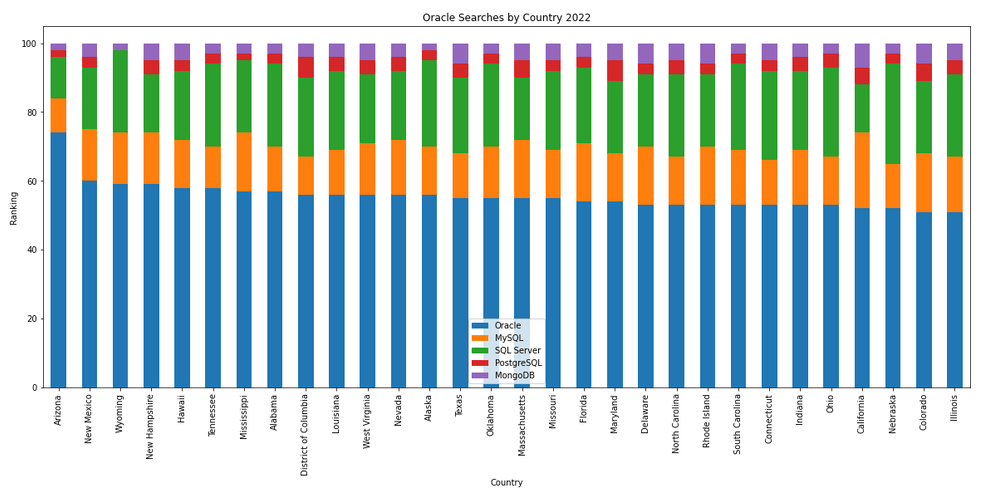
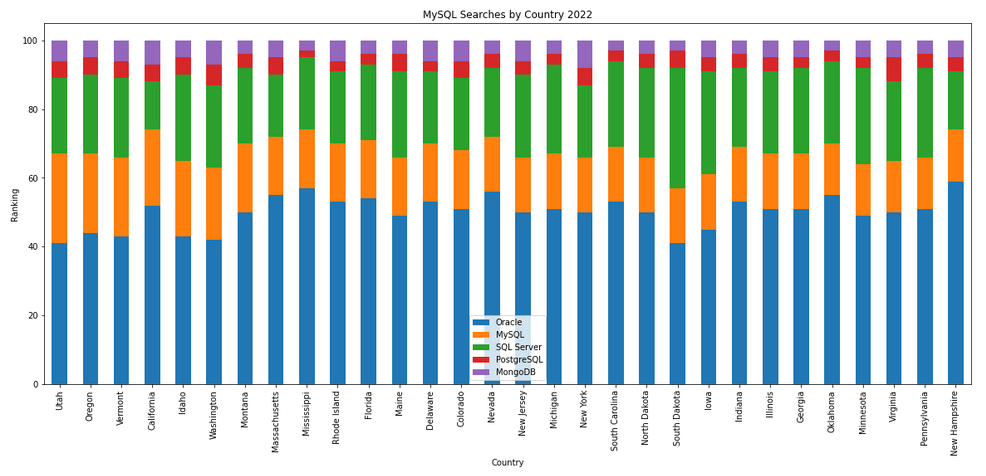
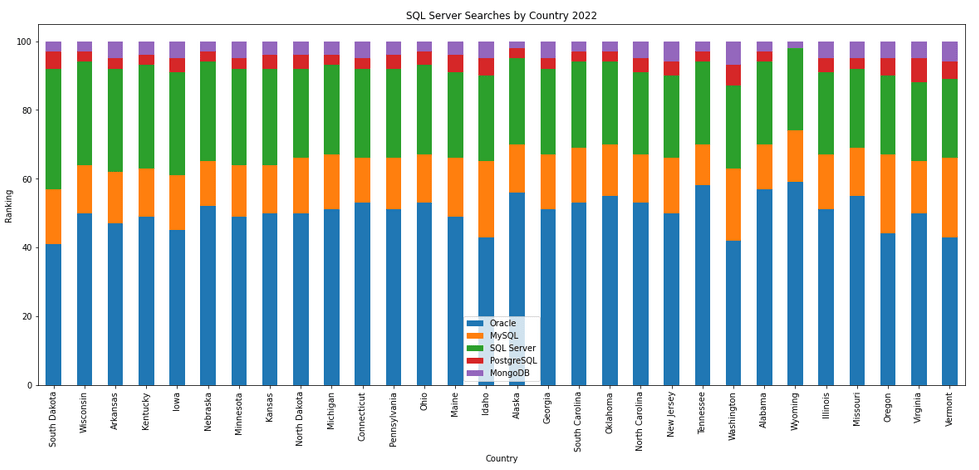
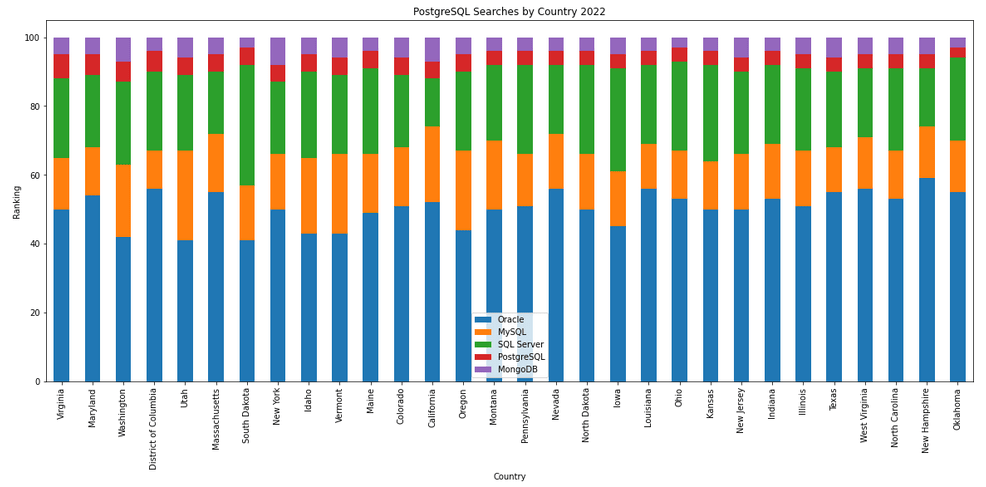
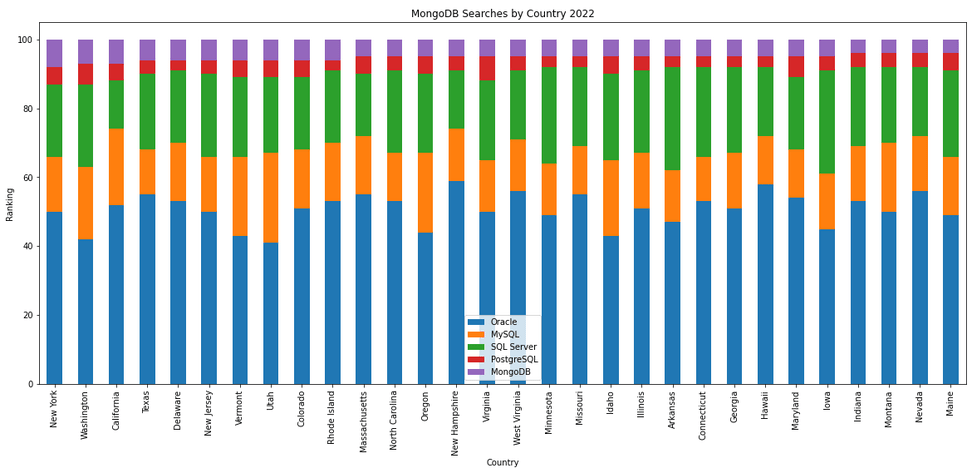
The next gallery of images is based on some Python code I’ve written to look a little bit closer at the top five Databases. In this case these are Oracle, MySQL, SQL Server, PostgreSQL and MongoDB. This gallery plots a bar chart for each Database for their top 15 Counties, and compares them with the other four Databases. The results are interesting and we can see some geographic aspects to the popularity of the Databases.
Migrating SAS files to CSV and database
Many organizations have been using SAS Software to analyse their data for many decades. As with most technologies organisations will move to alternative technologies are some point. Recently I’ve experienced this kind of move. In doing so any data stored in one format for the older technology needed to be moved or migrated to the newer technology. SAS Software can process data in a variety of format, one of which is their own internal formats. Thankfully Pandas in Python as a function to read such SAS files into a pandas dataframe, from which it can be saved into some alternative format such as CSV. The following code illustrates this conversion, where it will migrate all the SAS files in a particular directory, converts them to CSV and saves the new file in a destination directory. It also copies any existing CSV files to the new destination, while ignore any other files. The following code is helpful for batch processing of files.
import os
import pandas as pd

#define the Source and Destination directories
source_dir='/Users/brendan.tierney/Dropbox/4-Datasets/SAS_Data_Sets'
dest_dir=source_dir+'/csv'

#What file extensions to read and convert
file_ext='.sas7bdat'

#Create output directory if it does not already exist
if not os.path.exists(dest_dir):
    os.mkdir(dest_dir)
else:  #If directory exists, delete all files
    for filename in os.listdir(source_dir):
        os.remove(filename)

#Process each file
for filename in os.listdir(source_dir):
    #Process the SAS file
    if filename.endswith(file_ext):
        print('.processing file :',filename)
        print('...converting file to csv')
        df=pd.read_sas(os.path.join(source_dir, filename))
        df.to_csv(os.path.join(dest_dir, filename))
        print('.....finished creating CSV file')
    elif filename.endswith('csv'):
        #Copy any CSV files to the Destination Directory
        print('.copying CSV file')
        cmd_copy='cp '+os.path.join(source_dir, filename)+' '+os.path.join(dest_dir, filename)
        os.system(cmd_copy)
        print('.....finished copying CSV file')
    else:
        #Ignore any other type of files
        print('.ignoring file :',filename)

print('--Finished--')
That’s it. All the files have now been converted and located in the destination directory.
For most, the above might be all you need, but sometimes you’ll need to move the the newer technology. In most cases the newer technology will easily use the CSV files. But in some instance your final destination might be a database. In my scenarios I use the CSV2DB app developed by Gerald Venzi. You can download the code from GitHub. You can use this to load CSV files into Oracle, MySQL, PostgreSQL, SQL Server and Db2 databases. Here’s and example of the command line to load into an Oracle Database.
csv2db load -f /Users/brendan.tierney/Dropbox/4-Datasets/SAS_Data_Sets/csv -t pva97nk -u analytics -p analytics -d PDB1
Downloading your Twitter Archive
Over the past few weeks there has been various dramas with Twitter, its new owner, how the staff have been treated, etc. All this drama has also impacted the day-to-day users of Twitter. Will Twitter survive? If it does, how will it be different? Maybe nothing will change for now or for a while, and we might see some gradual changes as a use of the platform. Many people have either moved to Mastodon, although it has many limitations and might not be suitable for everyone.
Maybe Twitter will survive? Only time will tell.
But what about all your Twitter posts, replies and interactions? What if Twitter disappears and all your content over the past few years or even long (10+ years). One thing you can do, and do it now, is to download your Twitter Archive. This will contain a those tweets, replies and interactions over the years. There will be a lot of valuable information in those and it would be a shame to have lost it.
These are the step I’ve followed to Download your Twitter Archive:
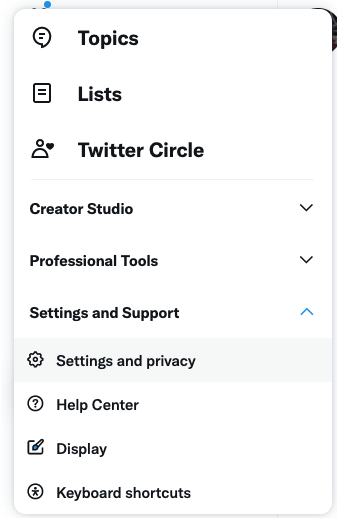
1. To to your Twitter home page, and click on the More icon in the menu on the left hand side of the page. Select “Settings and Support” from the menu options. Click “Settings and privacy.” Select “Your account” from the menu options.

2. Click “Download an archive of your data.” You’ll be asked to enter your password, do so and click “Confirm.”

3. Next you’ll have to verify your identity. Click “Send code” to your email and/or your phone number. You’ll be redirected to the “Account information” page where you’ll be able to enter the code that was sent to your email or phone.
4. Once Twitter has verified it is really you, click “Request archive.”
5. When your download is ready to be downloaded, you’ll receive an email from Twitter with a link to the zip file containing your archive.
That’s it. You now have your Twitter data, to use as you want.
There are several reasons why downloading your Twitter archive can be valuable. Here are some additional benefits:
- It allows you to access and view your entire tweet history in one place, which can be useful for personal or professional purposes. For example, you might want to review your tweets to see what you have shared in the past, or to see how your online presence has evolved over time.
- It can be a useful backup of your tweet history, in case your account is ever deleted or suspended. By downloading your archive, you will have a copy of your tweets that you can refer to or use to restore your account if necessary.
- It can be useful for researching and analyzing your Twitter activity. For example, you might want to use the archive to see which tweets have been most popular, or to identify trends or patterns in your tweeting behavior.
- It can be useful for exporting your tweet data to other platforms or tools for further analysis or processing. For example, you might want to use the data in your archive to create visualizations or to perform sentiment analysis on your tweets.
Overall, downloading your Twitter archive can provide a range of benefits, including the ability to access and view your tweet history, create a backup of your tweets, and use the data for research or analysis.
What does Legacy really mean?
In the IT industry we hear the term “legacy” being using, but that does it mean? It can mean a lot of different things and it really depends on the person who is saying it, their context, what they want to portray and their intended meaning. In a lot of cases people seem to use it without knowing the meaning or the impact it can have. This can result in negative impact and not in the way the person intended.
Before looking at some (and there can be lots) possible meanings, lets have a look at what one person said recently.
“Migrating away from legacy databases like Oracle can seem like a daunting undertaking for businesses. But it doesn’t have to be.”
To give context to this quote, the person works for a company selling products, services, support, etc for PostgreSQL and wants everyone to move to ProtgreSQL (Postgres), which is understandable given their role. There’s nothing wrong with trying to convince people/companies to use software that you sell lots of services and additional software to support it. What is interesting is they used the work “legacy”.
Legacy can mean lots of different things to different people. Here are some examples of how legacy is used within the IT industry.
- The product is old and out of date
- The product has no relevancy in software industry today
- Software or hardware that has been superseded
- Any software that has just been released (yes I’ve come across this use)
- Outdated computing software and/or hardware that is still in use. The system still meets the needs it was originally designed for, but doesn’t allow for growth
- Anything in production
- Software that has come to an end of life with no updates, patching and/or no product roadmap
- …
Going back to the quote given above, let’s look a little closer at their intended use. As we can see from the list above the use of the word “legacy” can be used in derogatory way and can try to make one software appear better then it’s old, out of date, not current, hard to use, etc competitor.
If you were to do a side-by-side comparison of PostgreSQL and Oracle, there would be a lot of the same or very similar features. But there are differences too and this, in PostgreSQL case, we see various vendors offering add-on software you can pay for. This is kind of similar with Oracle where you need to license various add-ons, or if you are using a Cloud offering it may come as part of the package. On a features comparison level when these are similar, saying one is “legacy” doesn’t seem right. Maybe its about how old the software is, as in legacy being old software. The first release of Oracle was 1979 and we now get yearly update releases (previously it could be every 2-4 years). PostgresSQL, or its previous names date back to 1974 with the first release of Ingres, which later evolved to Postgres in early 1980s, and took on the new name of PostgreSQL in 1996. Are both products today still the same as what they had in the 1970s, 1980s, 1990s, etc. The simple answer is No, they have both evolved and matured since then. Based on this can we say PostgreSQL is legacy or is more of a Legacy product than Oracle Database which was released in 1979 (5 years after Ingres)? Yes we can.
I’m still very confused by the quote (given above) as to what “legacy” might mean, in their scenario. Apart from and (trying) to ignore the derogatory aspect of “they” are old and out of date, and look at us we are new and better, it is difficult to see what they are trying to achieve.
In a similar example on a LinkedIn discussion where one person said MongoDB was legacy, was a little surprising. MongoDB is very good at what it does and has a small number of use cases. The problem with MongoDB is it is used in scenarios when it shouldn’t be used and just causes too many data architecture problems. For me, the main problem driving these issues is how software engineering and programming is taught in Universities (and other third level institutions). They are focused on JavaScript which makes using MongoDB so so easy. And its’ Agile, and the data model can constantly change. This is great, up until you need to use that data. Then it becomes a nightmare.
Getting back to saying MongoDB is legacy, again comes back to the person saying it. They work at a company who is selling cloud based data engineering and analytic services. Is using cloud services the only thing people should be using? For me it is No but a hybrid cloud and on-premises approach will work based for most. Some of the industry analysts are now promoting this, saying vendors offering both will succeed into the future, where does only offering cloud based services will have limited growth, unless the adapt now.
What about other types legacy software applications. Here is an example Stew Ashton posted on Twitter. “I once had a colleague who argued, in writing, that changing the dev stack had the advantage of forcing a rewrite of “legacy applications” – which he had coded the previous year! Either he thought he had greatly improved, or he wanted guaranteed job security”
There are lots and lots of more examples out there and perhaps you will encounter some when you are attending presentations or sales pitches from various vendors. If you hear, then saying one product is “legacy” get them to define their meaning of it and to give specific examples to illustrate it. Does their meaning match with one from the list given above, or something else. Are they just using the word to make another product appear inferior without knowing the meaning or the differences in the product? Their intended meaning within their context is what defines their meaning, which may be different to yours.
AI Liability Act
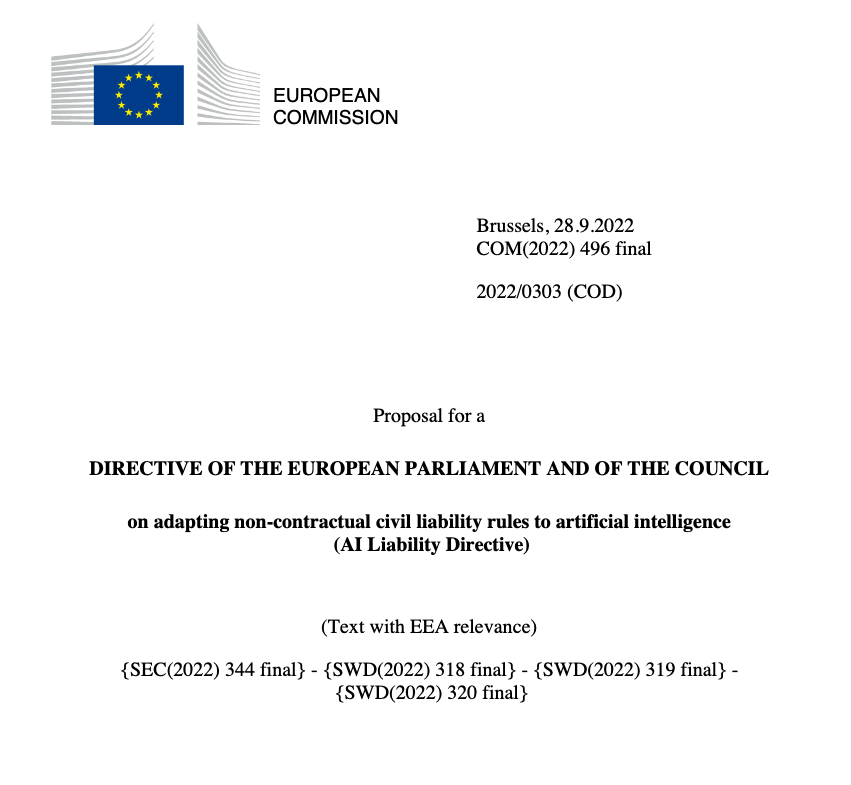
Over the past few weeks we have seem a number of new Artificial Intelligence (AI) Acts or Laws, either being proposed or are at an advanced stage of enactment. One of these is the EU AI Liability Act (also), and is supposed be be enacted and work hand-in-hand with the EU AI Act.
There are different view or focus perspectives between these two EU AI acts. For the EU AI Act, the focus is from the technical perspective and those who develop AI solutions. On the other side of things is the EU AI Liability Act whose perspective is from the end-user/consumer point.
The aim of the EU AI Liability Act is to create a framework for trust in AI technology, and when a person has been harmed by the use of the AI, provides a structure to claim compensation. Just like other EU laws to protect the consumers from defective or harmful products, the AI Liability Act looks to do similar for when a person is harmed in some way by the use or application of AI.
Most of the examples given for how AI might harm a person includes the use of robotics, drones, and when AI is used in the recruitment process, where is automatically selects a candidate based on the AI algorithms. Some other examples include data loss from tech products or caused by tech products, smart-home systems, cyber security, products where people are selected or excluded based on algorithms.
Harm can be difficult to define, and although some attempt has been done to define this in the Act, additional work is needed to by the good people refining the Act, to provide clarifications on this and how its definition can evolve post enactment to ensure additional scenarios can be included without the need for updates to the Act, which can be a lengthy process. A similar task is being performed on the list of high-risk AI in the EU AI Act, where they are proposing to maintain a webpages listing such.
Vice-president for values and transparency, Věra Jourová, said that for AI tech to thrive in the EU, it is important for people to trust digital innovation. She added that the new proposals would give customers “tools for remedies in case of damage caused by AI so that they have the same level of protection as with traditional technologies”
Didier Reynders, the EU’s justice commissioner says, “The new rules apply when a product that functions thanks to AI technology causes damage and that this damage is the result of an error made by manufacturers, developers or users of this technology.
The EU defines “an error” in this case to include not just mistakes in how the A.I. is crafted, trained, deployed, or functions, but also if the “error” is the company failing to comply with a lot of the process and governance requirements stipulated in the bloc’s new A.I. Act. The new liability rules say that if an organization has not complied with their “duty of care” under the new A.I. Act—such as failing to conduct appropriate risk assessments, testing, and monitoring—and a liability claim later arises, there will be a presumption that the A.I. was at fault. This creates an additional way of forcing compliance with the EU AI Act.
The EU Liability Act says that a court can now order a company using a high-risk A.I. system to turn over evidence of how the software works. A balancing test will be applied to ensure that trade secrets and other confidential information is not needlessly disclosed. The EU warns that if a company or organization fails to comply with a court-ordered disclosure, the courts will be free to presume the entity using the A.I. software is liable.
The EU Liability Act will go through some changes and refinement with the aim for it to be enacted at the same time as the EU AI Act. How long will this process that is a little up in the air, considering the EU AI Act should have been adopted by now and we could be in the 2 year process for enactment. But the EU AI Act is still working its way through the different groups in the EU. There has been some indications these might conclude in 2023, but lets wait and see. If the EU Liability Act is only starting the process now, there could be some additional details if the EU wants both Acts to be effective at the same time.
 Ora-lytics
You must be logged in to post a comment.